- Document Solutions for Excel Java Overview
- Key Features
- Getting Started
- Features
- Templates
-
Formula Reference
- Add-in and Automation Functions
- Compatibility Functions
- Database Functions
- Date and Time Functions
- Engineering Functions
- Financial Functions
- Information Functions
- Logical Functions
- Lookup and Reference Functions
- Math and Trigonometry Functions
- Statistical Functions
-
Text Functions
- ARRAYTOTEXT
- ASC
- BAHTTEXT
- CHAR
- CLEAN
- CODE
- CONCAT
- CONCATENATE
- DBCS
- DOLLAR
- EXACT
- FIND
- FINDB
- FIXED
- JIS
- LEFT
- LEFTB
- LEN
- LENB
- LOWER
- MID
- MIDB
- NUMBERVALUE
- PROPER
- REPLACE
- REPLACEB
- REPT
- RIGHT
- RIGHTB
- SEARCH
- SEARCHB
- SUBSTITUTE
- T
- TEXT
- TEXTAFTER
- TEXTBEFORE
- TEXTJOIN
- TEXTSPLIT
- TRIM
- UNICHAR
- UNICODE
- UPPER
- VALUE
- VALUETOTEXT
- Web Functions
- File Operations
- Tutorials
- Use JDK 8 Date Time API
- Document Solutions Data Viewer
- API Reference
- Release Notes
TEXTSPLIT
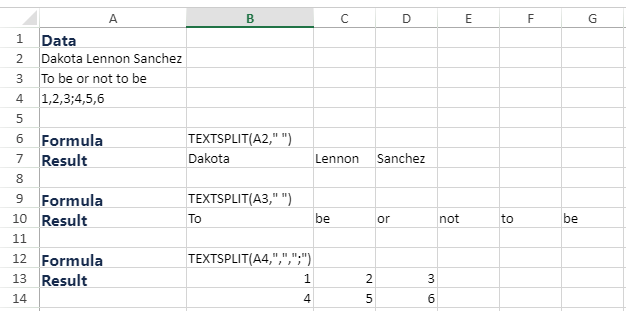
This function splits text strings by using column and row delimiters.
Note: TEXTSPLIT is a dynamic array formula, and you need to enable the dynamic array feature in the Workbook.
Syntax
TEXTSPLIT(text, col_delimiter, [row_delimiter], [ignore_empty], [match_mode], [pad_with])
Arguments
The function has the following arguments:
Argument | Description |
|---|---|
text | [Required] Refers to the text you want to split. |
col_delimiter | [Required] Refers to the text that marks the point where to spill the text across columns. |
row_delimiter | [Optional] Refers to the text that marks the point where to spill the text down rows. |
ignore_empty | [Optional] Specify FALSE to create an empty cell when two delimiters are consecutive. Defaults to TRUE, which creates an empty cell. |
match_mode | [Optional] Searches the text for a delimiter match. By default, a case-sensitive match is done. |
pad_with | [Optional] Refers to the value with which to pad the result. The default is #N/A. |
Remarks
An array constant must be used if there is more than one delimiter. For example, to split by both a comma and a period, use =TEXTSPLIT(A1,{",","."}).
Examples