- Document Solutions for Excel .NET Overview
- Key Features
- Getting Started
- Features
- Templates
-
Formula Reference
- Add-in and Automation Functions
- Compatibility Functions
- Database Functions
- Date and Time Functions
- Engineering Functions
- Financial Functions
- Information Functions
- Logical Functions
- Lookup and Reference Functions
- Math and Trigonometry Functions
- Statistical Functions
-
Text Functions
- ARRAYTOTEXT
- ASC
- BAHTTEXT
- CHAR
- CLEAN
- CODE
- CONCAT
- CONCATENATE
- DBCS
- DOLLAR
- EXACT
- FIND
- FINDB
- FIXED
- JIS
- LEFT
- LEFTB
- LEN
- LENB
- LOWER
- MID
- MIDB
- NUMBERVALUE
- PROPER
- REPLACE
- REPLACEB
- REPT
- RIGHT
- RIGHTB
- SEARCH
- SEARCHB
- SUBSTITUTE
- T
- TEXT
- TEXTAFTER
- TEXTBEFORE
- TEXTJOIN
- TEXTSPLIT
- TRIM
- UNICHAR
- UNICODE
- UPPER
- VALUE
- VALUETOTEXT
- Web Functions
- File Operations
- Tutorials
- Document Solutions Data Viewer
- API Reference
- Release Notes
VALUETOTEXT
The VALUETOTEXT function returns text from any specified value. It passes text values unchanged, and converts non-text values to text.
Syntax
VALUETOTEXT(value, [format])
Arguments
This function includes the following arguments:
Argument | Description |
|---|---|
value | [Required] The numeric value, array, or reference to convert to text. It can be a number, text, Boolean value, error value, empty cell, array, Lambda expression, or a cell/range reference. |
format | [Optional] The format of the returned data. It can be one of two values:
|
Remarks
The VALUETOTEXT function does not support 3D references such as
=Sheet2:Sheet3!A1:C3; otherwise, it will return a #VALUE! error.If the format argument is a number or string greater than or equal to 0 and less than 1, it is treated as 0; if it is greater than or equal to 1 and less than 2, it is treated as 1.
If the format argument is TRUE, it is treated as 1; if FALSE, it is treated as 0.
If the format argument is a string type, unless its value is greater than or equal to 0 and less than 2, the formula returns a
#VALUE!error.If the format argument itself is of an error type (for example,
=VALUETOTEXT("aaa", #DIV/0!)), or if the argument causes an error during calculation (for example,=VALUETOTEXT("aaa", 10/0)), the final result will display as an error type and will not be converted to text.Both the value and format arguments can be arrays, for example:
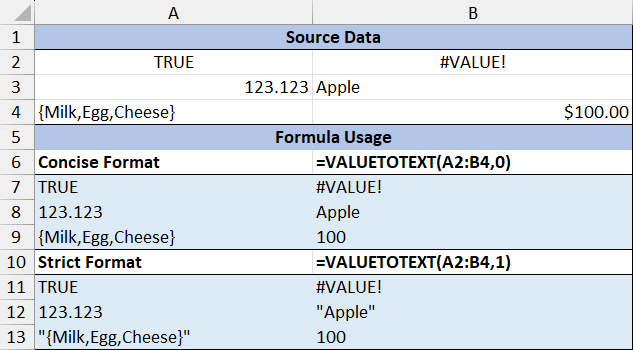
=VALUETOTEXT({"Hello","Hello","Hello";"Hello","Hello","Hello"},{1,1,1;0,0,0}).
Example