


Axes
An axis is composed of several elements, such as labels, line, tick marks and titles. There are several properties available in FlexChart that let you customize these elements, for both X and Y axes. Some of the important properties are listed below.
- TitleStyle - Gets or sets the axis title style.
- AxisType - Lets you select the axis type.
- Style - Lets you select the axis style..
- LabelAngel - Lets you get or set the rotation for axis labels.
- MajorTickColor - Lets you select the color for major tick marks.
- MajorTickWidth - Lets you select the thickness of major tick marks.
- MajorUnit - Lets you set the major unit of the axis.
- Origin - Lets you set the origin.
- Title - Lets you add a title to the axis.
- Fill- Lets you select the color for the axis title.
The image below shows a FlexChart with customized axes titles.
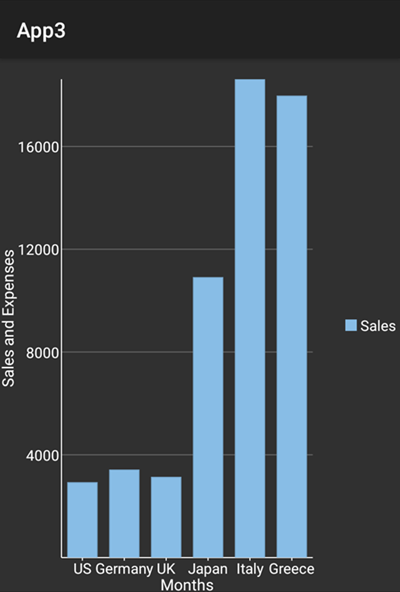
The following code examples demonstrate how to customize the axes of the FlexChart control in C#. This examples uses the sample created in the Customize Appearance section.
In Code
mChart.AxisX.Title = "Months";
mChart.AxisX.TitleStyle.FontSize = 15;
mChart.AxisX.TitleStyle.Fill = Color.White;
mChart.AxisY.Title = "Sales and Expenses";
mChart.AxisY.TitleStyle.FontSize = 15;
mChart.AxisY.TitleStyle.Fill = Color.White;
Customizing Axis Origin
Users can customize the origin to plot the data points in two quadrants. You can use Origin method to set the origin for both the axes at a particular point. The image given below shows the origin of X axis set to 10,000.
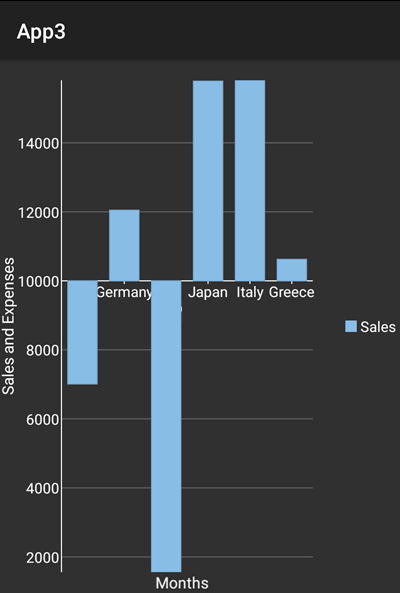
In Code
The following code example illustrates how to customize the X-axis origin in C#. This example uses the sample created in Customize Appearance section. You can also set Y-axis origin in code behind in a way similar to that given in code below.
//set X axis Origin
mChart.AxisX.Origin = 10000;