


-
Spread for ASP.NET Product Documentation
-
Developer's Guide
- Getting Started
- Understanding the Product
- Namespaces Overview
- Working with the Spread Designer
- Customizing User Interaction
- Customizing the Appearance
- Customizing with Cell Types
- Managing Data Binding
- Managing Data in the Component
- Managing Formulas
- Managing File Operations
- Using Sheet Models
- Maintaining State
- Working with the Chart Control
-
Using Touch Support with the Component
- Understanding Touch Support
-
Using Touch Support
- Using the Touch Menu Bar
- Using Touch Support with AutoFit
- Using Touch Support with Charts
- Using Touch Support with Editable Cells
- Using Touch Support with Filtering
- Using Touch Support with Grouping
- Using Touch Support when Moving Columns
- Using Touch Support when Moving Rows
- Using Touch Support when Resizing Columns or Rows
- Using Touch Support with Scrolling
- Using Touch Support with Selections
- Using Touch Support with Sorting
- Assembly Reference
- Client-Side Scripting Reference
- Import and Export Reference
-
Developer's Guide
Using Touch Support when Moving Columns
You can use touch gestures to move columns.
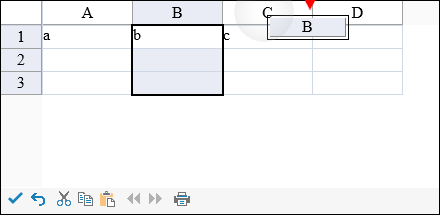
Tap the column header to select it, then slide to the target location. Release to move the column.
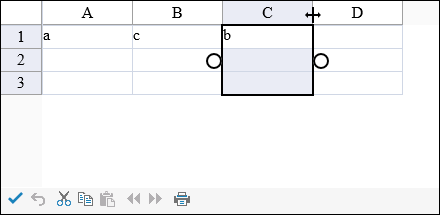
The following image displays the column after the move action has been completed.
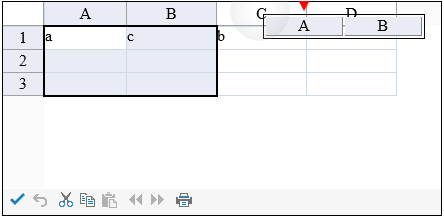
Select a column header range and then press and slide to move the range. Release to complete the action.
The AllowColumnMove property must be true to move columns.
Refer to Using Touch Support with Selections for more information on how to select a column or row.
Using Code
Set the AllowColumnMove property.
Example
This example code sets the AllowColumnMove property.
FpSpread1.ActiveSheetView.AllowColumnMove = true;FpSpread1.ActiveSheetView.AllowColumnMove = True