


- Document Solutions for Excel Java Overview
- Key Features
- Getting Started
- Features
- Templates
- Formula Reference
- File Operations
- Tutorials
- Use JDK 8 Date Time API
- Document Solutions Data Viewer
- API Reference
- Release Notes
LAMBDA
This function allows you to create and name custom reusable functions that can be called like any other function.
Syntax
LAMBDA([parameter1, parameter2, ...], calculation)
Arguments
This function has these arguments:
Argument | Description |
|---|---|
parameter | [Optional] A value that you want to pass to the function, such as a cell reference, string or number. You can enter up to 253 parameters. |
calculation | [Required] The formula you want to execute and return as the result of the function. It must be the last argument and it must return a result. |
Remarks
If an incorrect number of parameters or more than 253 parameters are provided to a LAMBDA function, it returns a #VALUE! error.
If an incorrect number of arguments is passed to a LAMBDA function, it returns a #VALUE! error.
If you call a LAMBDA function from within itself and the call is circular, it returns a #NUM! error.
If you create a LAMBDA function in a cell without also calling it from within the cell, it returns a #CALC! error.
Note: If the lambda function is recursive, the maximum recursion depth is related to the browser.
Examples
The following code sample shows the basic usage of LAMBDA function.
// Create a workbook.
Workbook workbook = new Workbook();
IWorksheet sheet = workbook.getWorksheets().get(0);

// Set data.
Object[][] data = {
        { "Date","Fahrenheit" },
        { "2025-06-01", 95},
        { "2025-06-02", 95},
        { "2025-06-03", 96.8},
        { "2025-06-04", 86},
        { "2025-06-05", 82.4},
        { "2025-06-06", 89.6},
        { "2025-06-07", 86},
        { "2025-06-08", 87.8}
};
sheet.getRange("B3:C11").setValue(data);
ITable table = sheet.getTables().add(sheet.getRange("B3:C11"), true);
ITable table1 = sheet.getTables().add(sheet.getRange("E3:E11"), true);
sheet.getRange("B3:B11").setNumberFormat("yyyy-mm-dd");
table.convertToRange();
table1.convertToRange();

// Define the LAMBDA name ToCelsius, implementing the formula for converting Fahrenheit to Celsius.
workbook.getNames().add("ToCelsius", "=LAMBDA(temp, (5/9) * (temp-32))");

// Insert the formula in the range E4:E11 to convert the Fahrenheit values in column C to Celsius.
sheet.getRange("E4:E11").setFormula2("ToCelsius(C4)");
sheet.getRange("E3").setValue("=ToCelsius(C4:C11)");
sheet.getRange("B:E").autoFit();

// Save the Excel file.
workbook.save("LAMBDAToCelsius.xlsx");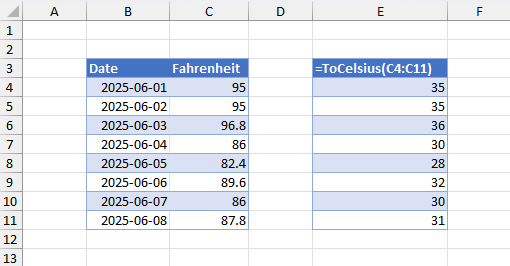
Lambda Helper Functions
DsExcel.NET supports seven new LAMBDA helper functions. These functions help creating re-usable LAMBDA functions by having LAMBDA function as a parameter. They also serve as stand-alone functions themselves. For more information, refer:
BYROW
BYCOL
ISOMITTED
MAKEARRAY
MAP
REDUCE
SCAN