- Document Solutions for Excel Java Overview
- Key Features
- Getting Started
- Features
- Templates
- Formula Reference
- File Operations
- Tutorials
- Use JDK 8 Date Time API
- Document Solutions Data Viewer
- API Reference
- Release Notes
Export Text
DsExcel supports exporting Excel files that contain special text layouts, including vertical text and Ruby text, to PDF documents.
Export Vertical Text
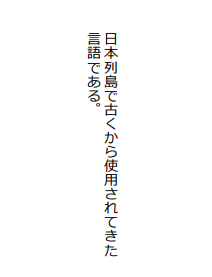
DsExcel allows users to export Excel files with vertical text to PDF without any issues.
While saving an Excel file with vertical text correctly to a PDF file, the following methods can be used -
IRange.setOrientation - The setOrientation() method of the IRange interface sets the orientation of the text.
IRange.getFont.setName - Sets the specific font name using the getFont method of the IRange interface. If the font name starts with "@", each double-byte character in the text is rotated to 90 degrees.
Refer to the following example code in order to export vertical text to PDF.
// Create workbook and a worksheet.
Workbook workbook = new Workbook();
IWorksheet sheet = workbook.getWorksheets().get(0);

// Specify the font name.
sheet.getRange("A1").getFont().setName("@Meiryo");

// Set orientation and wrap text.
sheet.getRange("A1").setOrientation(-90);
sheet.getRange("A1").setWrapText(true);

// Set value and configure horizontal and vertical alignment.
sheet.getRange("A1").setValue("日本列島で使用されてきた言語である");
sheet.getRange("A1").setHorizontalAlignment(HorizontalAlignment.Right);
sheet.getRange("A1").setVerticalAlignment(VerticalAlignment.Top);

// Set column width and row height.
sheet.getRange("A1").setColumnWidth(27);
sheet.getRange("A1").setRowHeight(190);

// Export the worksheet with vertical text ("sheet") to pdf file.
sheet.save("ExportVerticalTextToPDF.pdf", SaveFileFormat.Pdf);
The output is shown in the figure below.
Note: The following limitations must be kept in mind while exporting Excel files with vertical text to PDF.
The orientation can only be set to 0, 90, -90 and 255. Other values will be treated as 0 while rendering the PDF file.
If the font name starts with "@" and the orientation is 255, DsExcel will ignore the "@".
Export Ruby Text
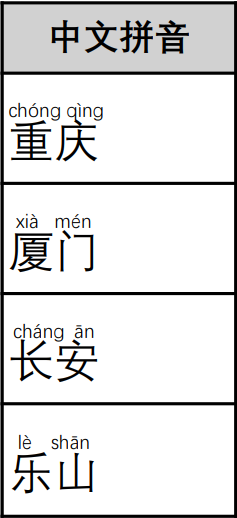
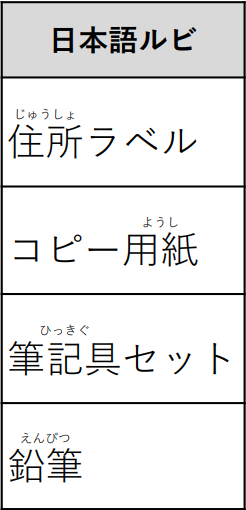
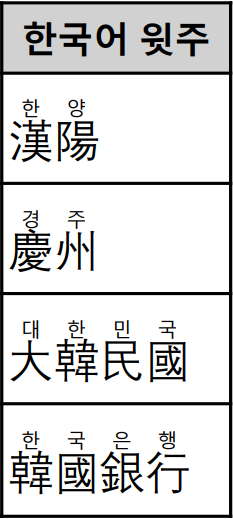
DsExcel preserves Ruby text when exporting an Excel workbook to PDF. If the source workbook contains Ruby text and its display is enabled for a cell, the Ruby text is rendered with the associated cell text in the exported PDF.
Ruby text is supported for text and rich text cells under Chinese, Japanese, or Korean culture settings. If the machine is not configured with a CJK culture, ruby text will not be rendered in the PDF output. Set the Workbook.setCulture method to an appropriate CJK culture to enable ruby text.
The following table shows examples of Ruby text rendered in the exported PDF.
Chinese Ruby Text | Japanese Ruby Text | Korean Ruby Text |
|---|---|---|
|
|
|