- Document Solutions for Excel Java Overview
- Key Features
- Getting Started
-
Features
-
Worksheet
- Work with Worksheets
-
Range Operations
- Access a Range
- Get Intersection, Union and Offset Range
- Access Areas in a Range
- Get Special Cell Ranges
- Access Cells, Rows and Columns in a Range
- Get Address of Cell Range
- Cut or Copy Cell Ranges
- Cut or Copy Shape, Slicer, Chart and Picture
- Paste or Ignore Data in Hidden Range
- Find and Replace Data
- Get Row and Column Count
- Hide Rows and Columns
- Insert And Delete Cell Ranges
- Insert and Delete Rows and Columns
- Merge Cells
- Auto Merge Cells
- Protect Cell Range
- Set Values to a Range
- Set Custom Objects to a Range
- Set Row Height and Column Width
- Auto Fit Row Height and Column Width
- Work with Used Range
- Measure Digital Width
- Set Default Values for Cell Range
- Set Cell Background Image for Cell Range
- Ignore Errors in Cell Range
- Get Range and Range Area
- Picture in Cell
- Customize Worksheets
- Worksheet Views
- Cell Types
- Quote Prefix
- Tags
- Rich Text
- Date and Time Format for a Culture
- Background Image
- Cell Checkboxes
- Workbook
- Comments
- Hyperlinks
- Sort
- Filter
- Group
- Conditional Formatting
- Data Validations
- Data Binding
- Import Data
- Digital Signatures
- Formulas
- Custom Functions
- Shapes
- Document Properties
- Styles
- Form Controls
- Barcodes
- Themes and Colors
- Chart
- Table
- Pivot Table
- Pivot Chart
- Sparkline
- Slicer
- Print Settings
- Logging
- Defined Names
- AI Assistant
-
Worksheet
- Templates
- Formula Reference
- File Operations
- Tutorials
- Use JDK 8 Date Time API
- Document Solutions Data Viewer
- API Reference
- Release Notes
Merge Cells
DsExcel Java enables users to execute the merge operation on several cells by combining them into a single cell using merge method of the IRange interface. When a cell range is merged, the data of top left cell stays in the final merged cell, and the data of other cells in the given range is lost.
If all the cells within the given range are empty, the formatting of top left cell in the cell range is applied to the merged cell, by default.
In order to merge the range of cells, refer to the following example code.
// Merge the cell range A1:B4 into one single cell
worksheet.getRange("A1:B4").merge();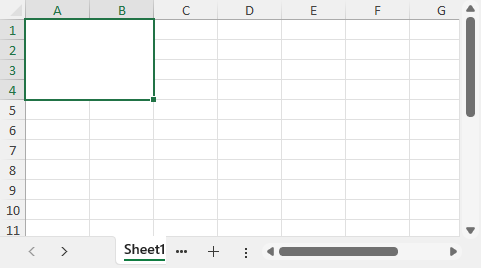
In order to merge only the rows of the specified range of cell into one, refer to the following example code.
// Merge the cell range C1:D4 into a single merged cell in one row.
worksheet.getRange("C1:D4").merge(true);