


- FlexGrid for WPF Overview
- Feature Comparison
- Quick Start
- Object Model Summary
- Data Binding
-
Features
- Columns
- Row
- Scrolling Modes
- Selection
- Sorting
- Cell Merging
- Custom Editors
- Custom Icon
- Transpose Data in Grid
- Data Grouping
- Data Filtering
- Data Aggregation
- Custom Cells
- Multiple Cell Factory
- Virtualization
- Paging
- TreeGrid
- Print Support
- Row Details Template
- Layout and Appearance: ClearStyle Technology
- Freezing and Pinning
- Import Data from Excel
- Export to Excel
- Clipboard Operations
- Validation
- FlexGrid Samples
Filter Mode
FlexGrid provides different modes for displaying filtering options in the column-header menu. The FilterMode property controls the filtering interface for the entire FlexGrid or for an individual GridColumn.
The FilterMode property accepts the following values from the GridFilterMode enumeration:
Value | Description |
|---|---|
| Displays the default filter based on the column's data type. |
| Displays a checklist of distinct values available in the column. |
| Does not display the default filter in the column-header menu. |
FilterMode can be configured at the FlexGrid level to apply the same filtering mode to the grid or at the GridColumn level to configure individual columns.
Default Filter
When FilterMode is set to Default, FlexGrid displays a specialized filter interface tailored to the underlying data type and configuration of each column:
Text columns: Displays a Full Text Filter consisting of an input text box with checkboxes for Match Case and Match Whole Word.
Numeric and DateTime columns: Display comparison operators and dedicated input controls, including range thresholds (Greater Than, Less Than) and interactive calendar date pickers.
Boolean (
bool) columns: Display dedicated selection options forTrueandFalse, allowing users to quickly filter binary values without typing text conditions.Enum columns: Automatically inspect the underlying enumeration type and display a selectable list containing all defined enum member values.
Columns with DataMap: Display a selectable list populated with human-readable display values rather than the underlying raw keys or identifier values.
Default is the standard filtering mode applied automatically when no specific FilterMode is configured on the grid or column.
Value Filter
Set FilterMode to Value to display a checklist containing the distinct values available in the column.
<c1:FlexGrid>
    <c1:FlexGrid.Columns>
        <c1:GridColumn Binding="Country"
                       FilterMode="Value" />
    </c1:FlexGrid.Columns>
</c1:FlexGrid>
The checklist contains values from the column after filters applied to other columns have been taken into account. This allows value selections to be combined across columns.
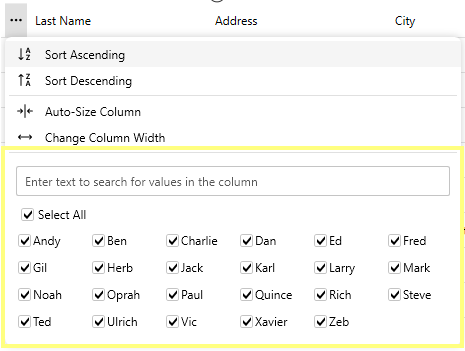
FilterMode="Value" can also be set on the FlexGrid.
<c1:FlexGrid FilterMode="Value" />None Filter Mode
Set FilterMode to None to prevent the default filter from being displayed in the column-header menu.
This mode is useful when the application provides another filtering interface or when inline filtering should not be available for a particular column.
<c1:FlexGrid>
    <c1:FlexGrid.Columns>
        <c1:GridColumn Binding="Country"
                       FilterMode="None" />
    </c1:FlexGrid.Columns>
</c1:FlexGrid>