


Aggregation
FlexGrid provides selection statistics, which can be used to display Excel-style data summaries in the footer. It allows you to display the statistics of the basic functions and operations performed on the selected cell range. These functions or operations include aggregate operations such as sum, average, count, maximum number, minimum number, and count distinct which can be applied to the selected cells from the context menu. You can use the Aggregate property of the AggregateDefinition class to provide data summary for the selected cell range.
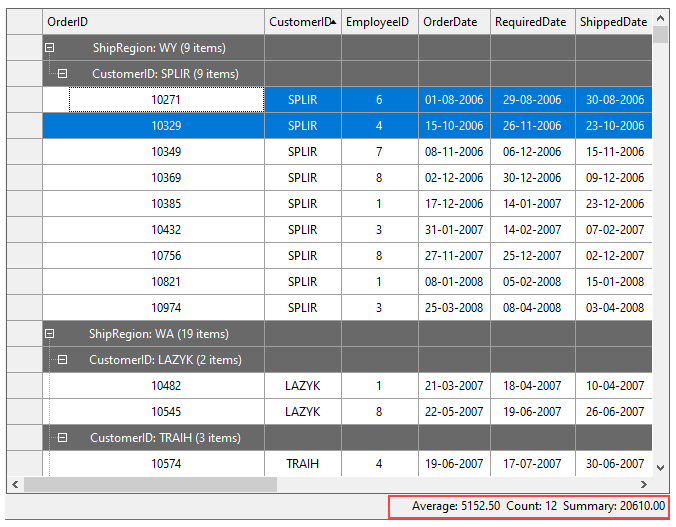
The Aggregate property uses AggregateEnum enumeration to set the aggregate function to be applied on the cells by setting one of the following values:
Average: Displays the value of the non-empty cells in a range.
Sum: Displays the sum of all values in the range.
Clear: Clear the existing aggregates
Count: Displays the total number of non-empty cells in a range.
CountDistinct: Displays the count of unique non-empty cells in a range.
Min: Displays the minimum value in a range.
Max: Displays the maximum value in a range.
Percent: Displays the percentage value of the grand total.
Std: Displays the sample standard deviation of the values in a range.
Var: Displays the sample variance of the values.
StdPop: Displays the population standard deviation of the values in a range (uses the formula based on n).
VarPop: Displays the population variance of the values in a range (uses the formula based on n).
Aggregate: No aggregate.
To show the selection statistics at the footer of the grid, we have added a ToolStripLabel named 'tslSelectionStatistics' docked at the bottom of the grid. Then, add the below code to the SelChange event of the C1FlexGridBase class. This event fires when the user extends the selection with the mouse in the grid.
private void c1FlexGrid1_SelChange(object sender, EventArgs e)
{
    var text = string.Empty;
    if (!flexGrid1.Selection.IsSingleCell)
    {
        text = $"Average: {flexGrid1.Aggregate(AggregateEnum.Average):F2}  " +
       $"Count: {flexGrid1.Aggregate(AggregateEnum.Count)}  " +
       $"Summary: {flexGrid1.Aggregate(AggregateEnum.Sum):F2}";
    }
    //Gets the text to be displayed on the toolstrip label
    tslSelectionStatistics.Text = text;
}