


Context Menu
Context menus provide quick access to frequently used actions. FlexGrid supports displaying context menus in the following scenarios:
Non-edit mode
Edit mode
Display Context Menu in Non-edit Mode
To display a context menu when FlexGrid is not in edit mode:
Create a ContextMenuStrip instance.
Add the required menu items.
Assign the instance to the ContextMenuStrip property.
The following image shows a context menu displayed over the grid in non-edit mode.
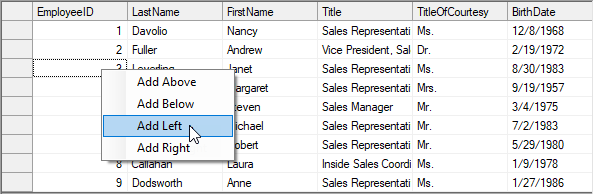
The following example demonstrates how to display a context menu in non‑edit mode.
// Create an instance of ContextMenuStrip control
ContextMenuStrip cm = new ContextMenuStrip();
// Add menu items to the context menu
cm.Items.Add("Add Above");
cm.Items.Add("Add Below");
cm.Items.Add("Add Left");
cm.Items.Add("Add Right");
// Assign the instance to ContextMenuStrip property
c1FlexGrid1.ContextMenuStrip = cm;
' Create an instance of ContextMenuStrip control
Dim cm As ContextMenuStrip = New ContextMenuStrip()
' Add menu items to the context menu
cm.Items.Add("Add Above")
cm.Items.Add("Add Below")
cm.Items.Add("Add Left")
cm.Items.Add("Add Right")
' Assign the instance to ContextMenuStrip property
c1FlexGrid1.ContextMenuStrip = cm Display Context Menu in Edit Mode
To display a context menu while a cell is in edit mode, handle the C1FlexGrid.StartEdit event.
In the event handler:
Access the active cell editor.
Create a ContextMenuStrip.
Add the required menu items.
Assign the context menu to the editor’s
ContextMenuStripproperty.
The following image shows a context menu displayed for the active cell editor.
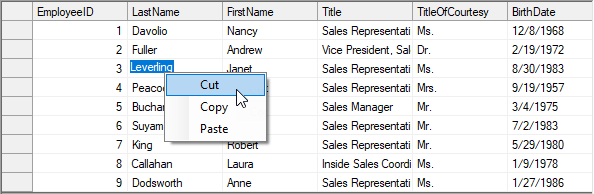
The following example demonstrates how to display a context menu in edit mode.
private void C1FlexGrid1_StartEdit(object sender, C1.Win.C1FlexGrid.RowColEventArgs e)
{
     TextBox tb = (TextBox)c1FlexGrid1.Editor;
    // Create context menu
    ContextMenuStrip cm2 = new ContextMenuStrip();
    cm2.Items.Add("Cut");
    cm2.Items.Add("Copy");
    cm2.Items.Add("Paste");
    // Set context menu
    tb.ContextMenuStrip = cm2;
}
Private Sub C1FlexGrid1_StartEdit(ByVal sender As Object, ByVal e As C1.Win.C1FlexGrid.RowColEventArgs)
Dim tb As TextBox = CType(c1FlexGrid1.Editor, TextBox)
' Create context menu
Dim cm2 As ContextMenuStrip = New ContextMenuStrip()
cm2.Items.Add("Cut")
cm2.Items.Add("Copy")
cm2.Items.Add("Paste")
' Set context menu
tb.ContextMenuStrip = cm2
End Sub