


Owner Draw Cell
FlexGrid supports advanced cell customization through the DrawMode property and the OwnerDrawCell event. These options support custom visuals, such as gradient backgrounds and graphics that extend beyond standard CellStyle formatting.
The DrawMode property determines whether FlexGrid raises the OwnerDrawCell event. Within the event handler, use the following event arguments to customize cell content:
e.Textspecifies the displayed text.e.Imagespecifies the displayed image.e.Stylespecifies the cell style.
Note: Do not modify properties of the existing Style object because the changes might affect other cells. Instead, assign a different CellStyle instance to e.Style. For example, assign a predefined style from the FlexGrid style collection instead of modifying e.Style.ForeColor directly.
Custom drawing logic can also render cell content directly. Use e.DrawCell with custom drawing operations to preserve the default borders and content rendering after applying custom graphics.
The following image demonstrates a gradient background applied to a selected cell range. The implementation sets DrawMode to OwnerDraw and uses a LinearGradientBrush to render the background.
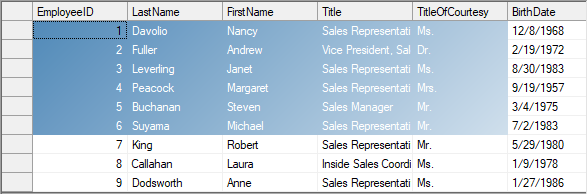
System.Drawing.Drawing2D.LinearGradientBrush m_GradientBrush;
private void Form1_Load(object sender, EventArgs e)
{
    // Brush to use with owner-draw cells
    m_GradientBrush = new System.Drawing.Drawing2D.LinearGradientBrush(ClientRectangle, Color.SteelBlue, Color.White, 45);
    // Use owner-draw to add gradients
    c1FlexGrid1.DrawMode = C1.Win.C1FlexGrid.DrawModeEnum.OwnerDraw;
}
private void C1FlexGrid1_OwnerDrawCell(object sender, C1.Win.C1FlexGrid.OwnerDrawCellEventArgs e)
{
    // Draw the selected cell background using gradient brush
    if (c1FlexGrid1.Selection.Contains(e.Row, e.Col))
    {
// Draw the background
e.Graphics.FillRectangle(m_GradientBrush, e.Bounds);
// Let the grid draw the content
e.DrawCell(C1.Win.C1FlexGrid.DrawCellFlags.Content);
// We are done drawing this cell
e.Handled = true;
    }
}
Private m_GradientBrush As Drawing.Drawing2D.LinearGradientBrush
Private Sub Form1_Load(ByVal sender As Object, ByVal e As EventArgs)
' Brush to use with owner-draw cells
m_GradientBrush = New Drawing.Drawing2D.LinearGradientBrush(ClientRectangle, Color.SteelBlue, Color.White, 45)
' Use owner-draw to add gradients
c1FlexGrid1.DrawMode = C1.Win.C1FlexGrid.DrawModeEnum.OwnerDraw
End Sub
Private Sub C1FlexGrid1_OwnerDrawCell(ByVal sender As Object, ByVal e As C1.Win.C1FlexGrid.OwnerDrawCellEventArgs)
' Draw the selected cell background using gradient brush
If c1FlexGrid1.Selection.Contains(e.Row, e.Col) Then
' Draw the background
e.Graphics.FillRectangle(m_GradientBrush, e.Bounds)
' Let the grid draw the content
e.DrawCell(C1.Win.C1FlexGrid.DrawCellFlags.Content)
' We are done drawing this cell
e.Handled = True
End If
End Sub
End If
End Sub