


Data Driven Approach
The data-driven approach generates tools dynamically from a data source using ItemsSource and an ItemTemplate. Use this method when creating the toolbar programmatically, such as when tools are user-configurable, loaded from a database, or generated based on application state. This approach enables flexible, scalable, and highly customizable tool creation.
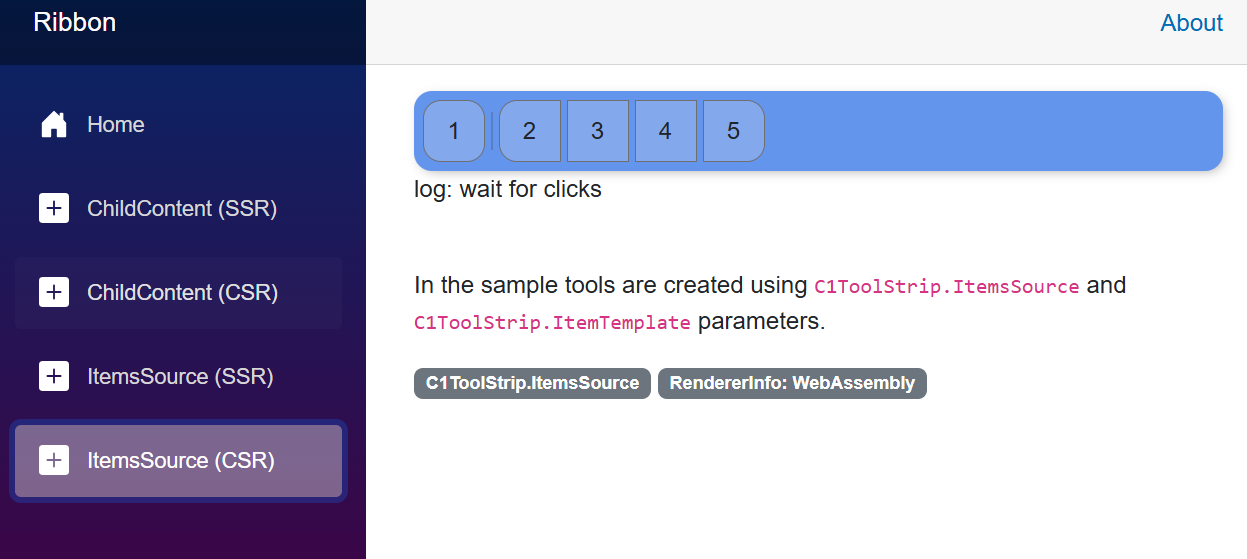
Create Toolstrip from Data Source
Create a data model:
 public enum ToolType
    {
        C1DropDownTool,
        C1ToolSeparator,
        C1ButtonTool,
        C1SelectTool,
        C1ToggleButtonTool,
        C1ContentControlTool,
        C1MenuTool
    }

    public class ToolItem
    {
        public ToolType Type { get; set; }
        public string Label { get; set; }
        public string Description { get; set; }
        public RenderFragment Content { get; set; }  // For DropDownTool content
    }
Create a tool list:
private List<ToolItem> ToolItems = new()
    {
        // create new dropdown
        new ToolItem
        {
            Type = ToolType.C1DropDownTool,
            Label = "options",
            Description = "(C1DropDownTool)",
        },

        // create new tool seperator "|"
        new() { Type = ToolType.C1ToolSeparator},

        // Create new C1Button Tool
        new() { Type = ToolType.C1ButtonTool, Label = "Save" },
        new() { Type = ToolType.C1ButtonTool, Label = "Edit" },
        new() { Type = ToolType.C1ButtonTool, Label = "View" }
    };
Bind ToolStrip and render each tool using ItemTemplate:
<C1ToolStrip @ref="toolStrip" GroupCornerRadius="16"
                 Style="@($"background: linear-gradient(90deg, #f5f7fa 0%, #c3cfe2 100%); border-radius: 12px; box-shadow: 0 2px 8px rgba(0,0,0,0.08); padding: 12px; border: 1px solid #e0e0e0;")"
                 OverflowDropDownStyle="@("background: green !important; padding: 12px !important; border: 3px solid red !important;")"
                 ToolStyle="@("border: thin solid; margin: 3px;")">
        @foreach (var item in ToolItems)
        {
            // Render method for rendering different controls
            @RenderTool(item)
        }

    </C1ToolStrip>
Render each tool based on its type:
 private RenderFragment RenderTool(ToolItem item) => builder =>
    {
        switch (item.Type)
        {
            case ToolType.C1ToolSeparator:
                builder.OpenComponent<C1ToolSeparator>(0);
                builder.CloseComponent();
                break;

            case ToolType.C1ButtonTool:
                builder.OpenComponent<C1ButtonTool>(0);
                builder.AddAttribute(1, "Label", item.Label);
                builder.CloseComponent();
                break;

            case ToolType.C1DropDownTool:
                builder.OpenComponent<C1DropDownTool>(0);
                builder.AddAttribute(1, "Label", item.Label);
                builder.AddAttribute(2, "Description", item.Description);

                if (item.Content != null)
                {
                    builder.AddAttribute(4, "ChildContent", item.Content);
                }
                builder.CloseComponent();
                break;
        }
Data-Driven Approach Sample
<div>
    <h2>
        Data Driven
    </h2>
    <C1ToolStrip @ref="toolStrip" GroupCornerRadius="16"
                 Style="@($"background: linear-gradient(90deg, #f5f7fa 0%, #c3cfe2 100%); border-radius: 12px; box-shadow: 0 2px 8px rgba(0,0,0,0.08); padding: 12px; border: 1px solid #e0e0e0; {(((Orientation)orientation)==Orientation.Vertical?"height: 300px;":"")};")"
                 Orientation="@((Orientation)orientation)"
                 IsToolLabelVisible="@isLabelVisible.Value"
                 ToolOrientation="@((Orientation)toolOrientation)"
                 Overflow="@((ToolStripOverflow)overflowMode)"
                 ToolStyle="@("border: thin solid; margin: 3px;")">
        @foreach (var item in ToolItems)
        {
            @RenderTool(item)
        }

    </C1ToolStrip>
</div>

<p>In the sample tools are created as components using the <code>C1ToolStrip.ChildContent.</p>

class="badge text-bg-secondary">C1ToolStrip.ChildContent</span>
class="badge text-bg-secondary">RendererInfo: @RendererInfo.Name </span>


@code {

    public enum ToolType
    {
        C1DropDownTool,
        C1ToolSeparator,
        C1ButtonTool,
        C1SelectTool,
        C1ToggleButtonTool,
        C1ContentControlTool,
        C1MenuTool
    }

    public class ToolItem
    {
        public ToolType Type { get; set; }
        public string Label { get; set; }
        public string Description { get; set; }
        public RenderFragment Content { get; set; }  // For DropDownTool content
    }

    private List<ToolItem> ToolItems = new()
    {
        new ToolItem
        {
            Type = ToolType.C1DropDownTool,
            Label = "options",
            Description = "(C1DropDownTool)",
        },
        new() { Type = ToolType.C1ToolSeparator},
        new() { Type = ToolType.C1ButtonTool, Label = "Save" },
        new() { Type = ToolType.C1ButtonTool, Label = "Edit" },
        new() { Type = ToolType.C1ButtonTool, Label = "View" }
    };

    private RenderFragment RenderTool(ToolItem item) => builder =>
    {
        switch (item.Type)
        {
            case ToolType.C1ToolSeparator:
                builder.OpenComponent<C1ToolSeparator>(0);
                builder.CloseComponent();
                break;

            case ToolType.C1ButtonTool:
                builder.OpenComponent<C1ButtonTool>(0);
                builder.AddAttribute(1, "Label", item.Label);
                builder.CloseComponent();
                break;

            case ToolType.C1DropDownTool:
                builder.OpenComponent<C1DropDownTool>(0);
                builder.AddAttribute(1, "Label", item.Label);
                builder.AddAttribute(2, "Description", item.Description);

                if (item.Content != null)
                {
                    builder.AddAttribute(4, "ChildContent", item.Content);
                }
                builder.CloseComponent();
                break;
        }
    };
}