


- Blazor Overview
- Get Started with Blazor
- Free and Open Source Software (FOSS) License
- Section 508 Compliance
- Blazor Project Types
- Adding NuGet Packages to your App
- Controls
- Release History
Localization
C1.Blazor.FlexGrid supports localization through resource files. Default resources provide translations for supported cultures. If a culture is not fully supported, or if an application needs to override existing translations, custom translations can be added through culture-specific .resx files embedded in the application.
For example, an application can provide Danish translations by adding the required Resources.da.resx files. Because FlexGrid UI can use strings from more than one ComponentOne assembly, custom translations may be required for each assembly that contributes localized text.
Add Custom Resource Files
To add custom localization for FlexGrid:
Create the required
.resxfiles for the target culture.Use the same file names and folder structure as the corresponding ComponentOne resources.
Set the build action for each file to
Embedded Resource.
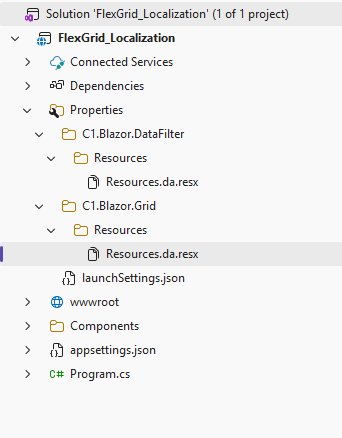
Add the required translated strings.
Set the application culture to the target culture.
Build and run the application.
When correctly named application resource files are present, they are used before the default resources embedded in the ComponentOne assemblies.
Resource File Structure
Custom resource files can use the same folder structure and file names as the default ComponentOne resources. They can also be added as a flat file list if the full namespace is included in the file name.
For example:
C1.Blazor.Grid.Resources.Resources.da.resxThe exact file name depends on the resource set used by the target assembly.
Related Resource Files
FlexGrid UI can use localized strings from more than one ComponentOne assembly.
For example, a column options menu can include strings from both C1.Blazor.Grid and C1.Blazor.DataFilter. If part of the UI comes from another component, the corresponding resource file must also be added for that assembly.
Limitations
Limitation | Description |
|---|---|
Resource names must match expected structure | Incorrect file names or folder layout prevent custom resources from loading |
Localization depends on active culture | Custom resources are used only when the matching culture is active |