


-
Spread Windows Forms Product Documentation
- Getting Started
-
Developer's Guide
- Understanding the Product
- Working with the Component
- Spreadsheet Objects
- Ribbon Control
- Sheets
- Rows and Columns
- Headers
- Cells
- Cell Types
- Data Binding
- Customizing the Sheet Appearance
- Customizing Interaction in Cells
- Tables
- Pivot Table
- Understanding the Underlying Models
- Customizing Row or Column Interaction
- Formulas in Cells
- Sparklines
- Keyboard Interaction
- Events from User Actions
- File Operations
- Storing Excel Summary and View
- Printing
- Chart Control
- Enhanced Chart
- Customizing Drawing
- Touch Support with the Component
- Spread Designer Guide
- Assembly Reference
- Import and Export Reference
- Version Comparison Reference
Creating Pivot Tables
Spread WinForms enables you to create and insert pivot tables in your spreadsheet using either a specified data range or a structured table. The IPivotCaches.Create method initializes a pivot cache from your data source, and the IPivotCache.CreatePivotTable method uses this cache to add a new pivot table to your worksheet for flexible data analysis.
Note: When creating or configuring pivot tables, it is recommended to use IWorkbookSet.BeginUpdate() and EndUpdate() methods. This prevents the Pivot Table from updating after each change and improves performance during batch operations.
Create Pivot Table from a Data Range
You can use the IPivotCaches.Create method to generate a pivot cache from a specified data range or table. Once the cache is created, you can use the IPivotCache.CreatePivotTable method to insert a pivot table into your worksheet. This approach allows you to define the data source, configure row and column fields, and add data fields to summarize your information efficiently.

The following example demonstrates how to create a pivot table from a data range.
C#
IWorkbook workbook = fpSpread1.AsWorkbook();
IWorksheet sheet1 = workbook.ActiveSheet;
fpSpread1.BorderCollapse = BorderCollapse.Enhanced;

// Set data.
sheet1.SetValue(0, 0, new object[,]
{
    { "OrderDate", "Region", "City", "Category", "Product", "Quantity" },
    { "2025-07-01", "East", "Jersey", "Breads", "Bakery", 1120 },
    { "2025-07-01", "East", "Jersey", "Breads", "Cookie", 563 },
    { "2025-07-02", "East", "Washington, DC", "Breads", "Bakery", 1281 },
    { "2025-07-02", "East", "Washington, DC", "Breads", "Cookie", 546 },
    { "2025-07-01", "East", "Jersey", "Beverages", "Coffee", 326 },
    { "2025-07-02", "East", "Washington, DC", "Beverages", "Coffee", 205 },
    { "2025-07-02", "East", "Washington, DC", "Beverages", "Juice", 186 },
    { "2025-07-01", "West", "San Francisco", "Breads", "Bakery", 1262 },
    { "2025-07-01", "West", "San Francisco", "Breads", "Cookie", 349 },
    { "2025-07-01", "West", "Seattle", "Breads", "Bakery", 524 },
    { "2025-07-01", "West", "Seattle", "Breads", "Cookie", 196 },
    { "2025-07-01", "West", "San Francisco", "Beverages", "Coffee", 363 },
    { "2025-07-01", "West", "Seattle", "Beverages", "Coffee", 100 },
    { "2025-07-02", "East", "Jersey", "Beverages", "Juice", 120 },
    { "2025-07-02", "West", "San Francisco", "Breads", "Bakery", 350 },
    { "2025-07-02", "West", "Seattle", "Beverages", "Tea", 180 },
    { "2025-07-02", "East", "Jersey", "Breads", "Cookie", 75 },
    { "2025-07-03", "West", "San Francisco", "Beverages", "Juice", 210 },
    { "2025-07-03", "East", "Boston", "Breads", "Bakery", 420 },
});

// Create a PivotCache from the specified data range.
IPivotCache pvCache = fpSpread1.AsWorkbook().PivotCaches.Create("Sheet1!A1:F20");

// Create a PivotTable.
IPivotTable pvTable = pvCache.CreatePivotTable(sheet1.Cells["I1"]);

// Get pivot fields from the PivotTable.
IPivotFields pvFields = pvTable.PivotFields;

// Add "Quantity" as a data field and summarize it by sum.
pvTable.AddDataField(pvFields["Quantity"], "Sum of quantity", ConsolidationFunction.Sum);

// Set "Region" and "City" as row fields.
pvFields["Region"].Orientation = PivotFieldOrientation.Row;
pvFields["City"].Orientation = PivotFieldOrientation.Row;

// Set "Category" and "Product" as column fields.
pvFields["Category"].Orientation = PivotFieldOrientation.Column;
pvFields["Product"].Orientation = PivotFieldOrientation.Column;

// Set "OrderDate" as a page (filter) field.
pvFields["OrderDate"].Orientation = PivotFieldOrientation.Page;
VB
Dim workbook As IWorkbook = fpSpread1.AsWorkbook()
Dim sheet1 As IWorksheet = workbook.ActiveSheet
fpSpread1.BorderCollapse = BorderCollapse.Enhanced

' Set data.
sheet1.SetValue(0, 0, New Object(,) {
    { "OrderDate", "Region", "City", "Category", "Product", "Quantity" },
    { "2025-07-01", "East", "Jersey", "Breads", "Bakery", 1120 },
    { "2025-07-01", "East", "Jersey", "Breads", "Cookie", 563 },
    { "2025-07-02", "East", "Washington, DC", "Breads", "Bakery", 1281 },
    { "2025-07-02", "East", "Washington, DC", "Breads", "Cookie", 546 },
    { "2025-07-01", "East", "Jersey", "Beverages", "Coffee", 326 },
    { "2025-07-02", "East", "Washington, DC", "Beverages", "Coffee", 205 },
    { "2025-07-02", "East", "Washington, DC", "Beverages", "Juice", 186 },
    { "2025-07-01", "West", "San Francisco", "Breads", "Bakery", 1262 },
    { "2025-07-01", "West", "San Francisco", "Breads", "Cookie", 349 },
    { "2025-07-01", "West", "Seattle", "Breads", "Bakery", 524 },
    { "2025-07-01", "West", "Seattle", "Breads", "Cookie", 196 },
    { "2025-07-01", "West", "San Francisco", "Beverages", "Coffee", 363 },
    { "2025-07-01", "West", "Seattle", "Beverages", "Coffee", 100 },
    { "2025-07-02", "East", "Jersey", "Beverages", "Juice", 120 },
    { "2025-07-02", "West", "San Francisco", "Breads", "Bakery", 350 },
    { "2025-07-02", "West", "Seattle", "Beverages", "Tea", 180 },
    { "2025-07-02", "East", "Jersey", "Breads", "Cookie", 75 },
    { "2025-07-03", "West", "San Francisco", "Beverages", "Juice", 210 },
    { "2025-07-03", "East", "Boston", "Breads", "Bakery", 420 }
})

' Create a PivotCache from the specified data range.
Dim pvCache As IPivotCache = fpSpread1.AsWorkbook().PivotCaches.Create("Sheet1!A1:F20")

' Create a PivotTable.
Dim pvTable As IPivotTable = pvCache.CreatePivotTable(sheet1.Cells("I1"))

' Get pivot fields from the PivotTable.
Dim pvFields As IPivotFields = pvTable.PivotFields

' Add "Quantity" as a data field and summarize it by sum.
pvTable.AddDataField(pvFields("Quantity"), "Sum of quantity", ConsolidationFunction.Sum)

' Set "Region" and "City" as row fields.
pvFields("Region").Orientation = PivotFieldOrientation.Row
pvFields("City").Orientation = PivotFieldOrientation.Row

' Set "Category" and "Product" as column fields.
pvFields("Category").Orientation = PivotFieldOrientation.Column
pvFields("Product").Orientation = PivotFieldOrientation.Column

' Set "OrderDate" as a page (filter) field.
pvFields("OrderDate").Orientation = PivotFieldOrientation.Page
Create a Pivot Table from a Table
You can use the Tables.Add method to create a structured table from a specified data range in your worksheet. After that, you can generate a pivot cache based on the table and insert a pivot table using the IPivotCache.CreatePivotTable method.
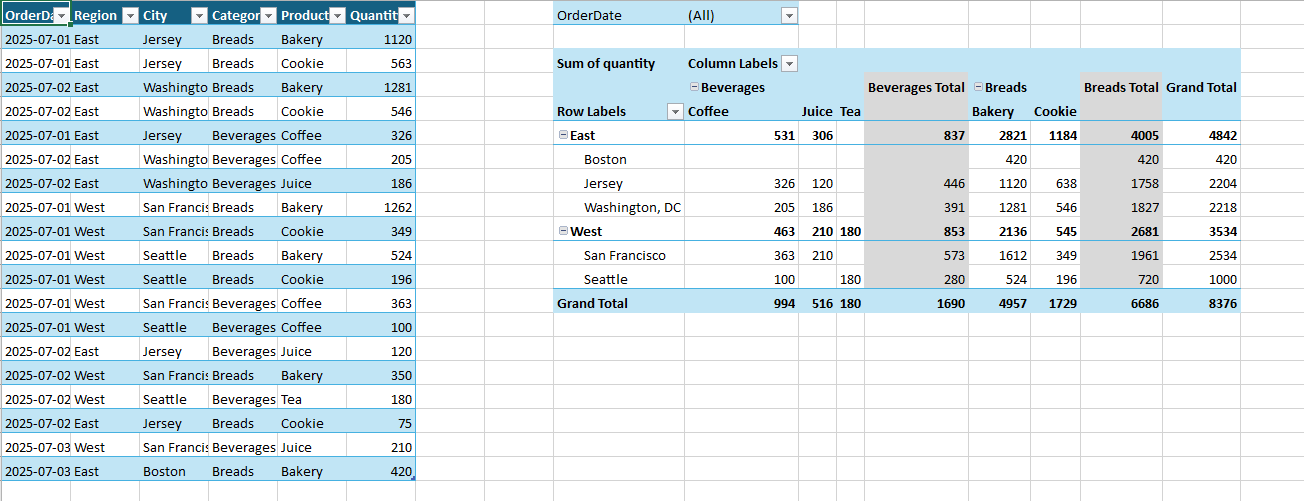
The following example demonstrates how to create a pivot table from a table.
C#
IWorkbook workbook = fpSpread1.AsWorkbook();
IWorksheet sheet1 = workbook.ActiveSheet;
fpSpread1.BorderCollapse = BorderCollapse.Enhanced;

// Set data.
sheet1.SetValue(0, 0, new object[,]
{
    { "OrderDate", "Region", "City", "Category", "Product", "Quantity" },
    { "2025-07-01", "East", "Jersey", "Breads", "Bakery", 1120 },
    { "2025-07-01", "East", "Jersey", "Breads", "Cookie", 563 },
    { "2025-07-02", "East", "Washington, DC", "Breads", "Bakery", 1281 },
    { "2025-07-02", "East", "Washington, DC", "Breads", "Cookie", 546 },
    { "2025-07-01", "East", "Jersey", "Beverages", "Coffee", 326 },
    { "2025-07-02", "East", "Washington, DC", "Beverages", "Coffee", 205 },
    { "2025-07-02", "East", "Washington, DC", "Beverages", "Juice", 186 },
    { "2025-07-01", "West", "San Francisco", "Breads", "Bakery", 1262 },
    { "2025-07-01", "West", "San Francisco", "Breads", "Cookie", 349 },
    { "2025-07-01", "West", "Seattle", "Breads", "Bakery", 524 },
    { "2025-07-01", "West", "Seattle", "Breads", "Cookie", 196 },
    { "2025-07-01", "West", "San Francisco", "Beverages", "Coffee", 363 },
    { "2025-07-01", "West", "Seattle", "Beverages", "Coffee", 100 },
    { "2025-07-02", "East", "Jersey", "Beverages", "Juice",  120 },
    { "2025-07-02", "West", "San Francisco", "Breads", "Bakery", 350 },
    { "2025-07-02", "West", "Seattle", "Beverages", "Tea", 180 },
    { "2025-07-02", "East", "Jersey", "Breads", "Cookie", 75 },
    { "2025-07-03", "West", "San Francisco", "Beverages", "Juice", 210 },
    { "2025-07-03", "East", "Boston", "Breads", "Bakery", 420 },
});

// Create a table.
ITable table = sheet1.Tables.Add(0, 0, 19, 5);

// Create a PivotCache based on the table.
IPivotCache pvCache = fpSpread1.AsWorkbook().PivotCaches.Create(table);

// Create a PivotTable.
IPivotTable pvTable = pvCache.CreatePivotTable(sheet1.Cells["I1"]);

// Get pivot fields from the PivotTable.
IPivotFields pvFields = pvTable.PivotFields;

// Add "Quantity" as a data field, summarized by sum.
pvTable.AddDataField(pvFields["Quantity"], "Sum of quantity", ConsolidationFunction.Sum);

// Set "Region" and "City" as row fields.
pvFields["Region"].Orientation = PivotFieldOrientation.Row;
pvFields["City"].Orientation = PivotFieldOrientation.Row;

// Set "Category" and "Product" as column fields.
pvFields["Category"].Orientation = PivotFieldOrientation.Column;
pvFields["Product"].Orientation = PivotFieldOrientation.Column;

// Set "OrderDate" as the page (filter) field.
pvFields["OrderDate"].Orientation = PivotFieldOrientation.Page;
VB
Dim workbook As IWorkbook = FpSpread1.AsWorkbook()
Dim sheet1 As IWorksheet = workbook.ActiveSheet
fpSpread1.BorderCollapse = BorderCollapse.Enhanced

' Set data.
sheet1.SetValue(0, 0, New Object(,) {
    {"OrderDate", "Region", "City", "Category", "Product", "Quantity"},
    {"2025-07-01", "East", "Jersey", "Breads", "Bakery", 1120},
    {"2025-07-01", "East", "Jersey", "Breads", "Cookie", 563},
    {"2025-07-02", "East", "Washington, DC", "Breads", "Bakery", 1281},
    {"2025-07-02", "East", "Washington, DC", "Breads", "Cookie", 546},
    {"2025-07-01", "East", "Jersey", "Beverages", "Coffee", 326},
    {"2025-07-02", "East", "Washington, DC", "Beverages", "Coffee", 205},
    {"2025-07-02", "East", "Washington, DC", "Beverages", "Juice", 186},
    {"2025-07-01", "West", "San Francisco", "Breads", "Bakery", 1262},
    {"2025-07-01", "West", "San Francisco", "Breads", "Cookie", 349},
    {"2025-07-01", "West", "Seattle", "Breads", "Bakery", 524},
    {"2025-07-01", "West", "Seattle", "Breads", "Cookie", 196},
    {"2025-07-01", "West", "San Francisco", "Beverages", "Coffee", 363},
    {"2025-07-01", "West", "Seattle", "Beverages", "Coffee", 100},
    {"2025-07-02", "East", "Jersey", "Beverages", "Juice", 120},
    {"2025-07-02", "West", "San Francisco", "Breads", "Bakery", 350},
    {"2025-07-02", "West", "Seattle", "Beverages", "Tea", 180},
    {"2025-07-02", "East", "Jersey", "Breads", "Cookie", 75},
    {"2025-07-03", "West", "San Francisco", "Beverages", "Juice", 210},
    {"2025-07-03", "East", "Boston", "Breads", "Bakery", 420}
})

' Create a table.
Dim table As ITable = sheet1.Tables.Add(0, 0, 19, 5)

' Create a PivotCache based on the table.
Dim pvCache As IPivotCache = FpSpread1.AsWorkbook().PivotCaches.Create(table)

' Create a PivotTable.
Dim pvTable As IPivotTable = pvCache.CreatePivotTable(sheet1.Cells("I1"))

' Get pivot fields from the PivotTable.
Dim pvFields As IPivotFields = pvTable.PivotFields

' Add "Quantity" as a data field, summarized by sum.
pvTable.AddDataField(pvFields("Quantity"), "Sum of quantity", ConsolidationFunction.Sum)

' Set "Region" and "City" as row fields.
pvFields("Region").Orientation = PivotFieldOrientation.Row
pvFields("City").Orientation = PivotFieldOrientation.Row

' Set "Category" and "Product" as column fields.
pvFields("Category").Orientation = PivotFieldOrientation.Column
pvFields("Product").Orientation = PivotFieldOrientation.Column

' Set "OrderDate" as the page (filter) field.
pvFields("OrderDate").Orientation = PivotFieldOrientation.Page
Refresh Pivot Table
If the data source for a pivot table is changed at any point in time, the pivot table needs to be refreshed to reflect the latest information. Spread WinForms allows you to refresh the data source and reflect the latest data in the pivot table by using the IPivotCache.Refresh() method.
The following example demonstrates how to refresh a pivot table.
C#
// Set pivot table fields.
IPivotCache pvCache = fpSpread1.AsWorkbook().PivotCaches.Create(table);
IPivotTable pvTable = pvCache.CreatePivotTable(sheet1.Cells["I1"]);
IPivotFields pvFields = pvTable.PivotFields;
pvTable.AddDataField(pvFields["Quantity"], "Sum of quantity", ConsolidationFunction.Sum);
pvFields["Region"].Orientation = PivotFieldOrientation.Row;
pvFields["City"].Orientation = PivotFieldOrientation.Row;
pvFields["Category"].Orientation = PivotFieldOrientation.Column;
pvFields["Product"].Orientation = PivotFieldOrientation.Column;
pvFields["OrderDate"].Orientation = PivotFieldOrientation.Page;

// Change pivot cache's source data.
sheet1.Cells["F2"].Value = 4000;

// Sync cache's data to pivot table.
pvCache.Refresh();
VB
' Set pivot table fields.
Dim pvCache As IPivotCache = FpSpread1.AsWorkbook().PivotCaches.Create(table)
Dim pvTable As IPivotTable = pvCache.CreatePivotTable(sheet1.Cells("I1"))
Dim pvFields As IPivotFields = pvTable.PivotFields
pvTable.AddDataField(pvFields("Quantity"), "Sum of quantity", ConsolidationFunction.Sum)
pvFields("Region").Orientation = PivotFieldOrientation.Row
pvFields("City").Orientation = PivotFieldOrientation.Row
pvFields("Category").Orientation = PivotFieldOrientation.Column
pvFields("Product").Orientation = PivotFieldOrientation.Column
pvFields("OrderDate").Orientation = PivotFieldOrientation.Page

' Change pivot cache's source data.
sheet1.Cells("F2").Value = 4000

' Sync cache's data to pivot table.
pvCache.Refresh()