- SpreadJS Overview
- Getting Started
- JavaScript Frameworks
- Best Practices
-
Features
- Workbook
- Worksheet
- Rows and Columns
- Headers
- Cells
- Data Binding
- Data Manager
- TableSheet
- GanttSheet
- ReportSheet
- Data Charts
- JSON Schema with SpreadJS
- SpreadJS File Format
- Data Validation
- Conditional Formatting
- Sort
- Group
- Formulas
- What-If Analysis
- Serialization
- Keyboard Actions
- Shapes
- Floating Objects
- Barcodes
- Charts
- Sparklines
- Tables
- Pivot Table
- Slicer
- Theme
- User Management
- Culture
- AI Assistant
- SpreadJS Designer
- SpreadJS Designer VSCode Plugin
- Tutorials
- SpreadJS Designer Component
- SpreadJS Collaboration Server
- Touch Support
- Formula Reference
- Import and Export Reference
- Events
- API Documentation
- Release Notes
SJS.AI.QUERY
Summary
SJS.AI.QUERY is a function in SpreadJS that sends prompts and optional worksheet data to a registered AI model. You can provide one or more prompt and data arguments, and SpreadJS combines them in order to create the request sent to the AI model.
Syntax
=SJS.AI.QUERY(prompt1, [data1], [prompt2], [data2], ...)Arguments
Parameter | Description |
|---|---|
prompt1 Required | Text that describes the task or asks a question for the AI model. |
data1 Optional | A cell or range reference that provides context or data for the AI model. |
prompt2, data2, ... Optional | Additional prompt text and data references. Arguments are combined in order to form the request sent to the AI model. |
Remarks:
SJS.AI.QUERYis an asynchronous formula and returns#BUSY!while the request is being processed.The function only uses data provided through its arguments. It does not read other workbook data automatically.
Results depend on the registered AI model and may vary.
Avoid using
SJS.AI.QUERYfor financial reporting, mathematical calculations, data lookup, or other high-risk scenarios that require deterministic results.
Examples
Use a Prompt and a Data Range
This formula reads country names from range A2:A11 and returns their corresponding capital cities.
=SJS.AI.QUERY("Get the capitals of these countries", A2:A11) 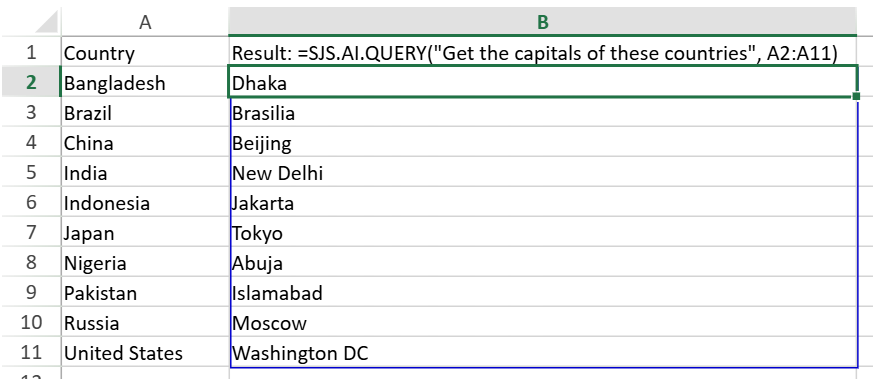
Use a Prompt from a Cell
=SJS.AI.QUERY(B25, A26:A35)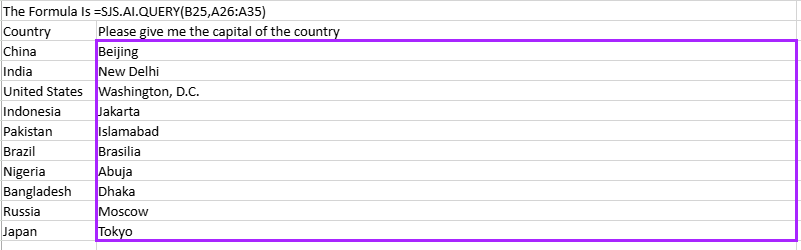
Combine Multiple Prompts and Data Ranges
=SJS.AI.QUERY("Clean this messy data", B4:B14, "Extract the values based on the column labels", C3:F3)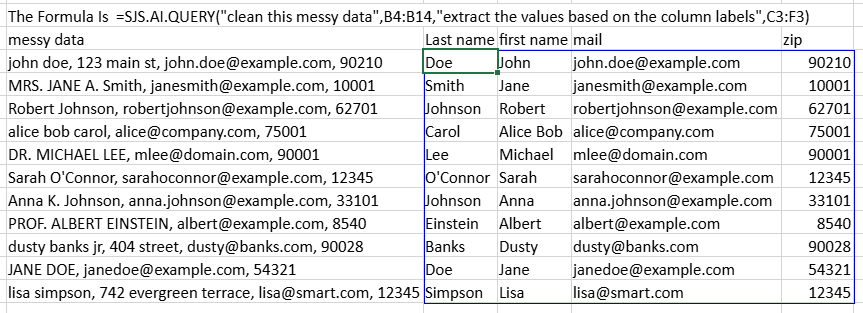
Use Reference Data as Context
=SJS.AI.QUERY("Return the category of each item", B9:B23, "Based on these categories", B27:B31)
Ask a Question
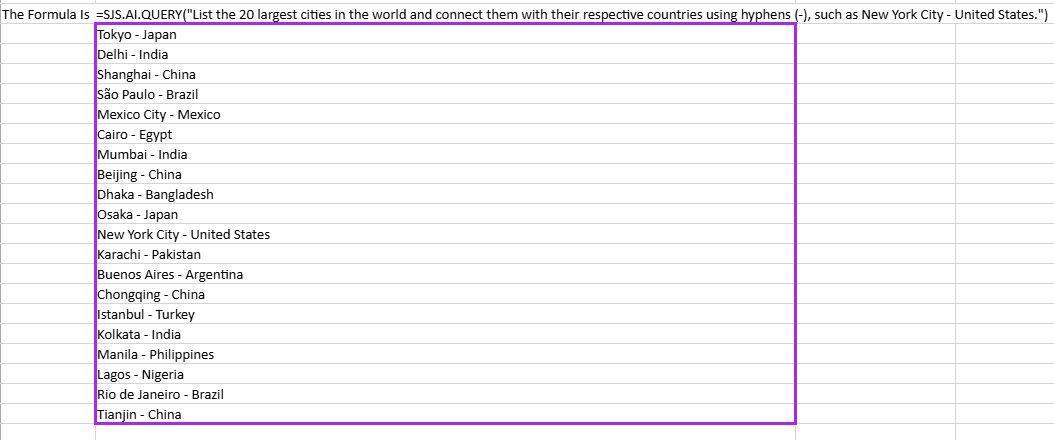
=SJS.AI.QUERY("List the 20 largest cities in the world and connect them with their respective countries using hyphens (-), such as New York City - United States.")