Setting the First Day of the Week
By default, the C1DatePicker control Sunday as the first day of the week in the drop-down calendar, but you can change the starting day if necessary. In this topic, you will learn how to change the first day of the week in the designer, in XAML, and in code.
In the Designer
To change the first day of the week, complete the following steps:
- Click the C1DatePicker control once to select it.
- In the Properties window, click the C1DatePicker.FirstDayOfWeek drop-down arrow and select a day from the list. For this example, select Monday.
In XAML
To change the first day of the week, place FirstDayOfWeek="Monday" within the <c1:C1DatePicker> tags so that the markup resembles the following:
<c1:C1DatePicker FirstDayOfWeek="Monday">
In Code
To change the date format, complete the following steps:
Open the MainWindow.xaml.cs page.
Place the following code beneath the InitializeComponent() method:
C1DatePicker1.FirstDayOfWeek = DayOfWeek.Mondayc1DatePicker1.FirstDayOfWeek = DayOfWeek.Monday;Run the project.
This Topic Illustrates the Following:
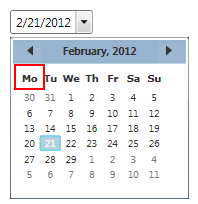
In this topic, you set the FirstDayOfWeek property to Monday so that Monday is the first day of the week in the drop-down calendar. The final result will resemble the following image: