


Export and Import
C1Editor supports loading and saving DOCX and RTF documents in addition to HTML, HTM, and plain text formats.
This support allows applications to open, edit, and save DOCX and RTF content directly in C1Editor using the same document APIs already used for other supported formats. The functionality is available across supported .NET Framework and modern .NET WinForms applications.
Dependencies
DOCX and RTF support relies on the following dependency.
C1.Word
Supported Features
C1Editor supports:
Loading DOCX and RTF documents from file paths
Loading DOCX and RTF documents from streams
Opening DOCX and RTF documents through file dialogs
Saving editor content to DOCX and RTF file paths
Saving editor content to streams
Saving documents through file dialogs
This support extends the existing document workflow and does not change HTML, HTM, or plain text behavior.
Supported APIs
The following APIs support DOCX and RTF document loading and saving.
API Name | Parameters | Description | |
|---|---|---|---|
|
| Loads a document from the specified file path without displaying a file dialog. Supports DOCX and RTF formats. | |
|
| Loads a document from the specified stream without displaying a file dialog. Supports DOCX and RTF formats. | |
|
| Displays the Open File dialog and loads the selected DOCX or RTF document. | |
|
| Saves the current document to the specified file path without displaying a file dialog. Supports DOCX and RTF formats. | |
|
| Saves the current document to the specified stream without displaying a file dialog. Supports DOCX and RTF formats. | |
|
| Displays the Save File dialog and saves the current document in the selected format. | |
Format Handling
DOCX and RTF support uses the existing document-loading and document-saving APIs rather than separate format-specific methods.
When loading, the format is determined by the input document. When saving, the format is determined by the output file or selected format.
Import Documents
Applications can load DOCX and RTF documents directly from a file path.
await c1Editor1.LoadDocumentAsync(filePath);Applications can also load documents from a stream.
using FileStream stream = File.OpenRead(filePath);
await c1Editor1.LoadDocumentAsync(stream);
When user-driven file selection is required, applications can use the file dialog API.
await c1Editor1.LoadDocumentRequestAsync();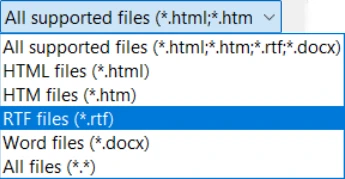
Export Documents
Applications can save editor content directly to a file path.
await c1Editor1.SaveDocumentAsync(filePath);Applications can also save content to a stream.
using MemoryStream stream = new();

await c1Editor1.SaveDocumentAsync(stream);

byte[] documentData = stream.ToArray();
When user-driven file selection is required, applications can use the save file dialog API.
await c1Editor1.SaveDocumentRequestAsync();
Limitations
Limitation | Description | |
|---|---|---|
| Supported content and formatting depend on the capabilities of | |
Format conversion differences | Some formatting or document features may not be preserved exactly during conversion | |
Sample Code
The following example demonstrates loading and saving DOCX and RTF documents through file paths, streams, and file dialogs.
public partial class EditorDocxRtfSample : UserControl
{
    private readonly string _resourcesFolder =
        Path.Combine(
            AppContext.BaseDirectory,
            "Resources");

    public EditorDocxRtfSample()
    {
        InitializeComponent();
    }

    private async void btnLoadDocx_Click(
        object sender,
        EventArgs e)
    {
        string filePath =
            Path.Combine(_resourcesFolder, "Sample.docx");

        await c1Editor1.LoadDocumentAsync(filePath);
    }

    private async void btnLoadRtf_Click(
        object sender,
        EventArgs e)
    {
        string filePath =
            Path.Combine(_resourcesFolder, "Sample.rtf");

        await c1Editor1.LoadDocumentAsync(filePath);
    }

    private async void btnSaveDocx_Click(
        object sender,
        EventArgs e)
    {
        string filePath =
            Path.Combine(
                Environment.GetFolderPath(
                    Environment.SpecialFolder.MyDocuments),
                "Sample.docx");

        await c1Editor1.SaveDocumentAsync(filePath);
    }

    private async void btnSaveRtf_Click(
        object sender,
        EventArgs e)
    {
        string filePath =
            Path.Combine(
                Environment.GetFolderPath(
                    Environment.SpecialFolder.MyDocuments),
                "Sample.rtf");

        await c1Editor1.SaveDocumentAsync(filePath);
    }

    private async void btnLoadFromStream_Click(
        object sender,
        EventArgs e)
    {
        string filePath =
            Path.Combine(_resourcesFolder, "Sample.docx");

        using FileStream stream = File.OpenRead(filePath);

        await c1Editor1.LoadDocumentAsync(stream);
    }

    private async void btnSaveToStream_Click(
        object sender,
        EventArgs e)
    {
        using MemoryStream stream = new();

        await c1Editor1.SaveDocumentAsync(stream);

        byte[] documentData = stream.ToArray();
    }

    private async void btnOpen_Click(
        object sender,
        EventArgs e)
    {
        await c1Editor1.LoadDocumentRequestAsync();
    }

    private async void btnSaveAs_Click(
        object sender,
        EventArgs e)
    {
        await c1Editor1.SaveDocumentRequestAsync();
    }
}