Tables
Tables organize document data into rows and columns for structured presentation and formatting. C1.Word lets you create tables with the RtfTable class and add cell content through the RtfParagraph class.
The following example builds a table with a colored header row, alternating row backgrounds, and per-column alignment, font, and text color:
using System.Drawing;
using C1.Word;

C1WordDocument doc = new C1WordDocument();

doc.AddParagraph("Table generated using the RtfTable class", new C1.Util.Font("Arial", 12));

int rows = 6;
int columns = 3;

RtfTable table = new RtfTable(rows, columns);

// Per-column settings
string[] headers = { "Left Aligned", "Center Aligned", "Right Aligned" };
Color[] headerColors = { Color.SteelBlue, Color.SeaGreen, Color.IndianRed };

RtfHorizontalAlignment[] alignments =
{
    RtfHorizontalAlignment.Left,
    RtfHorizontalAlignment.Center,
    RtfHorizontalAlignment.Right
};

Color[] textColors =
{
    Color.Black,
    Color.DarkGreen,
    Color.DarkRed
};

C1.Util.Font[] cellFonts =
{
    new C1.Util.Font("Arial", 11, C1.Util.FontStyle.Regular),
    new C1.Util.Font("Calibri", 11, C1.Util.FontStyle.Bold),
    new C1.Util.Font("Times New Roman", 11, C1.Util.FontStyle.Italic)
};

for (int row = 0; row < rows; row++)
{
    for (int column = 0; column < columns; column++)
    {
        var cell = table.Rows[row].Cells[column];

        // Cell borders
        cell.LeftBorderWidth = cell.TopBorderWidth = cell.RightBorderWidth = cell.BottomBorderWidth = 1;
        cell.LeftBorderColor = cell.TopBorderColor = cell.RightBorderColor = cell.BottomBorderColor = Color.SteelBlue;

        if (row == 0)
        {
            // Header row
            cell.BackFilling = headerColors[column];

            RtfString headerString = new RtfString(headers[column]);
            headerString.Font = new C1.Util.Font("Calibri", 11, C1.Util.FontStyle.Bold);
            headerString.ForeColor = Color.White;

            RtfParagraph headerParagraph = new RtfParagraph();
            headerParagraph.Alignment = alignments[column];
            headerParagraph.Content.Add(headerString);
            cell.Content.Add(headerParagraph);
        }
        else
        {
            // Data rows with alternating background colors
            cell.BackFilling = row % 2 == 0 ? Color.Beige : Color.White;

            RtfString cellString = new RtfString($"Row {row}, Col {column}");
            cellString.Font = cellFonts[column];
            cellString.ForeColor = textColors[column];

            RtfParagraph dataParagraph = new RtfParagraph();
            dataParagraph.Alignment = alignments[column];
            dataParagraph.Content.Add(cellString);
            cell.Content.Add(dataParagraph);
        }
    }
}

doc.Add(table);
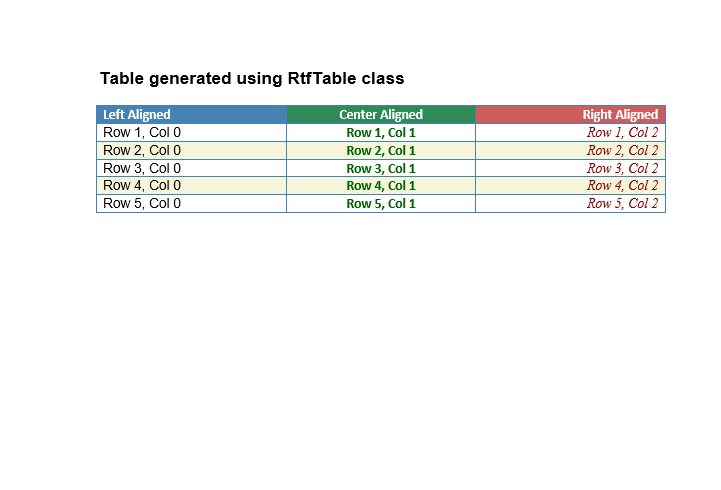
The resulting table looks like the following: