List
C1.Word supports ordered and unordered lists with multi-level nesting through the AddListTexts method. Each list item is a KeyValuePair<int, string>, where the key is the nesting level and the value is the item text. The RtfListType enumeration provides the standard list styles.
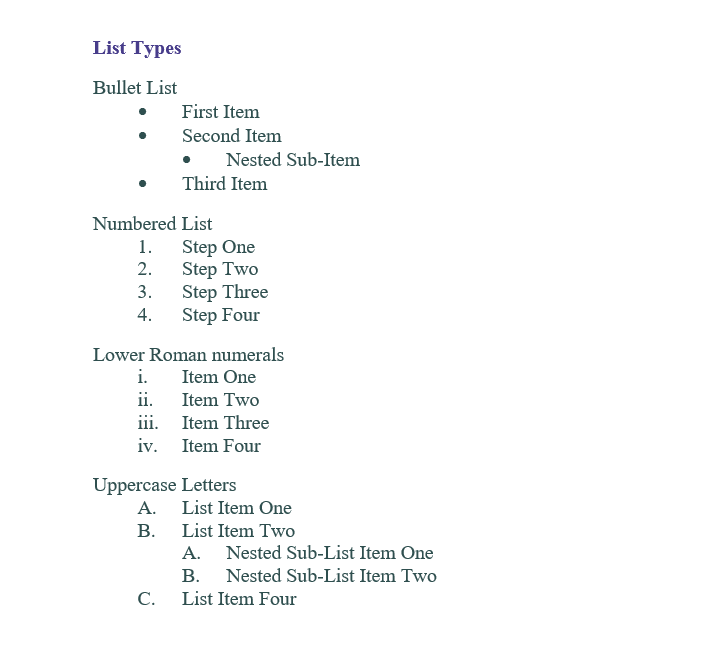
The following example creates a bulleted list, a numbered list, a lowercase Roman numeral list, and an uppercase letter list. The bulleted and uppercase letter lists include nested items.
using System.Collections.Generic;
using C1.Word;

C1WordDocument doc = new C1WordDocument();

// Bulleted list with a nested item
doc.AddListTexts(RtfListType.Bullet,
    new KeyValuePair<int, string>(1, "First Item"),
    new KeyValuePair<int, string>(1, "Second Item"),
    new KeyValuePair<int, string>(2, "Nested Sub-Item"),
    new KeyValuePair<int, string>(1, "Third Item"));

// Numbered list
doc.AddListTexts(RtfListType.ArabicNumeral,
    new KeyValuePair<int, string>(1, "Step One"),
    new KeyValuePair<int, string>(1, "Step Two"),
    new KeyValuePair<int, string>(1, "Step Three"),
    new KeyValuePair<int, string>(1, "Step Four"));

// Lowercase Roman numeral list
doc.AddListTexts(RtfListType.LowerRomanNumeral,
    new KeyValuePair<int, string>(1, "Item One"),
    new KeyValuePair<int, string>(1, "Item Two"),
    new KeyValuePair<int, string>(1, "Item Three"),
    new KeyValuePair<int, string>(1, "Item Four"));

// Uppercase letter list with nested items
doc.AddListTexts(RtfListType.UpperLetter,
    new KeyValuePair<int, string>(1, "List Item One"),
    new KeyValuePair<int, string>(1, "List Item Two"),
    new KeyValuePair<int, string>(2, "Nested Sub-List Item One"),
    new KeyValuePair<int, string>(2, "Nested Sub-List Item Two"),
    new KeyValuePair<int, string>(1, "List Item Four"));
The resulting lists look like the following: