


- Blazor Overview
- Get Started with Blazor
- Free and Open Source Software (FOSS) License
- Section 508 Compliance
- Blazor Project Types
- Adding NuGet Packages to your App
- Controls
- Release History
Time Components
C1DateTimePicker and C1TimeEditor support configurable time sections through the TimeComponents property.
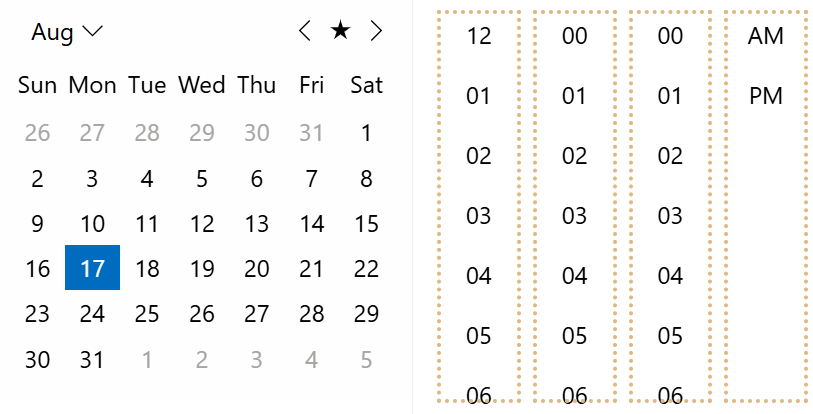
This property controls which parts of a time value are displayed and editable, including hours, minutes, and seconds. Date-time filters also support TimeComponents, which allows applications to use consistent time precision across date-time editing and filtering workflows.
Supported Controls
The TimeComponents property is available for the following controls.
Control | Namespace | |
|---|---|---|
|
| |
|
| |
|
| |
|
| |
|
| |
|
| |
Supported Time Components
TimeComponents determines which time sections are visible and editable in the target control.
Value | Description | |
|---|---|---|
| Displays and enables hour editing. | |
| Displays and enables minute editing. | |
| Displays and enables second editing. | |
| Displays and enables hours, minutes, and seconds. | |
Developers can use these values to match the required level of time precision. For example, a scheduling interface may require only hours and minutes, while an event-tracking workflow may require second-level precision.
Examples
A common configuration is to display only hours and minutes for general date/time entry.
<C1DateTimePicker
    TimeComponents="TimeComponents.Hours | TimeComponents.Minutes" />
A full time-editing scenario can include seconds.
<C1TimeEditor TimeComponents="TimeComponents.All" />Date-time filters can use the same property to keep filtering precision aligned with the rest of the application.
<C1DataFilter AutoGenerateFilters="false">
    <DataFilters>
        <DateTimeFilter
            TimeComponents="TimeComponents.Hours | TimeComponents.Minutes"
            PropertyName="EventDate" />
    </DataFilters>
</C1DataFilter>
AM/PM Designator
AM/PM designator visibility depends on the control type and time configuration.
For C1TimeEditor, the control does not provide a Format property. The AM/PM designator is displayed when TimeComponents includes TimeComponents.Hours and ClockType is set to ClockType.Type12.
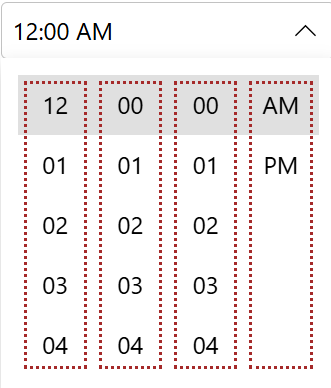
For C1DateTimePicker, the Format property determines whether the control uses a 12-hour or 24-hour clock. The AM/PM designator is displayed only when the format is a custom format that includes an hour component and TimeComponents includes TimeComponents.Hours.
Control | Designator Visibility | |
|---|---|---|
| Displayed when | |
| Displayed when the custom | |
Date-time filter controls do not use this automatic AM/PM designator behavior.
Time Components in Filters
Date-time filters in C1DataFilter support the same TimeComponents property used by editor controls.
This allows applications to expose only the required time sections in filter editors and maintain consistent precision between editing and filtering workflows.
Limitations
Limitation | Description | |
|---|---|---|
| The property is not derived automatically from | |