


-
Spread Windows Forms Product Documentation
- Getting Started
-
Developer's Guide
- Understanding the Product
- Working with the Component
-
Spreadsheet Objects
- Understanding Parts of the Component
- Object Parentage
- Resetting Parts of the Interface
- Rich Text Editing
- Improving Performance by Suspending the Layout
- Ways to Improve Performance
- Allowing User Functionality
- Allowing the User to Zoom the Display of the Component
- Working with Scroll Bars
- Adding a Status Bar
- Customizing Viewports
- Customizing Split Boxes
- Working With Slicers
- Working with Built-In Dialogs
- Ribbon Control
- Sheets
- Rows and Columns
- Headers
- Cells
- Cell Types
- Data Binding
- Customizing the Sheet Appearance
- Customizing Interaction in Cells
- Tables
- Pivot Table
- Understanding the Underlying Models
- Customizing Row or Column Interaction
- Formulas in Cells
- Sparklines
- Keyboard Interaction
- Events from User Actions
- File Operations
- Storing Excel Summary and View
- Printing
- Chart Control
- Enhanced Chart
- Customizing Drawing
- Touch Support with the Component
- Spread Designer Guide
- Assembly Reference
- Import and Export Reference
- Version Comparison Reference
Scroll Chaining
Spread WinForms supports seamless scrolling transition from a child view to the parent view when the child view reaches its scroll boundaries.
When working with hierarchical data views (parent-child relationships), if the mouse cursor is positioned over a child view or the gray area beside it, the mouse wheel scrolls the child view. When the child view reaches its scroll boundary, the subsequent behavior depends on the AllowScrollChaining setting.
When AllowScrollChaining is set to true, scrolling continues from the child view to the parent view after the child view reaches its boundary.
When AllowScrollChaining is set to false, scrolling stops once the child view reaches its boundary (default behavior).
AllowScrollChaining defaults to false for backward compatibility with previous versions.
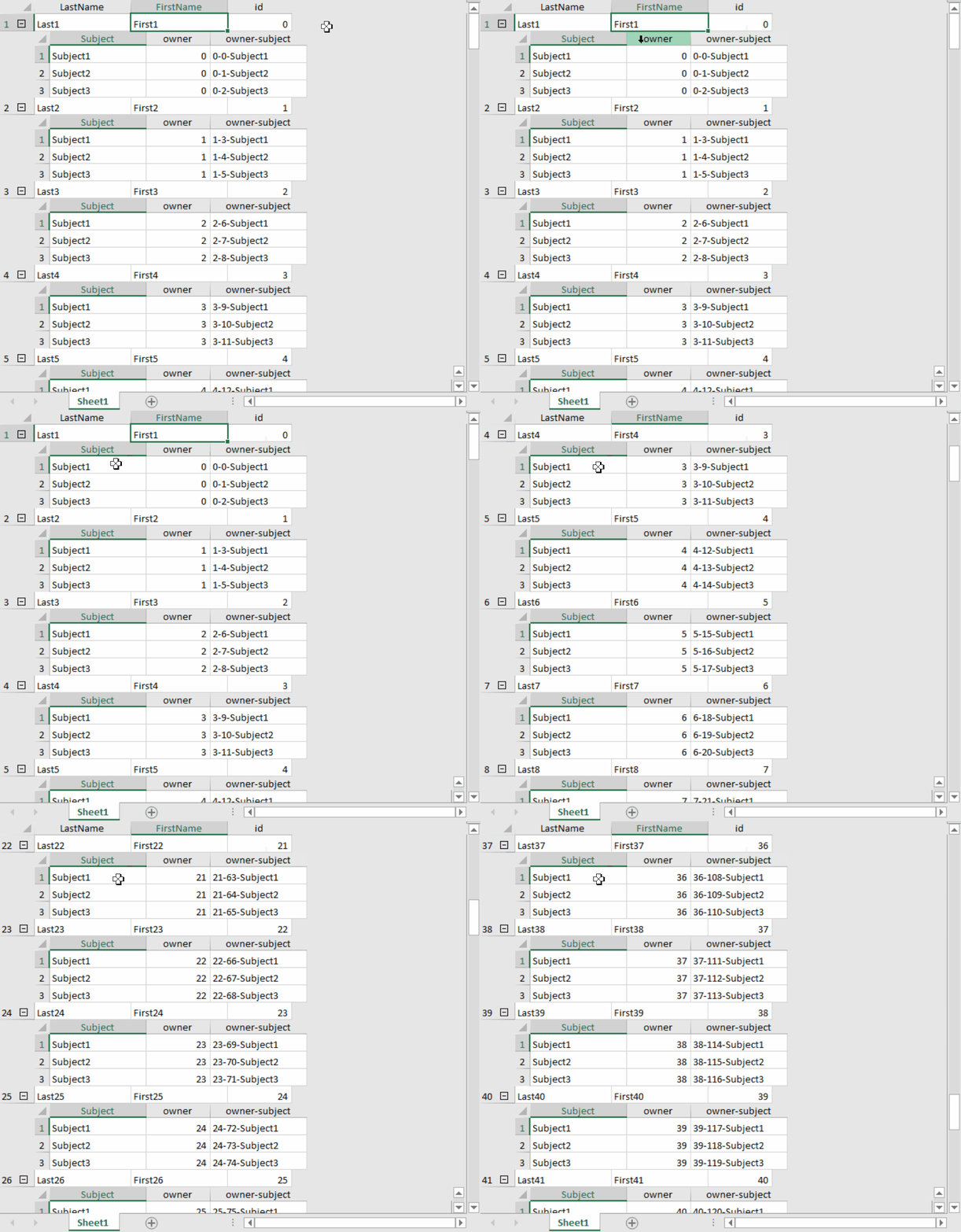
The child view and the gray area are shown in the figure below.

When AllowScrollChaining is set to true, if you place the mouse cursor on the cells of the child view and scroll the mouse in the child view or the gray area, the behavior is as shown in the GIF below.
Using the Properties Window
At design time, in the Properties window, select the Spread component.
In the Behavior group, set the AllowScrollChaining property to True.
Using Code
Refer to the following example code that shows how to allow seamless scrolling across hierarchical parent‑child views in FpSpread.
private void button1_Click(object sender, EventArgs e)
{
        fpSpread1.Height = 500;
        fpSpread1.AllowScrollChaining = true;
        CreateDataSet_TwoLevel(fpSpread1);
}

public void CreateDataSet_TwoLevel(FpSpread fpSpread1)
{
    System.Data.DataSet ds = new System.Data.DataSet();
    DataTable fpnames;
    DataTable fpclass;
    // configuration: 50 parents, 3 children per parent
    int parents = 50;
    int childrenPerParent = 3;
    // Create Students (parent)
    fpnames = ds.Tables.Add("Students");
    fpnames.Columns.AddRange(new DataColumn[] {
    new DataColumn("LastName", Type.GetType("System.String")),
    new DataColumn("FirstName", Type.GetType("System.String")),
    new DataColumn("id", Type.GetType("System.Int32"))
    });
    for (int p = 0; p < parents; p++)
    {
        fpnames.Rows.Add(new Object[] { $"Last{p + 1}", $"First{p + 1}", p });
    }
    // Create Class (child) - multiple classes per student
    fpclass = ds.Tables.Add("Class");
    fpclass.Columns.AddRange(new DataColumn[] {
    new DataColumn("Subject", Type.GetType("System.String")),
    new DataColumn("owner", Type.GetType("System.Int32")),
    new DataColumn("owner-subject", Type.GetType("System.String"))
    });
    for (int parentId = 0; parentId < parents; parentId++)
    {
        for (int c = 0; c < childrenPerParent; c++)
        {
            int classIndex = parentId * childrenPerParent + c; // unique index across all classes
            string subject = $"Subject{(c % 5) + 1}";
            string ownerSubject = $"{parentId}-{classIndex}-{subject}";
            fpclass.Rows.Add(new Object[] { subject, parentId, ownerSubject });
        }
    }
    // Relation: Students -> Class
    ds.Relations.Add("Class", fpnames.Columns["id"], fpclass.Columns["owner"]);
    // Bind to sheet and expand parent + child views
    fpSpread1.ActiveSheet.DataSource = ds;
    fpSpread1.ActiveSheet.DataMember = "Students";
    fpSpread1.ActiveSheet.ExpandRow(-1, true);
    for (int i = 0; i < fpSpread1.ActiveSheet.RowCount; i++)
    {
        var childView = fpSpread1.ActiveSheet.GetChildView(i, 0);
        if (childView != null)
        {
            childView.ExpandRow(-1, true);
        }
    }
}
Private Sub button1_Click(sender As Object, e As EventArgs) Handles button1.Click
fpSpread1.Height = 500
fpSpread1.AllowScrollChaining = True
CreateDataSet_TwoLevel(fpSpread1)
End Sub
Public Sub CreateDataSet_TwoLevel(fpSpread1 As FarPoint.Win.Spread.FpSpread)
Dim ds As New System.Data.DataSet()
Dim fpnames As DataTable
Dim fpclass As DataTable
' configuration: 50 parents, 3 children per parent
Dim parents As Integer = 50
Dim childrenPerParent As Integer = 3
' Create Students (parent)
fpnames = ds.Tables.Add("Students")
fpnames.Columns.AddRange(New DataColumn() {
New DataColumn("LastName", Type.GetType("System.String")),
New DataColumn("FirstName", Type.GetType("System.String")),
New DataColumn("id", Type.GetType("System.Int32"))
})
For p As Integer = 0 To parents - 1
fpnames.Rows.Add(New Object() {$"Last{p + 1}", $"First{p + 1}", p})
Next
' Create Class (child) - multiple classes per student
fpclass = ds.Tables.Add("Class")
fpclass.Columns.AddRange(New DataColumn() {
New DataColumn("Subject", Type.GetType("System.String")),
New DataColumn("owner", Type.GetType("System.Int32")),
New DataColumn("owner-subject", Type.GetType("System.String"))
})
For parentId As Integer = 0 To parents - 1
For c As Integer = 0 To childrenPerParent - 1
Dim classIndex As Integer = parentId * childrenPerParent + c ' unique index across all classes
Dim subject As String = $"Subject{(c Mod 5) + 1}"
Dim ownerSubject As String = $"{parentId}-{classIndex}-{subject}"
fpclass.Rows.Add(New Object() {subject, parentId, ownerSubject})
Next
Next
' Relation: Students -> Class
ds.Relations.Add("Class", fpnames.Columns("id"), fpclass.Columns("owner"))
' Bind to sheet and expand parent + child views
fpSpread1.ActiveSheet.DataSource = ds
fpSpread1.ActiveSheet.DataMember = "Students"
fpSpread1.ActiveSheet.ExpandRow(-1, True)
For i As Integer = 0 To fpSpread1.ActiveSheet.RowCount - 1
Dim childView = fpSpread1.ActiveSheet.GetChildView(i, 0)
If childView IsNot Nothing Then
childView.ExpandRow(-1, True)
End If
Next
End SubUsing the Spread Designer
1. Select the Spread component (or choose Spread from the drop-down menu in the property panel).
2. In the property list on the right, scroll down to find the AllowScrollChaining property and set it to True.