


- Document Solutions for Excel .NET Overview
- Key Features
- Getting Started
-
Features
- Worksheet
- Workbook
- Comments
- Hyperlinks
- Sort
- Filter
- Group
- Conditional Formatting
- Data Validations
- Data Binding
- Import Data
- Digital Signatures
- Formulas
- Custom Functions
- Shapes
- Document Properties
- Styles
- Form Controls
- Barcodes
- Themes and Colors
- Chart
- Table
- Pivot Table
- Pivot Chart
- Sparkline
- Slicer
- Logging
- Defined Names
- AI Assistant
- Templates
- Formula Reference
- File Operations
- Tutorials
- Document Solutions Data Viewer
- API Reference
- Release Notes
Stock Chart
Stock chart is used to illustrate fluctuations in data over a time. It can represent fluctuations in stock, rainfall, or annual temperatures. The data arranged in columns or rows of a worksheet can be plotted in a Stock chart.
DsExcel supports the following types of Stock charts.
Chart Type | Chart Snapshot | Use Case |
|---|---|---|
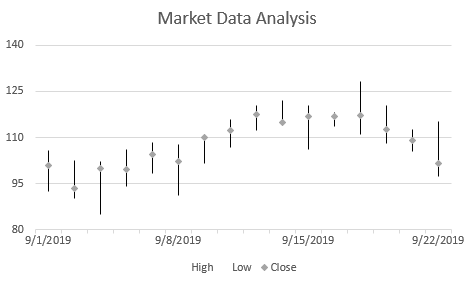
StockHLC |
| A high-low-close chart displays the data values organized in the order: high, low, close with the close value lying in between the high and low values. |
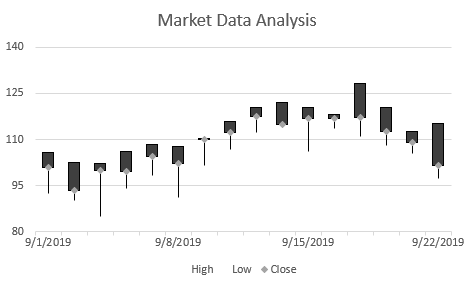
StockOHLC |
| An open-high-low-close chart displays the data values organized in the order: open, high, low and close. |
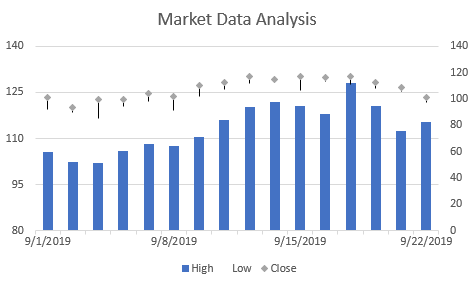
StockVHLC |
| A volume-high-low-close chart displays the data values organized in the order: volume, high, low and close. |
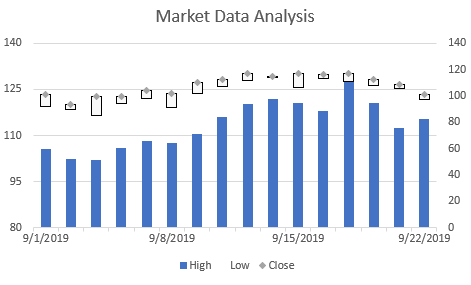
StockVOHLC |
| A volume-open-high-low-close chart displays the data values organized in the order : volume, open, high, low and close. |
Using Code
Refer the following code to add StockVOHLC chart:
public void StockCharts()
{
     // Initialize workbook
     Workbook workbook = new Workbook();
     // Fetch default worksheet
     IWorksheet worksheet = workbook.Worksheets[0];

     // Prepare data for chart
     worksheet.Range["A1:D17"].Value = new object[,]
     {
         { null, "High", "Low", "Close" },
         { new DateTime(2019, 9, 1), 105.76, 92.38, 100.94 },
         { new DateTime(2019, 9, 2), 102.45, 90.14, 93.45 },
         { new DateTime(2019, 9, 3),102.11, 85.01, 99.89 },
         { new DateTime(2019, 9, 4), 106.01, 94.04, 99.45 },
         { new DateTime(2019, 9, 5),108.23, 98.16, 104.33 },
         { new DateTime(2019, 9, 8),107.7, 91.02, 102.17 },
         { new DateTime(2019, 9, 9),110.36, 101.62, 110.07 },
         { new DateTime(2019, 9, 10),115.97, 106.89, 112.39 },
         { new DateTime(2019, 9, 11),120.32, 112.15, 117.52 },
         { new DateTime(2019, 9, 12),122.03, 114.67, 114.75 },
         { new DateTime(2019, 9, 15),120.46, 106.21, 116.85 },
         { new DateTime(2019, 9, 16),118.08, 113.55, 116.69 },
         { new DateTime(2019, 9, 17),128.23, 110.91, 117.25 },
         { new DateTime(2019, 9, 18),120.55, 108.09, 112.52 },
         { new DateTime(2019, 9, 19),112.58, 105.42, 109.12 },
         { new DateTime(2019, 9, 22),115.23, 97.25, 101.56 },

     };
     worksheet.Range["A:D"].Columns.AutoFit();

     // Add Stock Chart
     IShape stockChartshape = worksheet.Shapes.AddChart(ChartType.StockVOHLC, 350, 20, 360, 230);

     // Adding series to SeriesCollection
     stockChartshape.Chart.SeriesCollection.Add(worksheet.Range["A1:D17"], RowCol.Columns);

     // Configure Chart Title
     stockChartshape.Chart.ChartTitle.Text = "Market Data Analysis";

     // Configure value axis
     IAxis valueAxis = stockChartshape.Chart.Axes.Item(AxisType.Value);
     valueAxis.MinimumScale = 80;
     valueAxis.MaximumScale = 140;
     valueAxis.MajorUnit = 15;

     // Configure category axis
     IAxis categoryAxis = stockChartshape.Chart.Axes.Item(AxisType.Category);
     categoryAxis.CategoryType = CategoryType.CategoryScale;
     categoryAxis.MajorTickMark = TickMark.Outside;
     categoryAxis.TickLabelSpacingIsAuto = false;
     categoryAxis.TickLabelSpacing = 5;

     // Configure Close Series Style
     ISeries series_close = stockChartshape.Chart.SeriesCollection[2];
     series_close.MarkerStyle = MarkerStyle.Diamond;
     series_close.Has3DEffect = true;

     // Saving workbook to Xlsx
     workbook.Save("23-StockChart.xlsx", SaveFileFormat.Xlsx);
 }