Expression Editor Elements
Expression Editor Elements
The Expression Editor consists of three components:
C1ExpressionEditor: Provides an expression text box where users can enter expressions
C1ExpressionEngine: A non-UI engine responsible for validating and evaluating expressions. The C1ExpressionEditor relies on this engine for all calculations
C1ExpressionEditorPanel: A quick-access toolbar with arithmetic and logical operator buttons, along with a categorized view of built-in functions, operators, and constants
C1ExpressionEditor
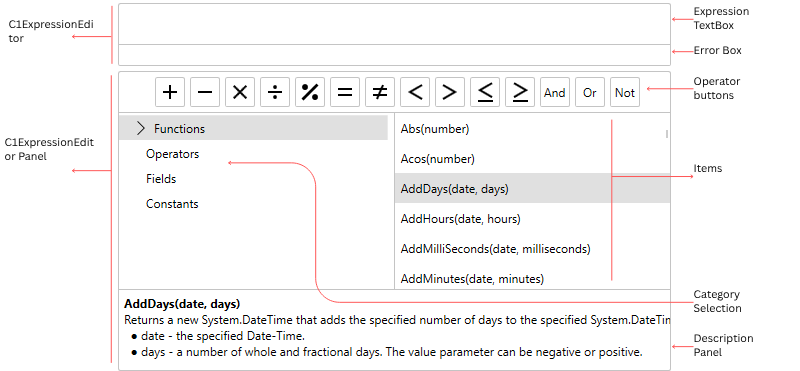
Expression TextBox: A text box that enables user to create and edit expressions
Error Box: Shows the error information for the entered expression
C1ExpressionEditorPanel
Operator Buttons: Buttons that represent shortcuts for operators
Category Selection: A tree view which contains available functions, operators, fields and constants
Items: A list box that lists the items selected from the Category Selection section
Description Panel: A panel that displays the description of the item selected from the Category Selection section
The following image illustrates constituting components of Expression Editor control and their respective elements.