


Using ComponentOne Templates
Ribbon Project Templates
ComponentOne WinForms Edition offers predefined project templates that create and configure WinForms Ribbon applications in Visual Studio. The ComponentOne installer registers these templates during WinForms Edition installation.
These templates provide a quick start for developing applications with ComponentOne Ribbon for WinForms by creating a ready-to-run project structure and automatically including required Ribbon resources and configuration settings.
The templates add these required resources to the project:
Adds required WinForms Edition references.
Adds a Licensing.licx file containing valid licenses.
Adds a sample demonstrating the related control or component.
C1 Windows Forms project templates for C1.Win.Ribbon are available in both, C# and VB programming languages.
C1Ribbon Application 4.0 (C#)
C1Ribbon Application 4.5.2 (C#)
C1Ribbon Application 4.0 (VB)
C1Ribbon Application 4.5.2 (VB)
Complete the following steps to create a WinForms project in Visual Studio using ComponentOne project templates:
1. Open Visual Studio.
2. Click File menu and select New | Project. The New Project dialog appears.
3. Under Installed in the left pane, click C1 to see the available programming languages, Visual Basic and Visual C#.
4. Choose a language.
Under the selected language, choose Windows Forms to see a list of available ComponentOne templates for Ribbon in the center pane.
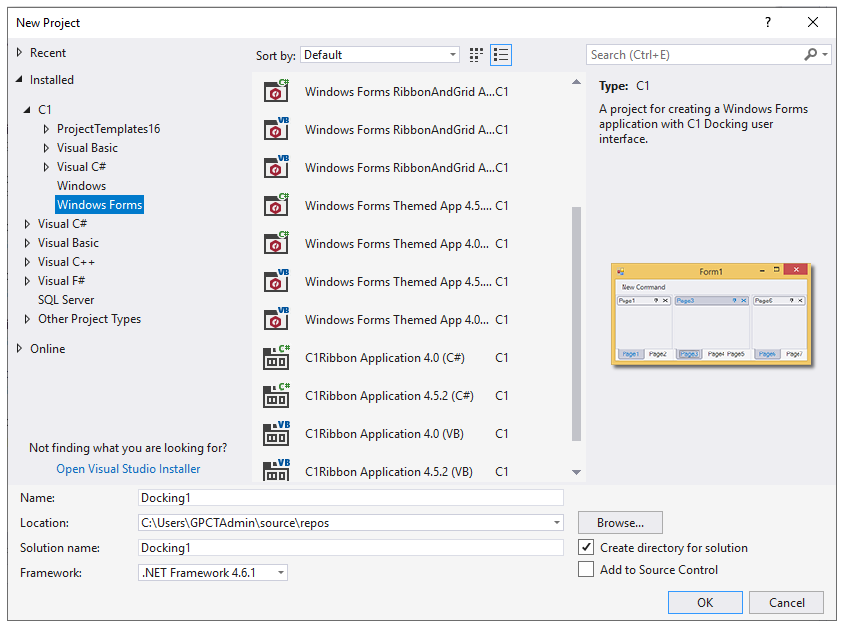
Select the required template.
Type project name, set its location, and click OK to create a new WinForms project.