


Adding Predefined Views
Users can add predefined views to their FlexPivot application by defining the views in an XML file and adding the same as a resource to the Project Designer. The FlexPivotPage class includes ReadXml and WriteXml methods to add files as streams. These methods are automatically invoked by the FlexPivotPage control to apply predefined views.
Create a new XML file, for example FlexPivotViews.xml, and add the following code to define 5 view definitions, each showing Extended Price (a field in the Invoices View of the c1NWind.mdb database file) by
Product vs Country
Salesperson vs Country
Salesperson vs Month
Salesperson vs Weekday
Salesperson vs Year
<FlexPivotViews> <FlexPivotPage id="Product vs Country"> <C1FlexPivotEngine> <Fields> <Field name="Address" subtotal="Count" /> <Field name="City" subtotal="Count" /> <Field name="Country" subtotal="Count" /> <Field name="CustomerID" subtotal="Count" /> <Field name="Customers_CompanyName" subtotal="Count" /> <Field name="Discount" subtotal="Sum" format="n0" /> <Field name="ExtendedPrice" subtotal="Sum" format="n0" /> <Field name="Freight" subtotal="Sum" format="n0" /> <Field name="OrderDate" subtotal="Count" format="d" /> <Field name="OrderID" subtotal="Sum" format="n0" /> <Field name="PostalCode" subtotal="Count" /> <Field name="ProductID" subtotal="Sum" format="n0" /> <Field name="ProductName" subtotal="Count" /> <Field name="Quantity" subtotal="Sum" format="n0" /> <Field name="Region" subtotal="Count" /> <Field name="RequiredDate" subtotal="Count" format="d" /> <Field name="Salesperson" subtotal="Count" /> <Field name="ShipAddress" subtotal="Count" /> <Field name="ShipCity" subtotal="Count" /> <Field name="ShipCountry" subtotal="Count" /> <Field name="ShipName" subtotal="Count" /> <Field name="ShippedDate" subtotal="Count" format="d" /> <Field name="Shippers_CompanyName" subtotal="Count" /> <Field name="ShipPostalCode" subtotal="Count" /> <Field name="ShipRegion" subtotal="Count" /> <Field name="UnitPrice" subtotal="Sum" format="n0" /> </Fields> <RowFields> <Field name="ProductName" /> </RowFields> <ColumnFields> <Field name="Country" /> </ColumnFields> <ValueFields> <Field name="ExtendedPrice" /> </ValueFields> </C1FlexPivotEngine> <C1FlexPivotPrintDocument> <Header Text="&[ViewTitle]	&[Date]	Page &[Page]" Separator="True" FontName="Arial" FontSize="9" FontStyle="Regular" /> <Footer Text="" Separator="False" FontName="Arial" FontSize="9" FontStyle="Regular" /> <Grid ShowGrid="True" GridOptions="1" /> <Chart ShowChart="True" ChartFillsPage="True" /> <RawData ShowRawData="False" RawDataOptions="1" /> <PageSettings Landscape="False" Margins="100,100,100,100" /> </C1FlexPivotPrintDocument> <FlexPivotChart ChartType="Bar" ColorGeneration="Office" ShowTitle="True" ShowLegend="Automatic" ShowGridLines="True" Stacked="True" /> </FlexPivotPage> <FlexPivotPage id="SalesPerson vs Country"> <C1FlexPivotEngine> <Fields> <Field name="Address" subtotal="Count" /> <Field name="City" subtotal="Count" /> <Field name="Country" subtotal="Count" /> <Field name="CustomerID" subtotal="Count" /> <Field name="Customers_CompanyName" subtotal="Count" /> <Field name="Discount" subtotal="Sum" format="n0" /> <Field name="ExtendedPrice" subtotal="Sum" format="n0" /> <Field name="Freight" subtotal="Sum" format="n0" /> <Field name="OrderDate" subtotal="Count" format="d" /> <Field name="OrderID" subtotal="Sum" format="n0" /> <Field name="PostalCode" subtotal="Count" /> <Field name="ProductID" subtotal="Sum" format="n0" /> <Field name="ProductName" subtotal="Count" /> <Field name="Quantity" subtotal="Sum" format="n0" /> <Field name="Region" subtotal="Count" /> <Field name="RequiredDate" subtotal="Count" format="d" /> <Field name="Salesperson" subtotal="Count" /> <Field name="ShipAddress" subtotal="Count" /> <Field name="ShipCity" subtotal="Count" /> <Field name="ShipCountry" subtotal="Count" /> <Field name="ShipName" subtotal="Count" /> <Field name="ShippedDate" subtotal="Count" format="d" /> <Field name="Shippers_CompanyName" subtotal="Count" /> <Field name="ShipPostalCode" subtotal="Count" /> <Field name="ShipRegion" subtotal="Count" /> <Field name="UnitPrice" subtotal="Sum" format="n0" /> </Fields> <RowFields> <Field name="Country" /> </RowFields> <ColumnFields> <Field name="Salesperson" /> </ColumnFields> <ValueFields> <Field name="ExtendedPrice" /> </ValueFields> </C1FlexPivotEngine> <C1FlexPivotPrintDocument> <Header Text="&[ViewTitle]	&[Date]	Page &[Page]" Separator="True" FontName="Arial" FontSize="9" FontStyle="Regular" /> <Footer Text="" Separator="False" FontName="Arial" FontSize="9" FontStyle="Regular" /> <Grid ShowGrid="True" GridOptions="1" /> <Chart ShowChart="True" ChartFillsPage="True" /> <RawData ShowRawData="False" RawDataOptions="1" /> <PageSettings Landscape="False" Margins="100,100,100,100" /> </C1FlexPivotPrintDocument> <FlexPivotChart ChartType="Bar" ColorGeneration="Office" ShowTitle="True" ShowLegend="Automatic" ShowGridLines="True" Stacked="True" /> </FlexPivotPage> <FlexPivotPage id="SalesPerson vs Month"> <C1FlexPivotEngine> <Fields> <Field name="Address" subtotal="Count" /> <Field name="City" subtotal="Count" /> <Field name="Country" subtotal="Count" /> <Field name="CustomerID" subtotal="Count" /> <Field name="Customers_CompanyName" subtotal="Count" /> <Field name="Discount" subtotal="Sum" format="n0" /> <Field name="ExtendedPrice" subtotal="Sum" format="n0" /> <Field name="Freight" subtotal="Sum" format="n0" /> <Field name="OrderDate" subtotal="Count" format="MMMM" /> <Field name="OrderID" subtotal="Sum" format="n0" /> <Field name="PostalCode" subtotal="Count" /> <Field name="ProductID" subtotal="Sum" format="n0" /> <Field name="ProductName" subtotal="Count" /> <Field name="Quantity" subtotal="Sum" format="n0" /> <Field name="Region" subtotal="Count" /> <Field name="RequiredDate" subtotal="Count" format="d" /> <Field name="Salesperson" subtotal="Count" /> <Field name="ShipAddress" subtotal="Count" /> <Field name="ShipCity" subtotal="Count" /> <Field name="ShipCountry" subtotal="Count" /> <Field name="ShipName" subtotal="Count" /> <Field name="ShippedDate" subtotal="Count" format="d" /> <Field name="Shippers_CompanyName" subtotal="Count" /> <Field name="ShipPostalCode" subtotal="Count" /> <Field name="ShipRegion" subtotal="Count" /> <Field name="UnitPrice" subtotal="Sum" format="n0" /> </Fields> <RowFields> <Field name="Salesperson" /> </RowFields> <ColumnFields> <Field name="OrderDate" /> </ColumnFields> <ValueFields> <Field name="ExtendedPrice" /> </ValueFields> </C1FlexPivotEngine> <C1FlexPivotPrintDocument> <Header Text="&[ViewTitle]	&[Date]	Page &[Page]" Separator="True" FontName="Arial" FontSize="9" FontStyle="Regular" /> <Footer Text="" Separator="False" FontName="Arial" FontSize="9" FontStyle="Regular" /> <Grid ShowGrid="True" GridOptions="1" /> <Chart ShowChart="True" ChartFillsPage="True" /> <RawData ShowRawData="False" RawDataOptions="1" /> <PageSettings Landscape="False" Margins="100,100,100,100" /> </C1FlexPivotPrintDocument> <FlexPivotChart ChartType="Bar" ColorGeneration="Office" ShowTitle="True" ShowLegend="Automatic" ShowGridLines="True" Stacked="True" /> </FlexPivotPage> <FlexPivotPage id="SalesPerson vs Weekday"> <C1FlexPivotEngine> <Fields> <Field name="Address" subtotal="Count" /> <Field name="City" subtotal="Count" /> <Field name="Country" subtotal="Count" /> <Field name="CustomerID" subtotal="Count" /> <Field name="Customers_CompanyName" subtotal="Count" /> <Field name="Discount" subtotal="Sum" format="n0" /> <Field name="ExtendedPrice" subtotal="Sum" format="n0" /> <Field name="Freight" subtotal="Sum" format="n0" /> <Field name="OrderDate" subtotal="Count" format="dddd" /> <Field name="OrderID" subtotal="Sum" format="n0" /> <Field name="PostalCode" subtotal="Count" /> <Field name="ProductID" subtotal="Sum" format="n0" /> <Field name="ProductName" subtotal="Count" /> <Field name="Quantity" subtotal="Sum" format="n0" /> <Field name="Region" subtotal="Count" /> <Field name="RequiredDate" subtotal="Count" format="d" /> <Field name="Salesperson" subtotal="Count" /> <Field name="ShipAddress" subtotal="Count" /> <Field name="ShipCity" subtotal="Count" /> <Field name="ShipCountry" subtotal="Count" /> <Field name="ShipName" subtotal="Count" /> <Field name="ShippedDate" subtotal="Count" format="d" /> <Field name="Shippers_CompanyName" subtotal="Count" /> <Field name="ShipPostalCode" subtotal="Count" /> <Field name="ShipRegion" subtotal="Count" /> <Field name="UnitPrice" subtotal="Sum" format="n0" /> </Fields> <RowFields> <Field name="Salesperson" /> </RowFields> <ColumnFields> <Field name="OrderDate" /> </ColumnFields> <ValueFields> <Field name="ExtendedPrice" /> </ValueFields> </C1FlexPivotEngine> <C1FlexPivotPrintDocument> <Header Text="&[ViewTitle]	&[Date]	Page &[Page]" Separator="True" FontName="Arial" FontSize="9" FontStyle="Regular" /> <Footer Text="" Separator="False" FontName="Arial" FontSize="9" FontStyle="Regular" /> <Grid ShowGrid="True" GridOptions="1" /> <Chart ShowChart="True" ChartFillsPage="True" /> <RawData ShowRawData="False" RawDataOptions="1" /> <PageSettings Landscape="False" Margins="100,100,100,100" /> </C1FlexPivotPrintDocument> <FlexPivotChart ChartType="Bar" ColorGeneration="Office" ShowTitle="True" ShowLegend="Automatic" ShowGridLines="True" Stacked="True" /> </FlexPivotPage> <FlexPivotPage id="SalesPerson vs Year"> <C1FlexPivotEngine> <Fields> <Field name="Address" subtotal="Count" /> <Field name="City" subtotal="Count" /> <Field name="Country" subtotal="Count" /> <Field name="CustomerID" subtotal="Count" /> <Field name="Customers_CompanyName" subtotal="Count" /> <Field name="Discount" subtotal="Sum" format="n0" /> <Field name="ExtendedPrice" subtotal="Sum" format="n0" /> <Field name="Freight" subtotal="Sum" format="n0" /> <Field name="OrderDate" subtotal="Count" format="yyyy" /> <Field name="OrderID" subtotal="Sum" format="n0" /> <Field name="PostalCode" subtotal="Count" /> <Field name="ProductID" subtotal="Sum" format="n0" /> <Field name="ProductName" subtotal="Count" /> <Field name="Quantity" subtotal="Sum" format="n0" /> <Field name="Region" subtotal="Count" /> <Field name="RequiredDate" subtotal="Count" format="d" /> <Field name="Salesperson" subtotal="Count" /> <Field name="ShipAddress" subtotal="Count" /> <Field name="ShipCity" subtotal="Count" /> <Field name="ShipCountry" subtotal="Count" /> <Field name="ShipName" subtotal="Count" /> <Field name="ShippedDate" subtotal="Count" format="d" /> <Field name="Shippers_CompanyName" subtotal="Count" /> <Field name="ShipPostalCode" subtotal="Count" /> <Field name="ShipRegion" subtotal="Count" /> <Field name="UnitPrice" subtotal="Sum" format="n0" /> </Fields> <RowFields> <Field name="Salesperson" /> </RowFields> <ColumnFields> <Field name="OrderDate" /> </ColumnFields> <ValueFields> <Field name="ExtendedPrice" /> </ValueFields> </C1FlexPivotEngine> <C1FlexPivotPrintDocument> <Header Text="&[ViewTitle]	&[Date]	Page &[Page]" Separator="True" FontName="Arial" FontSize="9" FontStyle="Regular" /> <Footer Text="" Separator="False" FontName="Arial" FontSize="9" FontStyle="Regular" /> <Grid ShowGrid="True" GridOptions="1" /> <Chart ShowChart="True" ChartFillsPage="True" /> <RawData ShowRawData="False" RawDataOptions="1" /> <PageSettings Landscape="False" Margins="100,100,100,100" /> </C1FlexPivotPrintDocument> <FlexPivotChart ChartType="Bar" ColorGeneration="Office" ShowTitle="True" ShowLegend="Automatic" ShowGridLines="True" Stacked="True" /> </FlexPivotPage> </FlexPivotViews>
Add the view definitions created above in an XML file (i.e. FlexPivotViews.xml) along with two image files CollapseAll.png (
 ) and Views_small.png (
 ) in a folder named, for example, Resources.
Add the Resources folder at the back end of your project and include it in your project from the Solution Explorer.
Right-click your project in the Solution Explorer and select Properties to open the Project Designer.
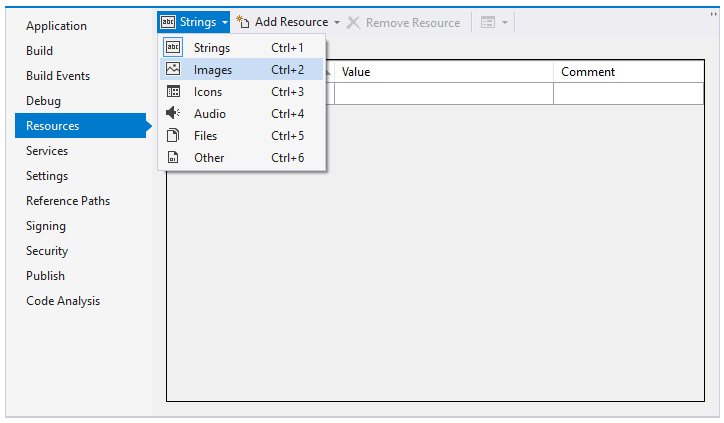
Select Resources and click the Strings drop-down menu. Choose Images option from the drop-down as illustrated in the image below.
Select the Add Resource drop-down menu and choose Add Existing File option.
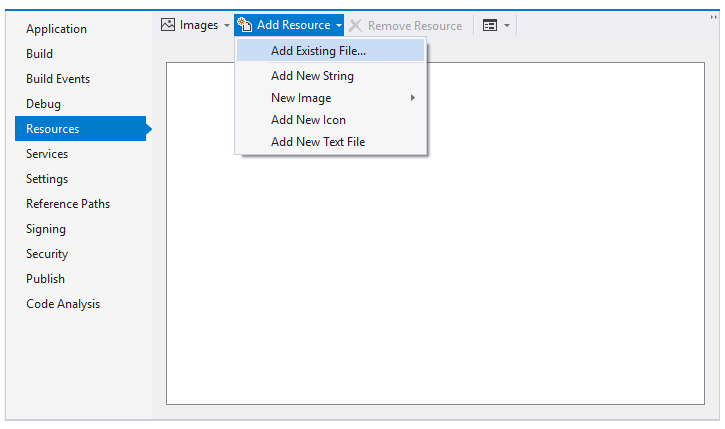
Browse to the Resources folder where the two image files are added in Step 2 and add them in the Project Designer.
Click the Strings drop-down menu. Choose Files option from the drop-down.
Select the Add Resources drop-down menu and choose Add Existing File option.
Browse to the Resources folder where FlexPivotViews.xml file is added in Step 2 and add it in the Project Designer.
Switch to the code view (i.e. Form1.cs) and add the following code to build menu with predefined views. vbnet
```vbnet
' build menu with predefined views:
Dim doc = New System.Xml.XmlDocument()
doc.LoadXml(My.Resources.FlexPivotViews)
Dim menuView = New C1.Win.C1Command.C1CommandMenu()
menuView.Text = "&View"
menuView.Image = My.Resources.Views_small
```

**csharp**

```csharp
// build menu with predefined views:
var doc = new System.Xml.XmlDocument();
doc.LoadXml(Properties.Resources.FlexPivotViews);
var menuView = new C1.Win.C1Command.C1CommandMenu();
menuView.Text = "&View";
menuView.Image = Properties.Resources.Views_small;
```
Add the following code below the above code snippet to apply selected view from the drop-down menu. vbnet
```vbnet
For Each nd As System.Xml.XmlNode In doc.SelectNodes("FlexPivotViews/FlexPivotPage")
    Dim cmd = New C1.Win.C1Command.C1Command()
    cmd.Text = nd.Attributes("id").Value
    cmd.UserData = nd
    AddHandler cmd.Click, AddressOf menuView_DropDownItemClicked
    Dim link = New C1.Win.C1Command.C1CommandLink(cmd)
    menuView.CommandLinks.Add(link)
Next nd
```

**csharp**

```csharp
foreach (System.Xml.XmlNode nd in doc.SelectNodes("FlexPivotViews/FlexPivotPage"))
{
    var cmd = new C1.Win.C1Command.C1Command();
    cmd.Text = nd.Attributes["id"].Value;
    cmd.UserData = nd;
    cmd.Click += menuView_DropDownItemClicked;
    var link = new C1.Win.C1Command.C1CommandLink(cmd);
    menuView.CommandLinks.Add(link);
}
```
Add the following code to the event handler created for menuView_DropDownItemClicked event. vbnet
```vbnet
Private Sub menuView_DropDownItemClicked(ByVal sender As Object, ByVal e As C1.Win.C1Command.ClickEventArgs)
    Dim nd = TryCast(e.CallerLink.Command.UserData, System.Xml.XmlNode)
    If nd IsNot Nothing Then
        ' load view definition from XML
        FlexPivotPage1.ViewDefinition = nd.OuterXml
        ' show current view name in status bar
        FlexPivotPage1.LabelStatus.Text = nd.Attributes("id").Value
    End If
End Sub
```

**csharp**

```csharp
private void menuView_DropDownItemClicked(object sender, C1.Win.C1Command.ClickEventArgs e)
{
    var nd = e.CallerLink.Command.UserData as System.Xml.XmlNode;
    if (nd != null)
    {
        // load view definition from XML
        flexPivotPage1.ViewDefinition = nd.OuterXml;
        // show current view name in status bar
        flexPivotPage1.LabelStatus.Text = nd.Attributes["id"].Value;
    }
}
```
Add the new View Menu to the toolstrip appearing on FlexPivotPage control using the following code. vbnet
```vbnet
' add new view menu to FlexPivotPage toolstrip
Dim menuLink = New C1.Win.C1Command.C1CommandLink(menuView)
FlexPivotPage1.ToolBar.CommandLinks.Insert(3, menuLink)
```

**csharp**

```csharp
// add new view menu to FlexPivotPage toolstrip
var menuLink = new C1.Win.C1Command.C1CommandLink(menuView);
flexPivotPage1.ToolBar.CommandLinks.Insert(3, menuLink);
```
Initialize a new variable, for example collapseAllView, of C1Command type in the Form1 class. vbnet
```vbnet
Dim collapseAllView As C1.Win.C1Command.C1Command
```

**csharp**

```csharp
C1.Win.C1Command.C1Command collapseAllView;
```
Add the CollapseAll Menu to the toolstrip appearing on FlexPivotPage control using the following code. vbnet
```vbnet
' add collapseall menu to FlexPivotPage toolstrip
collapseAllView = New C1.Win.C1Command.C1Command()
collapseAllView.Text = "&CollapseAll"
collapseAllView.Image = My.Resources.CollapseAll
AddHandler collapseAllView.Click, AddressOf collapseAllView_Click
Dim collapseAllViewLink = New C1.Win.C1Command.C1CommandLink(collapseAllView)
FlexPivotPage1.ToolBar.CommandLinks.Add(collapseAllViewLink)
```

**csharp**

```csharp
// add collapseall menu to FlexPivotPage toolstrip
collapseAllView = new C1.Win.C1Command.C1Command();
collapseAllView.Text = "&CollapseAll";
collapseAllView.Image = Properties.Resources.CollapseAll;
collapseAllView.Click += collapseAllView_Click;
C1.Win.C1Command.C1CommandLink collapseAllViewLink = new C1.Win.C1Command.C1CommandLink(collapseAllView);
flexPivotPage1.ToolBar.CommandLinks.Add(collapseAllViewLink);
```
Add the following code in the event handler created for collapseAllView_Click event. vbnet
```vbnet
Private Sub collapseAllView_Click(ByVal sender As Object, ByVal e As EventArgs)
    FlexPivotPage1.FlexPivotGrid.CollapseAllCols()
    FlexPivotPage1.FlexPivotGrid.CollapseAllRows()
End Sub
```

**csharp**

```csharp
private void collapseAllView_Click(object sender, C1.Win.C1Command.ClickEventArgs e)
{
    flexPivotPage1.FlexPivotGrid.CollapseAllCols();
    flexPivotPage1.FlexPivotGrid.CollapseAllRows();
}
```
Subscribe FlexPivotPage1.Updated event using the code below. vbnet
```vbnet
AddHandler FlexPivotPage1.Updated, AddressOf FlexPivotPage1_Updated
```

**csharp**

```csharp
flexPivotPage1.Updated += flexPivotPage1_Updated;
```
Add the following code to the event handler created for FlexPivotPage1.Updated event. vbnet
```vbnet
Private Sub FlexPivotPage1_Updated(ByVal sender As Object, ByVal e As EventArgs)
    ' clear report name after user made any changes
    FlexPivotPage1.LabelStatus.Text = String.Empty
    ' update button status of collapseAllView.
    If (FlexPivotPage1.ShowTotalsColumns
    = C1.FlexPivot.ShowTotals.Subtotals Or FlexPivotPage1.ShowTotalsRows
    = C1.FlexPivot.ShowTotals.Subtotals) Then
        collapseAllView.Enabled = True
    Else
        collapseAllView.Enabled = False
    End If
End Sub
```

**csharp**

```csharp
private void flexPivotPage1_Updated(object sender, EventArgs e)
{
    // clear report name after user made any changes
    flexPivotPage1.LabelStatus.Text = string.Empty;
    // update button status of collapseAllView.
    if (flexPivotPage1.ShowTotalsColumns == C1.FlexPivot.ShowTotals.Subtotals
    || flexPivotPage1.ShowTotalsRows == C1.FlexPivot.ShowTotals.Subtotals)
        collapseAllView.Enabled = true;
    else
        collapseAllView.Enabled = false;
}
```
Press F5 to run the application. The toolstrip appears with a View drop-down menu.
Click the View drop-down menu and observe that the list shows all the views whose definition is added in the FlexPivotViews.xml file.
