


- FlexPivot for WinForms Overview
- Key Features
- Quick Start
- Concepts
- Features
- Tutorials
Using Value Filters
A common analysis scenario is comparing the maximum unit prices of selected products across multiple salespersons.
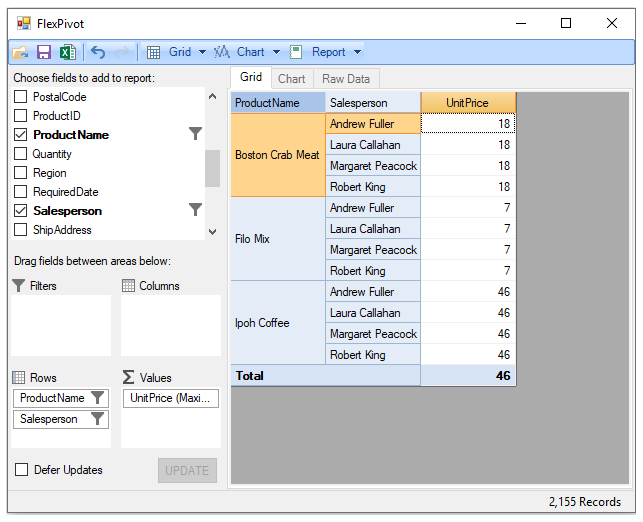
For example, a user may want to analyze the maximum unit prices for the products Boston Crab Meat, Filo Mix, and Ipoh Coffee sold by the salespersons Andrew Fuller, Laura Callahan, Margaret Peacock, and Robert King.
This scenario can be implemented by applying value filters to the Salesperson and Product Name fields in the underlying data source.
The following image shows a FlexPivotGrid displaying the maximum unit prices for the selected products and salespersons:
Limitation: Value filters use the underlying FlexGrid filtering functionality and are not integrated with FlexPivot Undo/Redo. Changes made through value filters cannot be undone or redone.
Configure Value Filtering in FlexPivotGrid
The following steps demonstrate how to apply value filtering in FlexPivotGrid. This example uses the sample created in the Binding FlexPivot to Data Source in Code topic.
Step 1: Configure Pivot Fields
Add the following fields to the pivot layout:
Add
SalespersonandProductNameto theRowsarea.Add
UnitPriceto theValuesarea.
Step 2: Filter the Salesperson Field
Right-click the
Salespersonfield in theRowsarea.Select
Field Settingsto open the configuration dialog.Select the following salespersons:
Andrew Fuller
Laura Callahan
Margaret Peacock
Robert King
Step 3: Filter the ProductName Field
Right-click the
ProductNamefield in theRowsarea.Select
Field Settings.Select the following products:
Boston Crab Meat
Filo Mix
Ipoh Coffee
Step 4: Configure the Value Aggregation
Right-click the
UnitPricefield in theValuesarea.Select
Field Settings.Open the
Subtotalstab.Select
Maximumas the aggregation function.
After applying these settings, FlexPivotGrid displays the maximum unit prices for the selected products grouped by the selected salespersons.