


DockingTab Elements
Docking elements are items that support the docking functionality. Without docking elements, you cannot build a docking interface.
The following image depicts the major docking elements:
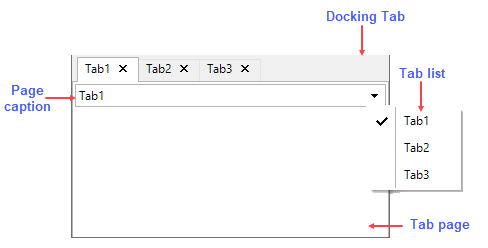
Let's describe each element in detail:
Docking Tab: It is a user interface that holds many tabs and overlaying pages.
Docking Tab Page: It is the tab page, which opens on clicking a tab in the DockingTab control.
Page Caption: It is the caption that appears on the top of each tab page.
Tab List: It is a dropdown showing a list of all tabs. The Tab List opens on clicking the arrow-down button.