


- Getting Started
- Configuring your MVC Application
- Adding NuGet Packages to your App
- Adding Controls
- Client-Side Support
- Working with Controls
- Globalization
- Styling
- ASP.NET MVC Samples
- Release History
Quick Start
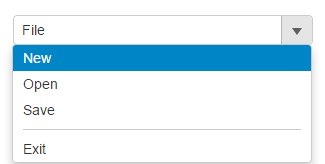
The quick start guides you through the steps of adding a Menu control to your application. For information on how to add ASP.NET MVC Edition controls , see Adding Controls.
Follow the steps given below to get started:
Create an MVC Application
Create a new MVC application using the ComponentOne or VisualStudio templates. For more information about creating an MVC application, see Configuring your MVC Application topic.
Add a new Controller and View
Add a new Controller:
- In the Solution Explorer, right click the folder Controllers.
- From the context menu, select Add | Controller. The Add Scaffold dialog appears.
- Complete the following steps in the Add Scaffold dialog:
- Select Empty MVC Controller template.
- Set name of the controller (for example:
Default1Controller). - Click Add.
- A new controller is added to the application.
Add a View for the controller:
- From the Solution Explorer, expand the folder Controllers and double click the controller (for example:
Default1Controller) to open it. - Place the cursor inside the method
Index(). - Right click and select Add View. The Add View dialog appears.
- In the Add View dialog, verify that the View name is Index and View engine is Razor (CSHTML).
- Click Add. A view is added for the controller.
Add the Control
From the Solution Explorer, expand the folder Views.
Double click
Index.cshtmlto open it.Replace the default code of the
Index.cshtmlfile with the code given below to initialize a Menu control.<label>ItemClicked Event</label> <c1-menu header="File" on-client-item-clicked="itemClicked"> <c1-menu-item header="New"></c1-menu-item> <c1-menu-item header="Open"></c1-menu-item> <c1-menu-item header="Save"></c1-menu-item> <c1-menu-item is-separator=true></c1-menu-item> <c1-menu-item header="Exit"></c1-menu-item> </c1-menu>
Build and Run the Project
- Click Build | Build Solution to build the project.
- Press F5 to run the project.
type=note
Append the folder name and view name to the generated URL (for example: http://localhost:1234/Default1/index) in the address bar of the browser to see the view. Or link the view to the home page.