


WebDesigner Custom
This sample shows how to use the WebDesigner API to create a customized UI for ActiveReports WebDesigner with an ASP.NET Core back end.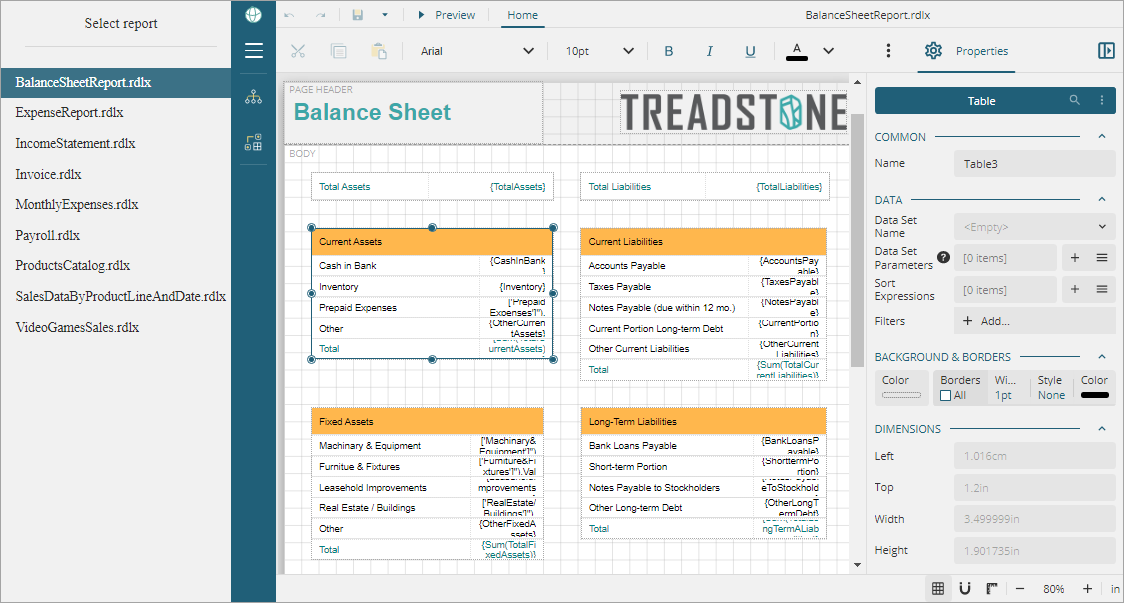
Sample Location
C#
https://github.com/activereports/WebSamples20/tree/main/WebDesigner_Custom
Details
Some of the customizations demonstrated in the sample are shown below. You can check the Index.cshtml page of the sample for complete implementation.
Use a custom logo (white labeling)
menu: { logo: { custom: { type: 'css', class: 'example-icon' } }Hide About button
appBar: { aboutButton: { visible: false } }Hide File menu
documents: { fileView: { visible: false }Lock the report layout, that is, disable the operations that modify the report layout structure
lockLayout: trueHide ToolBox
menu: { toolBox: { visible: false }}Hide Parameters tab, the design area for designing a custom parameter pane
appBar: { parametersTab : { visible: false }}
Hide Data tab
data: { dataTab: { visible: false }}
Hiding Data tab hides the options such as data sources, data sets, parameters, and common values.
Hide Properties Mode button that helps switch between the Advanced and Basic properties of the report elements
statusBar: { propertiesModeButton: { visible: false }}Limit font list to limited font families
fonts : [
                        { header: 'Questionable Choice' },
                        { label: 'Pretty Font', value: 'Comic Sans MS' },
                        { header: '' },
                         'Arial',
                         'Courier New',
                         'Times New Roman'
         ]
Property grid uses the Basic mode to show the properties of report elements
propertyGrid: { mode:'Basic'}