


-
Spread Windows Forms Product Documentation
- Getting Started
-
Developer's Guide
- Understanding the Product
- Working with the Component
- Spreadsheet Objects
- Ribbon Control
- Sheets
- Rows and Columns
- Headers
- Cells
- Cell Types
- Data Binding
- Customizing the Sheet Appearance
- Customizing Interaction in Cells
- Tables
- Pivot Table
- Understanding the Underlying Models
- Customizing Row or Column Interaction
- Formulas in Cells
- Sparklines
- Keyboard Interaction
- Events from User Actions
- File Operations
- Storing Excel Summary and View
- Printing
- Chart Control
- Enhanced Chart
- Customizing Drawing
- Touch Support with the Component
- Spread Designer Guide
- Assembly Reference
- Import and Export Reference
- Version Comparison Reference
Understanding Headers
The following figure shows the sheet corner, headers, and cells and illustrates the cell coordinates in headers with multiple rows and columns. The coordinates are shown in parentheses.
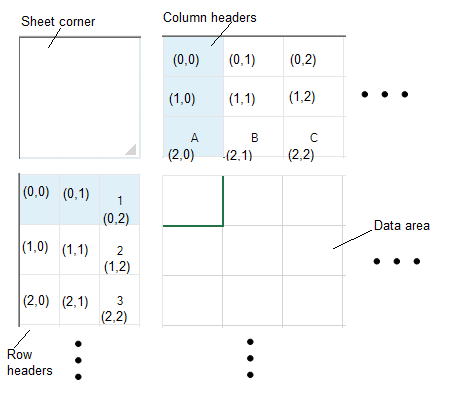
When you work with row headers and column headers, you can work with the objects using the shortcut objects in code (RowHeader and ColumnHeader classes), or you can work directly with the model. Most developers who are not creating extensive customizations find it easier to work with the shortcut objects.
See Also
Setting the Height or Width of Header
Customizing the Appearance of Headers