


- Formula Reference
- Contacting Us
- Getting Technical Support
- Formula Overview
-
Formula Functions
- Functions A to C
-
Functions D to G
- DATE
- DATEDIF
- DATEVALUE
- DAVERAGE
- DAY
- DAYS
- DAYS360
- DB
- DBCS
- DCOUNT
- DCOUNTA
- DDB
- DEC2BIN
- DEC2HEX
- DEC2OCT
- DECIMAL
- DEGREES
- DELTA
- DEVSQ
- DGET
- DISC
- DMAX
- DMIN
- DOLLAR
- DOLLARDE
- DOLLARFR
- DPRODUCT
- DROP
- DSTDEV
- DSTDEVP
- DSUM
- DURATION
- DVAR
- DVARP
- EDATE
- EFFECT
- ENCODEURL
- EOMONTH
- ERF
- ERF.PRECISE
- ERFC
- ERFC.PRECISE
- ERROR.TYPE
- ERRORTYPE
- EURO
- EUROCONVERT
- EVALUATE
- EVEN
- EXACT
- EXP
- EXPAND
- EXPON.DIST
- EXPONDIST
- F.DIST
- F.DIST.RT
- F.INV
- F.INV.RT
- F.TEST
- FACT
- FACTDOUBLE
- FALSE
- FDIST
- FIELDVALUE
- FILTER
- FILTERXML
- FIND
- FINDB
- FINV
- FISHER
- FISHERINV
- FIXED
- FLOOR
- FLOOR.MATH
- FLOOR.PRECISE
- FORECAST
- FORECAST.LINEAR
- FORECAST.ETS
- FORECAST.ETS.CONFINT
- FORECAST.ETS.SEASONALITY
- FORECAST.ETS.STAT
- FORMULATEXT
- FREQUENCY
- FTEST
- FV
- FVSCHEDULE
- GAMMA
- GAMMA.DIST
- GAMMA.INV
- GAMMADIST
- GAMMAINV
- GAMMALN
- GAMMALN.PRECISE
- GAUGEKPISPARKLINE
- GAUSS
- GCD
- GEOMEAN
- GESTEP
- GETPIVOTDATA
- GROWTH
- Functions H to L
- Functions M to Q
- Functions R to S
- Functions T to Z
GETPIVOTDATA
This function returns visible data from a Pivot Table.
Syntax
GETPIVOTDATA(data_field, pivot_table, [field1, item1, field2, item2], ...)
Arguments
This function has these arguments:
Arguments | Descriptions |
|---|---|
data_field | The name of the PivotTable field that contains the data you want to retrieve. This needs to be in double-quotes. |
pivot_table | A reference to any cell, range of cells, or named range of cells in a PivotTable. This information is used to determine which PivotTable contains the data that you want to retrieve. |
field1, item1, field2, item2.. | [Optional] Up to 126 pairs of field names and item names that describe the data that you want to retrieve. The pairs can be in any order. |
Remarks
Calculated fields or items and custom calculations can be included in GETPIVOTDATA calculations.
If the
pivot_tableargument is a range that includes two or more PivotTables, data will be retrieved from whichever PivotTable was created most recently.If the field and item arguments describe a single cell, then the value of that cell is returned regardless of whether it is a string, number, error, or blank cell.
If an item contains a date, the value must be expressed as a serial number or populated by using the DATE function so that the value will be retained if the worksheet is opened in a different locale. For example, an item referring to the date March 5, 1999 could be entered as 36224 or DATE(1999,3,5). Times can be entered as decimal values or by using the TIME function.
If the
pivot_tableargument is not a range in which a PivotTable is found, GETPIVOTDATA returns #REF!.If the arguments do not describe a visible field, or if they include a report filter in which the filtered data is not displayed, GETPIVOTDATA returns the #REF! error value.
Data Types
Returns visible data from a pivot table.
Examples
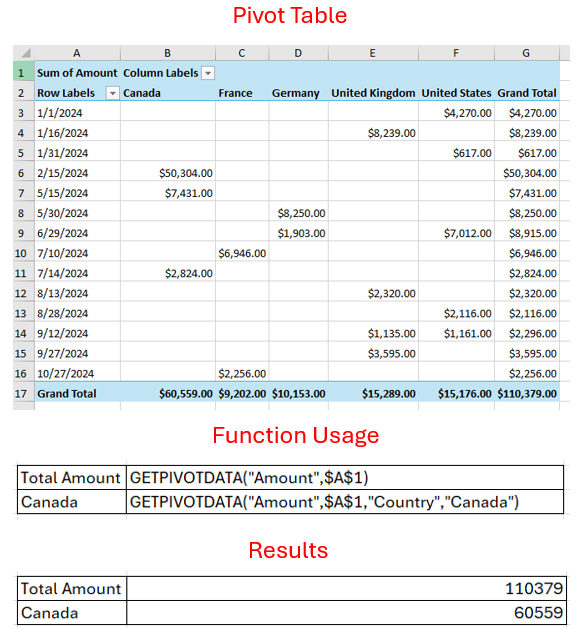
The following code sample shows the usage of the GETPIVOTDATA function.
C#
sheet2.Cells["K1"].Formula = "GETPIVOTDATA(\"Amount\",$A$1)";
sheet2.Cells["K2"].Formula = "GETPIVOTDATA(\"Amount\",$A$1,\"Country\",\"Canada\")";
VB
sheet2.Range("K1").Formula = "GETPIVOTDATA(""Amount"", $A$1)"
sheet2.Range("K2").Formula = "GETPIVOTDATA(""Amount"", $A$1, ""Country"", ""Canada"")"