


-
Spread for ASP.NET Product Documentation
-
Developer's Guide
-
Getting Started
- Handling Installation
-
Working with the Component
- Adding a Component to a Web Site using Visual Studio 2019
- Adding a Component to a Web Site using Visual Studio 2015 or 2017
- Adding JavaScript IntelliSense for Visual Studio 2015 or 2017
- Understanding Browser Support
- Understanding Parts of the Component Interface
- Working with Collection Editors
- Working with Web Parts
- Working with Windows Azure
- Working with Microsoft ASP.NET MVC 5
- Working with Microsoft ASP.NET MVC 3
- Copying Shared Assemblies to Local Folder
- Working with Strongly Typed Data Controls
- Getting More Practice
- Understanding the Spread Wizard
- Tutorial: Creating a Checkbook Register
- Understanding the Product
- Namespaces Overview
- Working with the Spread Designer
- Customizing User Interaction
- Customizing the Appearance
- Customizing with Cell Types
- Managing Data Binding
- Managing Data in the Component
- Managing Formulas
- Managing File Operations
- Using Sheet Models
- Maintaining State
- Working with the Chart Control
- Using Touch Support with the Component
-
Getting Started
- Assembly Reference
- Client-Side Scripting Reference
- Import and Export Reference
-
Developer's Guide
Copying Shared Assemblies to Local Folder
FarPoint.CalcEngine.dll, FarPoint.Excel.dll, and FarPoint.PDF.dll are installed to the GAC by default when installing Spread for ASP.NET.
You can use the smart tag verb "Copy Shared Assemblies Local" to copy FarPoint.CalcEngine.dll, FarPoint.Excel.dll, and FarPoint.PDF.dll to the local bin folder on the web site when deploying.
The smart tag verb appears as follows:
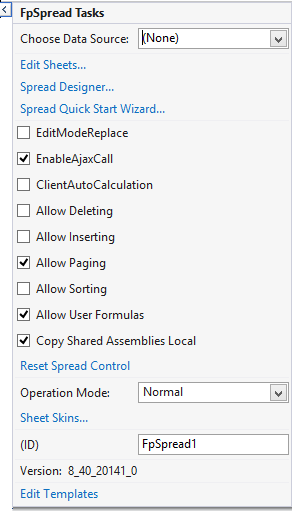
The following entry is added to the web.config file:
<appSettings>
  <add key="fp_CopySharedAssembliesLocal" value="True" />
</appSettings>