


-
Spread for ASP.NET Product Documentation
-
Developer's Guide
-
Getting Started
- Handling Installation
-
Working with the Component
- Adding a Component to a Web Site using Visual Studio 2019
- Adding a Component to a Web Site using Visual Studio 2015 or 2017
- Adding JavaScript IntelliSense for Visual Studio 2015 or 2017
- Understanding Browser Support
- Understanding Parts of the Component Interface
- Working with Collection Editors
- Working with Web Parts
- Working with Windows Azure
- Working with Microsoft ASP.NET MVC 5
- Working with Microsoft ASP.NET MVC 3
- Copying Shared Assemblies to Local Folder
- Working with Strongly Typed Data Controls
- Getting More Practice
- Understanding the Spread Wizard
- Tutorial: Creating a Checkbook Register
- Understanding the Product
- Namespaces Overview
- Working with the Spread Designer
- Customizing User Interaction
- Customizing the Appearance
- Customizing with Cell Types
- Managing Data Binding
- Managing Data in the Component
- Managing Formulas
- Managing File Operations
- Using Sheet Models
- Maintaining State
- Working with the Chart Control
- Using Touch Support with the Component
-
Getting Started
- Assembly Reference
- Client-Side Scripting Reference
- Import and Export Reference
-
Developer's Guide
Working with Collection Editors
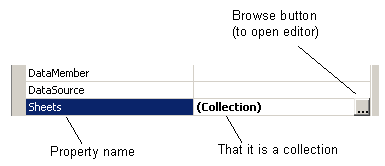
Several properties that appear in the Properties window are associated with collections. To view and modify these settings, click on the Browse button (...) and a separate Collection Editor window appears. This is the case for the NamedStyles property and the Sheets property in the FpSpread component.
With these collection editors, you must click OK to see the results of a change to a setting. (The collection editors are part of the Microsoft .NET framework and do not have an Apply button.)