


-
Spread for ASP.NET Product Documentation
-
Developer's Guide
- Getting Started
- Understanding the Product
- Namespaces Overview
- Working with the Spread Designer
- Customizing User Interaction
- Customizing the Appearance
- Customizing with Cell Types
- Managing Data Binding
- Managing Data in the Component
- Managing Formulas
- Managing File Operations
- Using Sheet Models
- Maintaining State
- Working with the Chart Control
- Using Touch Support with the Component
- Assembly Reference
- Client-Side Scripting Reference
- Import and Export Reference
-
Developer's Guide
Using the Chart Context Menu
Select and right-click on the Chart control at design time to bring up the chart context menu. This menu gives you the standard cut, copy, paste, and delete options as well as options to change the chart.
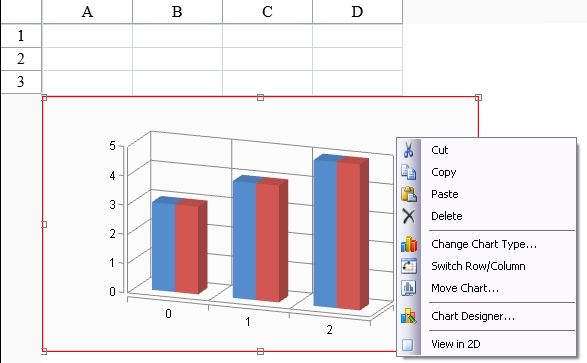
The cut, copy, and paste options allow you to cut, copy, and paste the Chart control. Delete allows you to delete the Chart control.
The Change Chart Type option allows you to change the chart type (bar to pie, for example). The Switch Row/Column option swaps the category and series names and swaps the rows and columns of data.
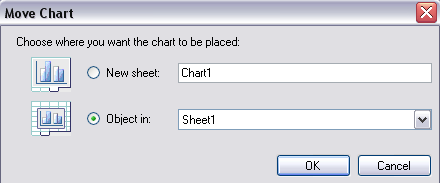
The Move Chart option brings up a Move Chart dialog that allows you to move the chart to another sheet view or a new sheet. The Move Chart dialog appears as follows:
The Chart Designer option allows you to bring up the Chart Designer.
The View option allows you to change the view to 2D or 3D.