


- SpreadJS Overview
- Getting Started
- JavaScript Frameworks
- Best Practices
- Features
- SpreadJS Designer
- SpreadJS Designer VSCode Plugin
- Tutorials
- SpreadJS Designer Component
- SpreadJS Collaboration Server
- Touch Support
- Formula Reference
- Import and Export Reference
- Events
- API Documentation
- Release Notes
Presence
spread-sheets-collaboration, based on js-collaboration-presence, provides a Presence feature specifically designed for SpreadJS Sheets Collaborative editing scenarios. It supports real-time display of user presence states (e.g., cursor position, selection areas), helping users understand the activity status of other collaborators and improving collaboration efficiency. You can associate workbook and Presence using setPresences/getPresences or bindPresence.
Core Feature: Real-Time User State Sharing
Functionality Description
In the active worksheet, real-time rendering of selection areas or selected cells for all collaborating users working on the current active sheet.
Each user is assigned a unique color, with the username displayed in the top-right corner of the selection area.
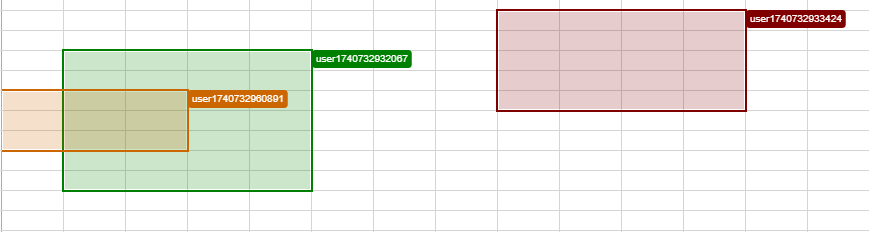
Application Scenarios
During multi-user editing, users can clearly see the cells or areas others are working on to avoid conflicts.
Facilitates team coordination, such as real-time visibility of other collaborators’ editing positions in financial spreadsheets.
Interfaces
ISelections
The ISelections interface defines the structure of an object representing specific selection area information in workbook.
//* typedef GC.Spread.Sheets.Collaboration.ISelections
/**
 * @property {GC.Spread.Sheets.Range[]} [selections]
 * @property {string} [sheetId]
 */
export interface ISelections {
    selections?: GC.Spread.Sheets.Range[];
    sheetId?: string;
}
Property Descriptions
Property Name | Type | Description |
|---|---|---|
selections (optional) | All selection areas in SpreadSheets. | |
sheetId (optional) | string | The Sheet ID where the selection areas reside. |
IStatus
The IStatus interface defines the structure of all status objects.
//* typedef GC.Spread.Sheets.Collaboration.IStatus
/**
 * @property {GC.Spread.Sheets.Collaboration.ISelections} [selections]
 */
export interface IStatus {
    selections?: GC.Spread.Sheets.Collaboration.ISelections;
}
Property Descriptions
Property Name | Type | Description |
|---|---|---|
selections | All selection states. |
IPresence
The IPresence interface defines the structure of a user presence state object in workbook.
//* typedef GC.Spread.Sheets.Collaboration.IPresence
/**
 * @property {GC.Spread.Common.IUser} [user]
 * @property {GC.Spread.Sheets.Collaboration.IStatus} [status]
 */
export interface IPresence {
    user: GC.Spread.Common.IUser;
    status: GC.Spread.Sheets.Collaboration.IStatus;
}
Property Descriptions
Property Name | Type | Description |
|---|---|---|
user | User object information. | |
status | Presence state information. |
IBindPresenceOptions
The IBindPresenceOptions interface defines the configuration options for bindPresence.
export interface IBindPresenceOptions {
    onPresencesUpdate?: (presences?: IPresence[]) => void
}
Property Descriptions
Property Name | Type | Description |
|---|---|---|
onPresencesUpdate (optional) | (presences?: IPresence[]) => void | Callback method triggered after presence updates via |
Methods
setPresences
The setPresences method updates user presence state information.
function setPresences(presences: GC.Spread.Sheets.Collaboration.IPresence[]): voidParameter
presences (
GC.Spread.Sheets.Collaboration.IPresence[]): The user presence states to be set.
Example
let presences = [{
	user: {
		id: '1',
		name: 'User1',
		color: '#FF0000'
	},
	status: {
		selections: {
			selections: [new GC.Spread.Sheets.Range(0, 0, 1, 1)],
			sheetId: 'vbHbfEVB' //sheet.getId();
		}
	}
}];
spread.collaboration.setPresences(presences);
getPresences
The getPresences method get current presences
function getPresences(): GC.Spread.Sheets.Collaboration.IPresence[]Return
presences(
GC.Spread.Sheets.Collaboration.IPresence[]): the current presences
Example
const presences = spread.collaboration.getPresences();bindPresence
The bindPresence method binds presence and user information and permission info to the current workbook, providing a simpler way to simultaneously bind both presence and user info and permission to the workbook.
export interface IUserWithPermission extends GC.Spread.Common.IUser {
    permission?: IPermission;
}
export declare function bindPresence(workbook: any, presence: Presence<IPresence>, user: IUserWithPermission, options?: IBindPresenceOptions): Promise<void>;
Parameters
workbook (
GC.Spread.Sheets.Workbook): The Workbook instance.presence (
IPresence): The Presence instance.user (
IUserWithPermission): User information with permission.options (
IBindPresenceOptions): Configuration options for binding user presence states.
Return
Promise<void>: Will return a promise, which will resolve when the bind is complete.
Example
import { Client } from "@mescius/js-collaboration-client";
import { Presence } from "@mescius/js-collaboration-presence-client";
import { bindPresence, IUserWithPermission } from 'spread-sheets-collaboration-client';

const conn = new Client('ws://localhost:8080/').connect('room1');
const presence = new Presence(conn);

const user:IUserWithPermission = {
    id: '1',
    name: "user1",
    permission: {
        mode: GC.Spread.Sheets.Collaboration.BrowsingMode.edit,
    }
}

bindPresence(workbook, presence, user);
Usage
Client Side
Install Npm Packages
npm install @mescius/js-collaboration-client @mescius/js-collaboration-presence-client @mescius/spread-sheets-collaboration-clientCreate Presence Instance
import { Client } from "@mescius/js-collaboration-client";
import { Presence } from "@mescius/js-collaboration-presence-client";

const conn = new Client('ws://localhost:8080/').connect('room1');
const presence = new Presence(conn);
Bind Workbook and Presence (without user info)
This method does not include user information. If user info is needed, use the approach in Step 4.
const presences: IPresence[] = Object.values(presence.otherStates);
workbook.collaboration.setPresences(presences.map(p => ({ user: p.user, status: p.status })));
Get User Instance and Bind Workbook, Presence, and User
This is an example only. Replace
userwith actual user info from your production environment.
import { bindPresence, IUserWithPermission } from 'spread-sheets-collaboration-client';
var seed = new Date().valueOf() + "";
const user: IUserWithPermission = {
    id: seed,
    name: "user" + seed,
    permission: {
        mode: GC.Spread.Sheets.Collaboration.BrowsingMode.edit,
    }
}
bindPresence(workbook, presence, user);
Server Side
The server-side usage aligns with Presence Server.