


SpreadJS Sheets Collaboration
SpreadJS integrates the Collaboration Framework along with the extension packages spread-sheets-collaboration and the SpreadJS plugin spread-sheets-collaboration-addon to deliver a seamless experience for both local synchronization and remote collaboration. This enables real-time multi-user collaborative editing.
Architecture Design
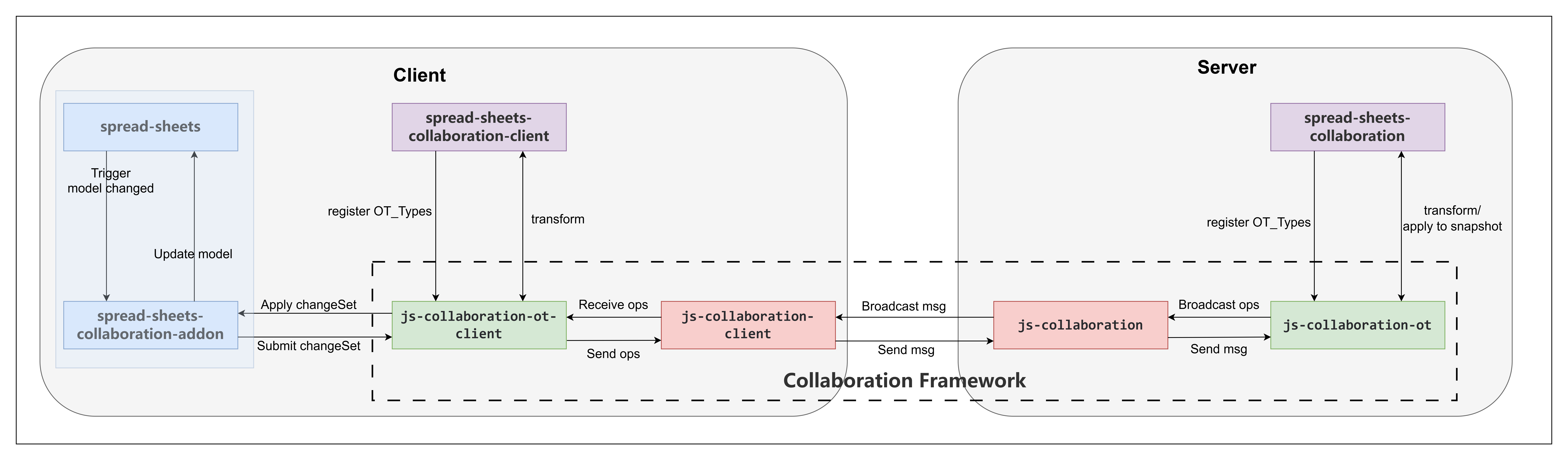
Overall Process
Core Components
Collaboration Framework: The foundational framework for real-time collaboration, handling communication and operation synchronization between client and server.
SpreadJS Sheets Collaboration: An extension package for the Collaboration Service, providing dedicated Operational Transformation (OT) types for workbook. It includes Reducer and Transform logic to ensure data consistency during concurrent editing.
SpreadJS Sheets Collaboration Add-on: A plugin for workbook that listens for changes in the data model, generates operations (ops), and integrates them into ChangeSets for server interaction. It also applies ChangeSets pushed from the server to the local data model.
Working Mechanism
Local Synchronization: Involves only the
spread-sheets-collaboration-addonplugin, which monitors data model changes and synchronizes them across multiple workbook instances within the same page, without requiring server intervention.Remote Collaboration: The
spread-sheets-collaboration-addonlistens for changes in the workbook data model, generates corresponding operations, and integrates them into ChangeSets. These are transmitted to the server via the Collaboration Service framework. The server leverages the communication and processing capabilities of the Collaboration Service, combined with the OT types (including Transform and Reducer logic) registered inspread-sheets-collaboration, to process these operations. The processed operations are then broadcast to all connected clients, enabling real-time collaboration across users.
Use Cases
Single-User Multi-View: Using the
spread-sheets-collaboration-addon, multiple workbook instances on the same page can operate on the same document, suitable for scenarios requiring different views or editing perspectives.Team Collaboration: Paired with
spread-sheets-collaboration, it supports real-time multi-user editing, ideal for team sharing and collaborative processing of workbook documents.Permission Control: Allows assigning edit or read-only permissions to different users, enhancing collaboration flexibility and security.
Feature Overview
Real-Time Collaboration
Multi-User Editing: Enables multiple users to edit the same workbook document simultaneously, with all operations synchronized in real-time.
Operational Transformation (OT): Employs custom OT types to ensure the consistency and correctness of concurrent operations, such as cell updates and row insertions.
Online Presence
User Identification: Displays the selection areas and initial letters of other collaborating users’ names, making it easy to identify collaborators’ working areas.
Custom Colors: Allows users to set personalized colors, improving the visibility of different collaborators’ selection areas.
Permission Management
Edit Mode: Users can directly modify the document content.
View Mode: Users can only view the document without editing capabilities.
Local Synchronization
Multi-Instance Synchronization: Multiple workbook instances on the same page can synchronize updates in real-time, suitable for single-user multi-view scenarios.
Collaboration Editing Status
Real-Time Editing States: When conflict operations (e.g., row add, column hide) affect the current user’s editing state, it updates the editing state and ensures proper UI display.
Collaboration Capability
While the underlying collaboration mechanism is consistent, the synchronization scope and supported behaviors may vary depending on the participating sheet type or feature module.
The collaboration capability definition specifies:
The synchronization scope
Excluded features
Module-specific collaboration rules
For detailed capability definitions, see: Collaboration Capability.
Collaboration Policy
In the collaborative use cases of SpreadJS, due to differences in the underlying collaboration mechanism, the use of certain APIs needs to follow new polices: Collaboration Policy.
For more detailed technical implementations or example code, please refer to the documentation for each functional unit.