


- Document Solutions for Excel Java Overview
- Key Features
- Getting Started
- Features
- Templates
- Formula Reference
- File Operations
- Tutorials
- Use JDK 8 Date Time API
- Document Solutions Data Viewer
- API Reference
- Release Notes
Export Slicers
Slicers are visual filters that are used to filter data in Excel spreadsheets. You can filter the data by clicking on desired type of data in slicer.
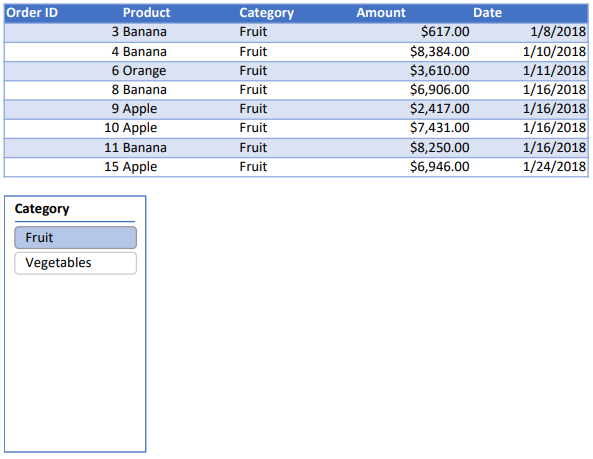
DsExcel supports the export of Excel spreadsheet containing a slicer to PDF document. So, if an Excel spreadsheet containing a slicer is exported to PDF, the resulting PDF will contain the applied slicer.
Refer to the following example code to export slicers to PDF document.
// Create a new workbook.
Workbook workbook = new Workbook();
Object sourceData = new Object[][] { { "Order ID", "Product", "Category", "Amount", "Date", "Country" },
        { 1, "Carrots", "Vegetables", 4270, new GregorianCalendar(2018, 0, 6), "United States" },
        { 2, "Broccoli", "Vegetables", 8239, new GregorianCalendar(2018, 0, 7), "United Kingdom" },
        { 3, "Banana", "Fruit", 617, new GregorianCalendar(2018, 0, 8), "United States" },
        { 4, "Banana", "Fruit", 8384, new GregorianCalendar(2018, 0, 10), "Canada" },
        { 5, "Beans", "Vegetables", 2626, new GregorianCalendar(2018, 0, 10), "Germany" },
        { 6, "Orange", "Fruit", 3610, new GregorianCalendar(2018, 0, 11), "United States" },
        { 7, "Broccoli", "Vegetables", 9062, new GregorianCalendar(2018, 0, 11), "Australia" },
        { 8, "Banana", "Fruit", 6906, new GregorianCalendar(2018, 0, 16), "New Zealand" },
        { 9, "Apple", "Fruit", 2417, new GregorianCalendar(2018, 0, 16), "France" },
        { 10, "Apple", "Fruit", 7431, new GregorianCalendar(2018, 0, 16), "Canada" },
        { 11, "Banana", "Fruit", 8250, new GregorianCalendar(2018, 0, 16), "Germany" },
        { 12, "Broccoli", "Vegetables", 7012, new GregorianCalendar(2018, 0, 18), "United States" },
        { 13, "Carrots", "Vegetables", 1903, new GregorianCalendar(2018, 0, 20), "Germany" },
        { 14, "Broccoli", "Vegetables", 2824, new GregorianCalendar(2018, 0, 22), "Canada" },
        { 15, "Apple", "Fruit", 6946, new GregorianCalendar(2018, 0, 24), "France" },
};
IWorksheet worksheet = workbook.getWorksheets().get(0);
worksheet.getRange("A:E").setColumnWidth(15);

worksheet.getRange("A1:E16").setValue(sourceData);
ITable table = worksheet.getTables().add(worksheet.getRange("A1:E16"), true);
table.getColumns().get(3).getDataBodyRange().setNumberFormat("$#,##0.00");

// Create slicer cache for table.
ISlicerCache cache = workbook.getSlicerCaches().add(table, "Category", "categoryCache");

// Add slicer for Category column.
ISlicer slicer1 = cache.getSlicers().add(workbook.getWorksheets().get("Sheet1"), "cate1", "Category", 150, 30, 100, 200);
slicer1.getSlicerCache().getSlicerItems().get("Vegetables").setSelected(false);

// Save to a pdf file.
workbook.save("SaveSlicer.pdf");
The output is shown in the figure below.
Limitations
The following is not supported while exporting slicers to PDF documents:
Report connections
Hiding the slicer header
Slicer styles (except the color property)
Slicer header styles
Scroll viewer which surrounds the items panel
Slicer item styles for the "No data" visual state group