


- Document Solutions for Excel Java Overview
- Key Features
- Getting Started
- Features
- Templates
- Formula Reference
- File Operations
- Tutorials
- Use JDK 8 Date Time API
- Document Solutions Data Viewer
- API Reference
- Release Notes
Export Barcodes
DsExcel provides support to export barcodes to PDF documents. For more information about supported barcodes and the sample code implementation to export them to PDF documents.
Supported Barcode Types
DsExcel supports exporting the following barcode types to PDF:
Export Barcodes to PDF
To export barcodes, add the required barcode formulas to worksheet cells and save the workbook to a PDF file. DsExcel calculates and renders the formulas in the PDF output.
Refer to the following example code to export barcodes to PDF document.
// Create a new workbook.
Workbook workbook = new Workbook();

// Set worksheet layout and data.
IWorksheet worksheet = workbook.getWorksheets().get(0);
worksheet.getRange("A:A").setColumnWidth(2);
worksheet.getRange("B:C").setColumnWidth(15);
worksheet.getRange("D:G").setColumnWidth(25);
worksheet.getRange("4:14").setRowHeight(57);
worksheet.getRange("B3").setValue("Type");
worksheet.getRange("C3").setValue("Data");
worksheet.getRange("B2").setValue("Barcode");
worksheet.getRange("B2:G2").merge(true);
worksheet.getRange("D3:G3").setValue(new Object[][]{{"Default", "Change color", "Change showLable", "Change lablePosition"}});
worksheet.getPageSetup().setPrintTitleColumns("$A:$C");
worksheet.getRange("B4:C14").setHorizontalAlignment(HorizontalAlignment.Center);
worksheet.getRange("B4:C14").setVerticalAlignment(VerticalAlignment.Center);
worksheet.getRange("B2:G3").setHorizontalAlignment(HorizontalAlignment.Center);
worksheet.getRange("B2:G3").setVerticalAlignment(VerticalAlignment.Center);
worksheet.getRange("B4:C14").setValue(new Object[][]{
        {"QR code", "Policy:411"},
        {"Data Matrix", "Policy:411"},
        {"PDF417", 6935205311092L},
        {"EAN-8", 4137962},
        {"EAN-13", 6920312296219L},
        {"Code39", 3934712708295L},
        {"Code93", 6945091701532L},
        {"Code49", 6901668002433L},
        {"Code128", 465465145645L},
        {"Codabar", 9787560044231L},
        {"gs1128", 235465143135L}
});
String[] types = {
        "BC_QRCODE",
        "BC_DataMatrix",
        "BC_PDF417",
        "BC_EAN8",
        "BC_EAN13",
        "BC_CODE39",
        "BC_CODE93",
        "BC_CODE49",
        "BC_CODE128",
        "BC_CODABAR",
        "BC_GS1_128"};
worksheet.getPageSetup().setPrintGridlines(true);

// Use formula to add barcode.
for (int i = 0; i < types.length; i++) {
        String columnD = "D" + (i + 4);
        String columnE = "E" + (i + 4);
        worksheet.getRange(columnD).setFormula("=" + types[i] + "(C" + (i + 4) + ")");
        worksheet.getRange(columnE).setFormula("=" + types[i] + "(C" + (i + 4) + ",\"#fff\",\"#000\")");
}

for (int i = 3; i < types.length; i++) {
        String columnD = "F" + (i + 4);
        String columnE = "G" + (i + 4);
        worksheet.getRange(columnD).setFormula("=" + types[i] + "(C" + (i + 4) + ",,,0)");
        worksheet.getRange(columnE).setFormula("=" + types[i] + "(C" + (i + 4) + ",,,,\"top\")");
}

// Save to a pdf file.
workbook.save("ExportExcelBarcodesToPDF.pdf");
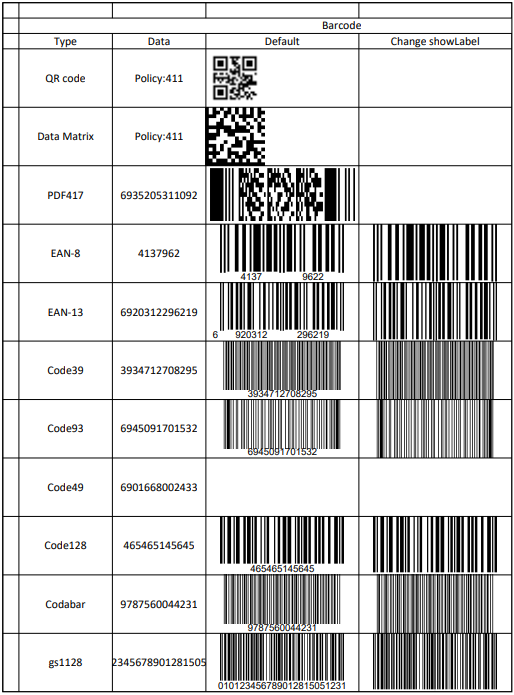
The output is shown in the figure below.
Limitations
The following table lists the parameters which are common to all barcode types but are not supported while exporting to PDF documents:
Common Properties | PDF Export |
|---|---|
color | Not Supported |
backgroundColor | Not Supported |
The following parameters in different barcode types have limited or no support while exporting to PDF documents, as is elaborated in the below table:
Barcode Type | Parameter | PDF Export |
|---|---|---|
QRcode | charSet | default "UTF8" |
charCode connection | Not Supported | |
model version mask | These parameters are calculated and set by the program. | |
DataMatrix | eccMode ecc200SymbolSize ecc200EndcodingMode | defult "ECC200" |
ecc00_140Symbole structureAppend structureNumber fileIdentifier | Not Supported | |
PDF417 | compact | Not Supported |
EAN-13 | addon addOnLabelPosition | Not Supported |
codabar | checkDigit nwRatio | Not Supported |
code39 | labelWithStartAndStopCharacter checkDigit nwRatio fullASCII | Not Supported |
code93 | checkDigit fullASCII | Not Supported |
code49 | This barcode is not supported | |
code128 | codeSet | Not Supported |
Some barcode types support various font options like fontFamily, fontWeight, fontStyle etc. The following font options have limited support as mentioned:
Font Options | PDF Export |
|---|---|
fontStyle | 'normal' and 'italic' |
fontTextDecoration | 'normal' and 'underline' |