


- Document Solutions for Excel Java Overview
- Key Features
- Getting Started
- Features
- Templates
- Formula Reference
- File Operations
- Tutorials
- Use JDK 8 Date Time API
- Document Solutions Data Viewer
- API Reference
- Release Notes
Export Charts
In DsExcel, you can export charts to PDF documents. This helps in the easy generation of PDF reports from spreadsheets, like finance, sales, marketing, health care etc. Following chart types can be exported to PDF documents:
Column Chart
Line Chart
Pie Chart
Bar Chart
Area Chart
XY (Scatter) Chart
Stock Chart
Radar Chart
Combo Chart
Funnel Chart
Waterfall Chart
Histogram Chart
Pareto Chart
Note: Please ensure that all the Required Dependencies are added to your project.
Using Code
Refer to the following example code to export charts in Excel files to PDF document.
// Create a new workbook.
Workbook workbook = new Workbook();
IWorksheet worksheet = workbook.getWorksheets().get(0);
IShape shape = worksheet.getShapes().addChart(ChartType.ColumnClustered, 20, 20, 360, 230);
worksheet.getRange("A20:D21").setValue(new Object[][] { { 100, 200, 300, 400 }, { 100, 200, 300, 400 } });
shape.getChart().getSeriesCollection().add(worksheet.getRange("A20:D21"), RowCol.Columns);
shape.getChart().getChartTitle().setText("Column Clustered Chart");

// Save to an pdf file.
workbook.save("ColumnChartPdf.pdf");
Supported features
The below table shows the supported features in different chart types when exported to PDF.
Common Features (Supported by all Chart Types)
Features | Settings | Supported |
|---|---|---|
Chart Title | font size | Yes |
font color | Yes | |
border | Yes | |
fill | Yes | |
overlap with plot area | No | |
custom angle | No | |
text direction | No | |
Plot Area | border | Yes |
fill | Yes | |
free layout(resize) | Yes | |
Axes | show/hide | Yes |
fill | Yes | |
title | Yes | |
title free layout | No | |
border | Yes | |
angle(text rotate) | No | |
max/min bounds | Yes (when min/max is auto, the rendered result might be different between MSExcel and DsExcel) | |
major/minor unit | ||
horizontal axis cross position | No | |
display units | Yes | |
logrithimic scale | Yes | |
values in reverse order | Yes | |
tick marks | Yes | |
label position | Yes | |
number format | Yes | |
Data Label | fill | Yes |
border | Yes | |
font | Yes | |
position | Yes | |
number format | Yes | |
contains(series name/category name/values) | Yes | |
Data Table | No | |
Error Bars | direction | Yes (There can be some differences in the exported PDF) |
end style | ||
error amount | ||
Gridlines | major/minor | Yes |
value axis | Yes | |
category axis | Yes | |
color | Yes | |
Legend | fill | Yes |
border | Yes | |
location(top/bottom/left/right) | Yes | |
free layout(resize) | Yes | |
Trend Line | Yes | |
Series Option | primary axis | Yes |
secondary axis | Yes | |
series overlap | Yes | |
gap width | Yes | |
fill | Yes | |
border | Yes |
Line Chart
Excel PDF Export | DsExcel PDF Export |
|---|---|
|
|
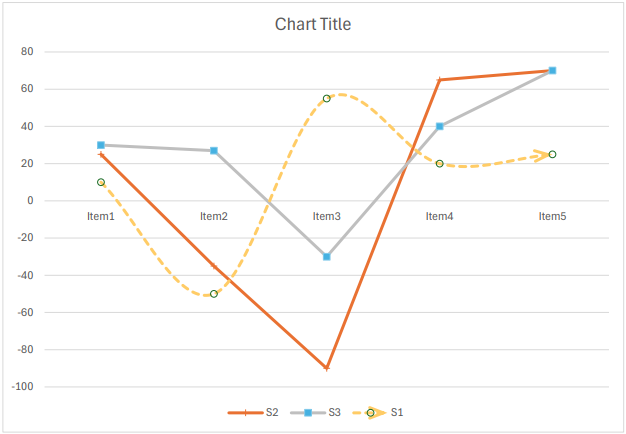
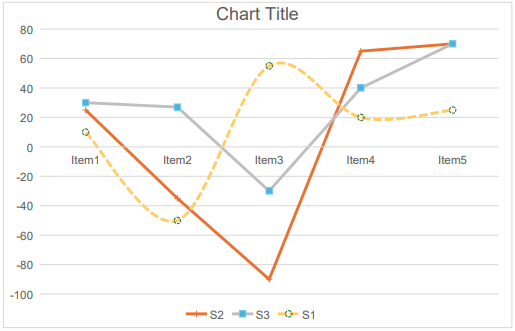
The below table shows the supported features in line chart type when exported to PDF.
Features | Settings | Supported |
|---|---|---|
Line | solid color | Yes |
gradient color | No | |
weight | Yes | |
cap type | No | |
join type | No | |
dash type | Yes | |
begin arrow | No | |
end arrow | No | |
smooth line | Yes | |
Marker | size | Yes |
fill | Yes | |
border | Yes | |
Drop Lines | - | No |
High-Low Lines | - | No |
Up-Down Bars | - | No |
Pie Chart
Excel PDF Export | DsExcel PDF Export |
|---|---|
|
|
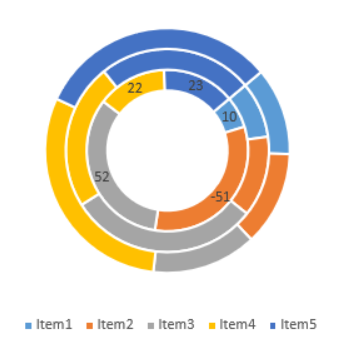
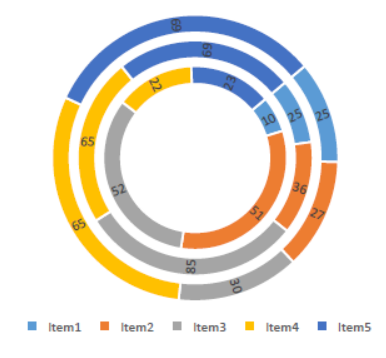
The below table shows the supported features in pie chart type when exported to PDF.
Features | Settings | Supported |
|---|---|---|
Pie Settings | angle of first slice | Yes |
explosion | No | |
Dought Chart | doughnut hole size | Yes |
Bar Chart
Excel PDF Export | DsExcel PDF Export |
|---|---|
|
|
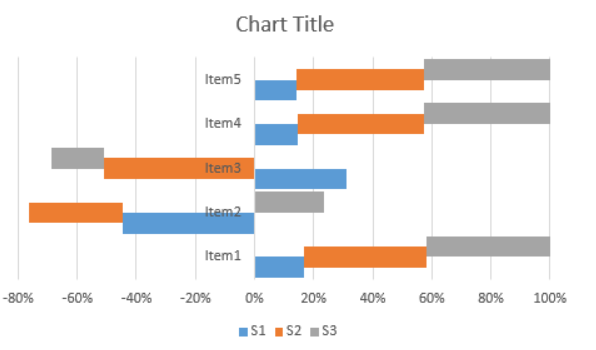
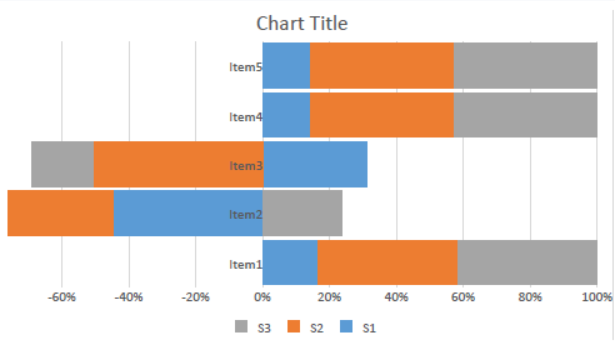
The below table shows the supported features in bar chart type when exported to PDF.
Features | Settings | Supported |
|---|---|---|
Series Option | overlap | No |
gap width | Yes |
Scatter Chart
Excel PDF Export | DsExcel PDF Export |
|---|---|
|
|
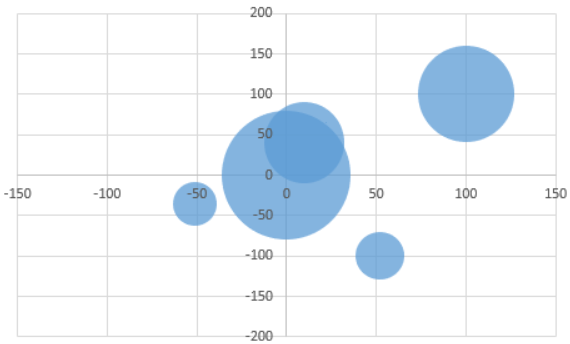
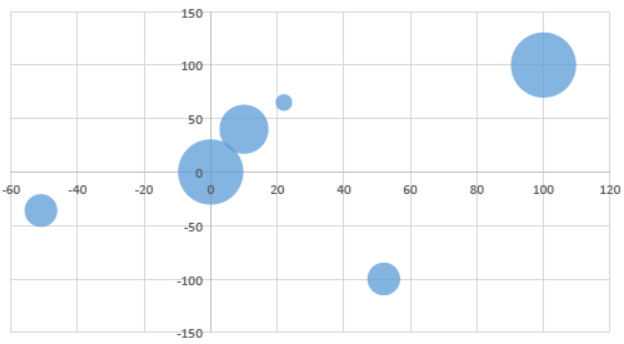
The below table shows the supported features in scatter chart type when exported to PDF.
Features | Settings | Supported |
|---|---|---|
Chart Type | scatter | Yes |
scatter with smooth lines and markers | Yes | |
scatter with smooth lines | Yes | |
scatter with straight lines and markers | Yes | |
scatter with straight lines | Yes | |
bubble | Yes | |
3D-bubble | No | |
Bubble Settings | size represents | No |
scale bubble size | No | |
Line | smooth line | Yes |
Stock Chart
Excel PDF Export | DsExcel PDF Export |
|---|---|
|
|
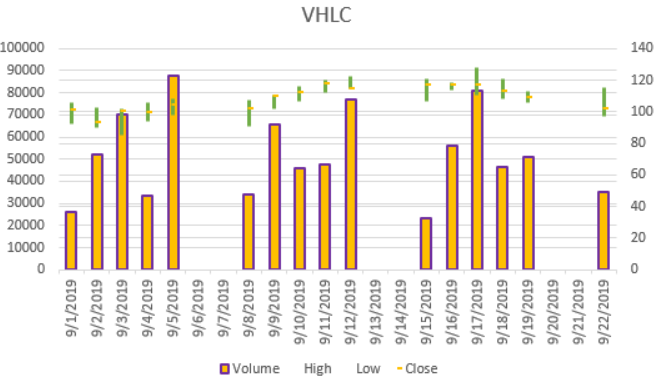
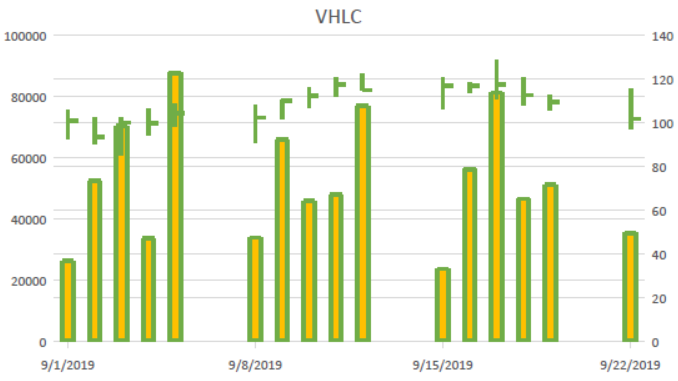
The below table shows the supported features in stock chart type when exported to PDF.
Features | Settings | Supported |
|---|---|---|
Common Features | line color | Yes |
stock | Yes | |
line dash type | No | |
line cap | No | |
line join | No | |
series marker | No | |
series line | No | |
Open-High-Low-Close | gap width | No |
down-bar fill | Yes | |
down-bar border | No | |
up-bar | No | |
Volume-High-Low-Close / Volume-Open-High-Low-Close | volumn fill | Yes |
volume border | No |
Radar Chart
Excel PDF Export | DsExcel PDF Export |
|---|---|
|
|
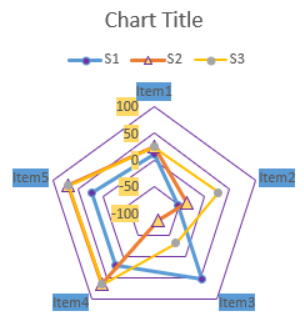
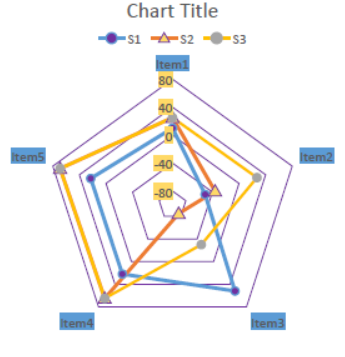
The below table shows the supported features in radar chart type when exported to PDF.
Features | Settings | Supported |
|---|---|---|
Line | cap type | No |
join type | No | |
Chart Type | radar | Yes |
radar with markers | Yes | |
filled radar | Yes | |
Series Line | width | Yes |
color | Yes | |
Marker | type | Yes |
size | Yes | |
fill | Yes | |
border | Yes |
TreeMap Chart
Excel PDF Export | DsExcel PDF Export |
|---|---|
|
|
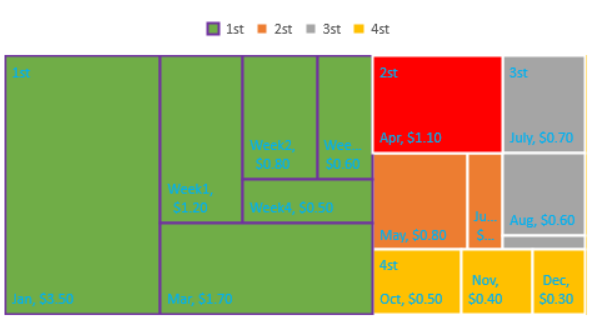
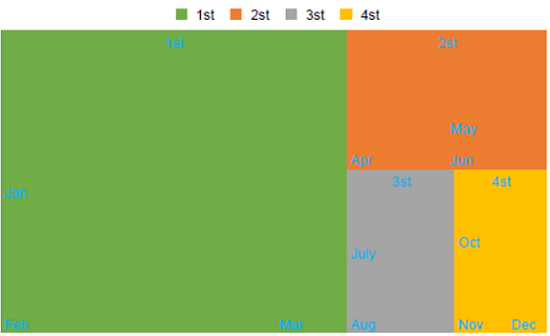
The below table shows the supported features in TreeMap chart type when exported to PDF.
Features | Settings | Supported |
|---|---|---|
Series Option | banner | No |
overlapping | No | |
Label Option | contains(series name/category name/value) | No |
number fromat | No | |
text font | Yes | |
text color | Yes | |
Point Formatting | fill | Yes (Only supports first level points) |
line | No |
Sunburst Chart
Excel PDF Export | DsExcel PDF Export |
|---|---|
|
|
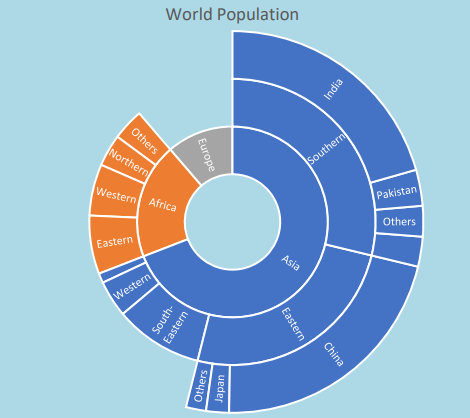
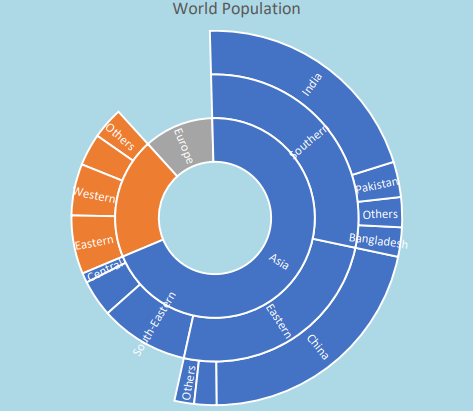
The below table shows the supported features in Sunburst chart type when exported to PDF.
Features | Settings | Supported |
|---|---|---|
Plot Area | fill | No |
Label Option | contains(series name/category name/value) | No |
number fromat | No | |
text font | Yes | |
text color | Yes | |
Point Formatting | fill | Yes (Only supports first level points) |
line | Yes |
Waterfall Chart
Excel PDF Export | DsExcel PDF Export |
|---|---|
|
|
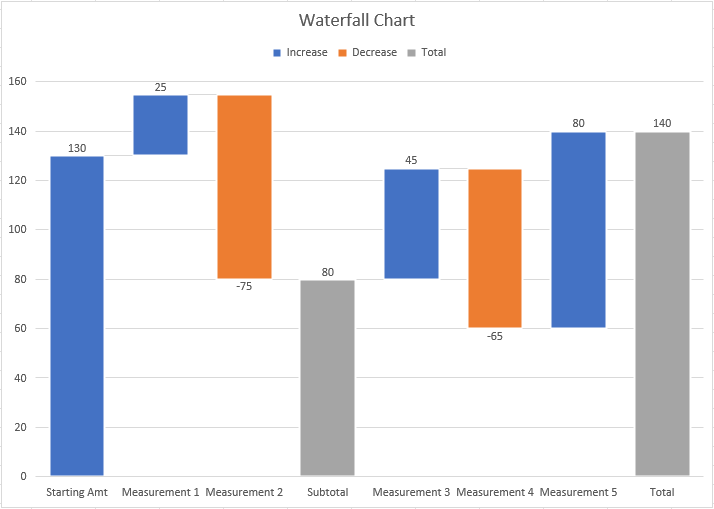
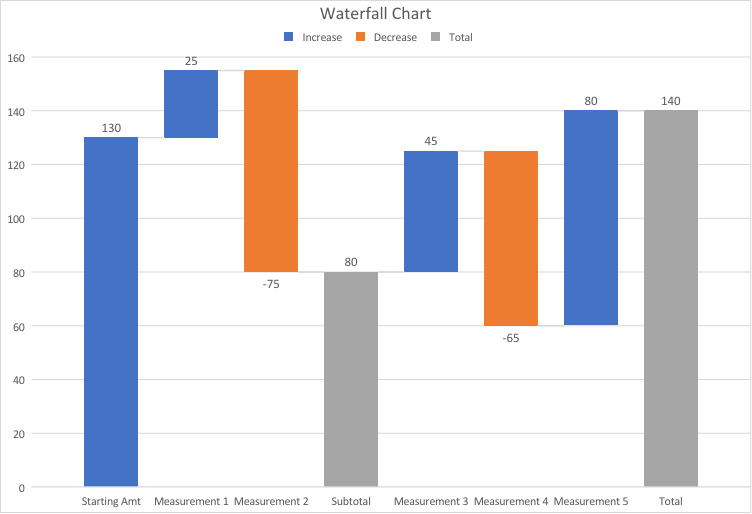
The below table shows the supported features in the waterfall chart type when exported to PDF.
Features | Settings | Supported |
|---|---|---|
Series options | Subtotal | Yes |
Total | Yes | |
Connector lines | Yes |
Histogram Chart
Excel PDF Export | DsExcel PDF Export |
|---|---|
|
|
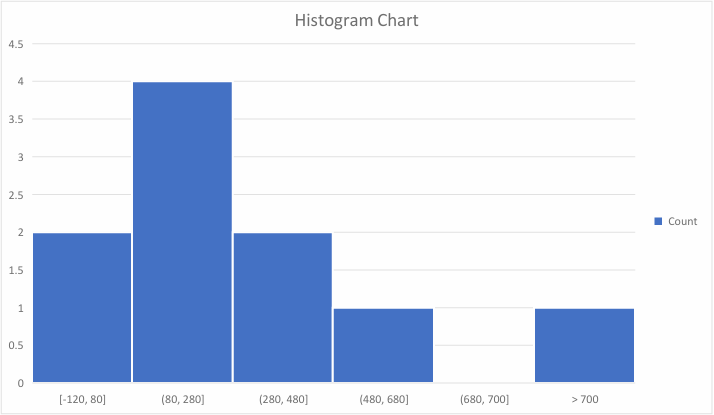
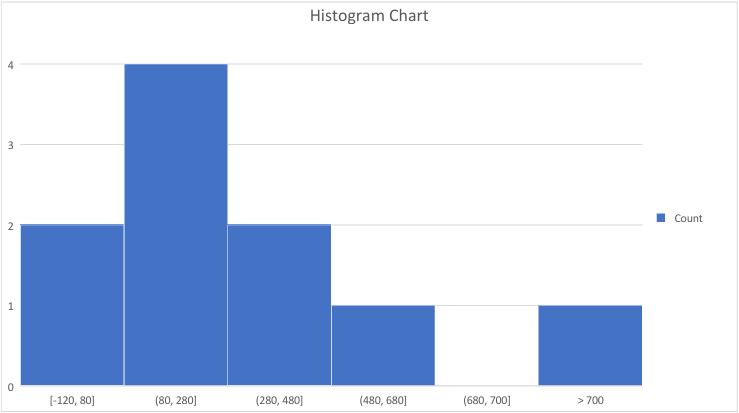
The below table shows the supported features in the histogram chart type when exported to PDF.
Features | Settings | Supported |
|---|---|---|
Bins options | Category bins | Yes |
Automatic bins | Yes (The bin intervals may be different from Excel.) | |
Bin width | Yes | |
Number of bins | Yes | |
Overflow bin | Yes | |
Underflow bin | Yes | |
Tick Marks | Yes | |
Number | Yes | |
Series options | Gap Width | Yes |
Note: When a histogram chart uses automatic bins, the exported result may not match Excel exactly in bin intervals because DsExcel and Excel can use different automatic binning heuristics. However, the exported output remains stable and visually close to Excel.
Pareto Chart
Excel PDF Export | DsExcel PDF Export |
|---|---|
|
|
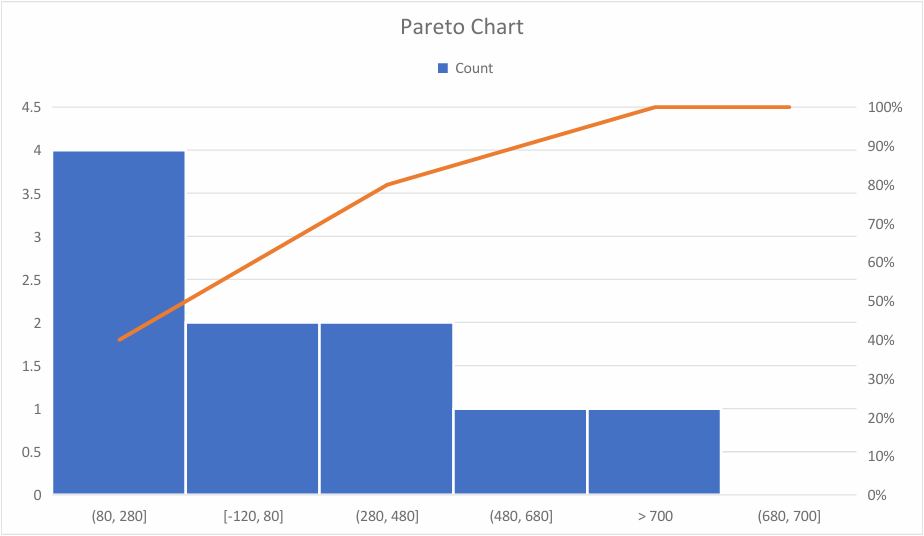
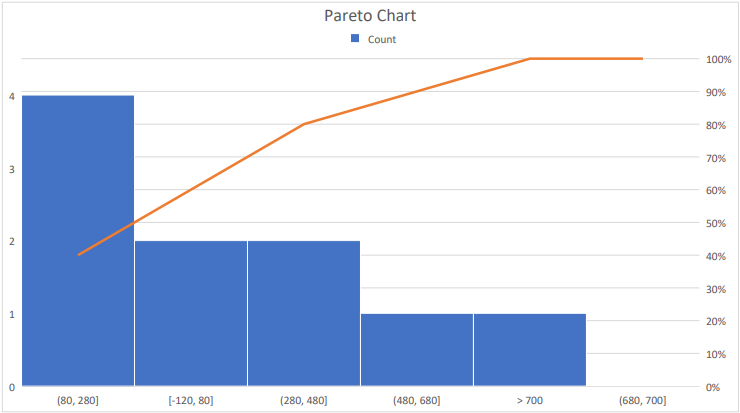
The below table shows the supported features in the pareto chart type when exported to PDF.
Features | Settings | Supported |
|---|---|---|
Axis options | Category bins | Yes |
Automatic bins | Yes (The bin intervals may be different from Excel.) | |
Bin width | Yes | |
Number of bins | Yes | |
Overflow bin | Yes | |
Underflow bin | Yes | |
Tick Marks | Yes | |
Number | Yes | |
Series options | Gap Width | Yes |
Pareto Line | Line | Yes |
Note: When a pareto chart uses automatic bins, the exported result may not match Excel exactly in bin intervals because DsExcel and Excel can use different automatic binning heuristics. However, the exported output remains stable and visually close to Excel.
Limitations
The following chart types are currently not supported and the corresponding area would appear empty when exported to PDF:
Column Chart
3D Clustered
3D Stacked
3D 100% Stacked
3D Column
Line Chart
3D Line
Pie Chart
3D Pie
Pie of Pie
Bar of Pie
Bar Chart
3D Clustered
3D Stacked
3D 100% Stacked
Area Chart
3D Area
3D Stacked Area
3D 100% Stacked Area
Scatter Chart
3D Bubble
Map
Surface
Box and Whisker