- Document Solutions for Excel .NET Overview
- Key Features
- Getting Started
-
Features
- Worksheet
- Workbook
- Comments
- Hyperlinks
- Sort
- Filter
- Group
- Conditional Formatting
- Data Validations
- Data Binding
- Import Data
- Digital Signatures
- Formulas
- Custom Functions
- Shapes
- Document Properties
- Styles
- Form Controls
- Barcodes
- Themes and Colors
- Chart
- Table
- Pivot Table
- Pivot Chart
- Sparkline
- Slicer
- Logging
- Defined Names
- AI Assistant
- Templates
- Formula Reference
- File Operations
- Tutorials
- Document Solutions Data Viewer
- API Reference
- Release Notes
AI.TRANSLATE
Users can use the AI.TRANSLATE function to translate given content into the target language.
Syntax
AI.TRANSLATE(array, language)
Arguments
This function has these arguments:
Argument | Description |
|---|---|
array | [Required] The array or range to be translated. |
language | [Required] The specified target language. |
Remarks
When setting the language parameter, it is recommended to use standard locale codes (such as RFC 5646), or clear and understandable language names. This helps ensure system compatibility, data consistency, and accurate results in globalization scenarios.
Common language code samples:
en-US / English
zh-CN / Chinese / 中文
ja-JP / Japanese / 日本語
ko-KR / Korean / 한국어
fr-FR / French / Français
Examples
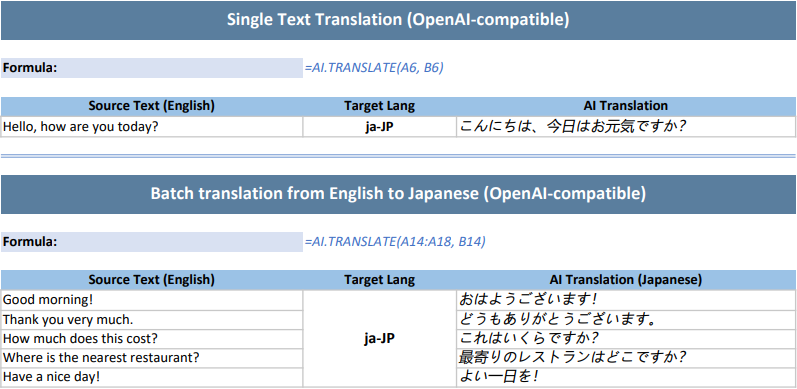
Example 1: Single and Batch Translation (OpenAI-compatible)
The following example shows how to invoke the OpenAI GPT-4.1 model and use the AI.TRANSLATE function for single sentence and batch text translation.
// To use this example, install the OpenAI dependency via NuGet Package Manager in your project.
// Configure the model request handler and choose different large model providers as needed. Here the example uses OpenAI GPT-4.1; replace with your API key when using.
Workbook.AIModelRequestHandler = new OpenAIModelRequestHandler("https://api.openai.com/v1", "sk-xxxx", "gpt-4.1");
// DeepSeek model.
// Workbook.AIModelRequestHandler = new OpenAIModelRequestHandler("https://api.deepseek.com/v1", "sk-xxxx", "deepseek-chat");
// Qwen model.
// Workbook.AIModelRequestHandler = new OpenAIModelRequestHandler("https://dashscope.aliyuncs.com/compatible-mode/v1", "sk-xxxx", "qwen-plus");

// Initialize the workbook and set data.
var workbook = new Workbook();
IWorksheet sheet = workbook.Worksheets[0];
sheet.Columns[0].ColumnWidth = 40;
sheet.Columns[1].ColumnWidth = 20;
sheet.Columns[2].ColumnWidth = 45;

// ============ Single Text Translation ============
sheet.Range["A1:C1"].Merge();
sheet.Range["A1"].Value = "Single Text Translation (OpenAI-compatible)";
sheet.Range["A1"].Font.Bold = true;
sheet.Range["A1"].Font.Size = 14;
sheet.Range["A1"].Font.Color = Color.White;
sheet.Range["A1"].Interior.Color = Color.FromArgb(90, 126, 158);
sheet.Range["A1"].HorizontalAlignment = HorizontalAlignment.Center;
sheet.Range["A1"].VerticalAlignment = VerticalAlignment.Center;
sheet.Range["A1"].RowHeight = 30;
sheet.Range["A3"].Value = "Formula:";
sheet.Range["A3"].Font.Bold = true;
sheet.Range["A3"].Font.Size = 11;
sheet.Range["A3"].Interior.Color = Color.FromArgb(217, 225, 242);
sheet.Range["B3:C3"].Merge();
sheet.Range["B3"].Value = "=AI.TRANSLATE(A6, B6)";
sheet.Range["B3"].Font.Italic = true;
sheet.Range["B3"].Font.Color = Color.FromArgb(68, 114, 196);
sheet.Range["A5:C5"].Value = new object[,] {
    { "Source Text (English)", "Target Lang", "AI Translation" }
};
sheet.Range["A5:C5"].Font.Bold = true;
sheet.Range["A5:C5"].Interior.Color = Color.FromArgb(155, 194, 230);
sheet.Range["A5:C5"].HorizontalAlignment = HorizontalAlignment.Center;
sheet.Range["A6"].Value = "Hello, how are you today?";
sheet.Range["B6"].Value = "ja-JP";
sheet.Range["B6"].Font.Bold = true;
sheet.Range["B6"].HorizontalAlignment = HorizontalAlignment.Center;

// Define AI translation formula to translate the text in A6 to the target language specified in B6.
sheet.Range["C6"].Formula2 = "=AI.TRANSLATE(A6, B6)";
sheet.Range["C6"].Font.Italic = true;
sheet.Range["C6"].Font.Size = 11;
sheet.Range["A6:C6"].Borders.LineStyle = BorderLineStyle.Thin;
sheet.Range["A6:C6"].Borders.Color = Color.FromArgb(200, 200, 200);

// ============ Batch Translation ============
sheet.Range["A9:C9"].Merge();
sheet.Range["A9"].Value = "Batch translation from English to Japanese (OpenAI-compatible)";
sheet.Range["A9"].Font.Bold = true;
sheet.Range["A9"].Font.Size = 14;
sheet.Range["A9"].Font.Color = Color.White;
sheet.Range["A9"].Interior.Color = Color.FromArgb(90, 126, 158);
sheet.Range["A9"].HorizontalAlignment = HorizontalAlignment.Center;
sheet.Range["A9"].VerticalAlignment = VerticalAlignment.Center;
sheet.Range["A9"].RowHeight = 30;
sheet.Range["A11"].Value = "Formula:";
sheet.Range["A11"].Font.Bold = true;
sheet.Range["A11"].Font.Size = 11;
sheet.Range["A11"].Interior.Color = Color.FromArgb(217, 225, 242);
sheet.Range["B11:C11"].Merge();
sheet.Range["B11"].Value = "=AI.TRANSLATE(A14:A18, B14)";
sheet.Range["B11"].Font.Italic = true;
sheet.Range["B11"].Font.Color = Color.FromArgb(68, 114, 196);
sheet.Range["A13:C13"].Value = new object[,] {
    { "Source Text (English)", "Target Lang", "AI Translation (Japanese)" }
};
sheet.Range["A13:C13"].Font.Bold = true;
sheet.Range["A13:C13"].Interior.Color = Color.FromArgb(155, 194, 230);
sheet.Range["A13:C13"].HorizontalAlignment = HorizontalAlignment.Center;
sheet.Range["A14:A18"].Value = new object[,] {
    { "Good morning!" },
    { "Thank you very much." },
    { "How much does this cost?" },
    { "Where is the nearest restaurant?" },
    { "Have a nice day!" }
};
sheet.Range["A14:C18"].Borders.LineStyle = BorderLineStyle.Thin;
sheet.Range["A14:C18"].Borders.Color = Color.FromArgb(200, 200, 200);
sheet.Range["B14"].Value = "ja-JP";
sheet.Range["B14:B18"].Merge();
sheet.Range["B14"].Font.Bold = true;
sheet.Range["B14"].Font.Size = 12;
sheet.Range["B14"].HorizontalAlignment = HorizontalAlignment.Center;
sheet.Range["B14"].VerticalAlignment = VerticalAlignment.Center;
sheet.Range["B14:B18"].Borders.LineStyle = BorderLineStyle.Thin;
sheet.Range["B14:B18"].Borders.Color = Color.FromArgb(200, 200, 200);

// Define AI translation formula to translate the text in A14:A18 into the target language specified in B14.
sheet.Range["C14"].Formula2 = "=AI.TRANSLATE(A14:A18, B14)";
sheet.Range["C14:C18"].Font.Italic = true;
sheet.Range["A1:C7"].Borders[BordersIndex.EdgeBottom].LineStyle = BorderLineStyle.Double;
sheet.Range["A1:C7"].Borders[BordersIndex.EdgeBottom].Color = Color.FromArgb(142, 172, 219);

// The AI function works as an asynchronous calculation function; you need to wait for its calculation to complete.
workbook.Calculate();
workbook.WaitForCalculationToFinish();

// Set the page to print as a single page.
sheet.PageSetup.FitToPagesTall = 1;
sheet.PageSetup.FitToPagesWide = 1;
sheet.PageSetup.IsPercentScale = false;

// Save as PDF file.
workbook.Save("AITranslate.pdf");
/// <summary>
/// Implementation of IAIModelRequestHandler for OpenAI API.
/// This class handles HTTP communication with OpenAI-compatible APIs.
/// </summary>
public class OpenAIModelRequestHandler : IAIModelRequestHandler
{
private readonly string _apiEndpoint;
private readonly string _apiKey;
private readonly string _model;
private readonly OpenAIClient _openAIClient;
/// <summary>
/// Initializes a new instance of the <see cref="OpenAIModelRequestHandler"/> class.
/// </summary>
/// <param name="apiEndpoint">The API endpoint URL for OpenAI-compatible API.</param>
/// <param name="apiKey">The API key for authentication.</param>
/// <param name="model">The model name to use for requests.</param>
public OpenAIModelRequestHandler(string apiEndpoint, string apiKey, string model)
{
if (string.IsNullOrWhiteSpace(apiEndpoint))
throw new ArgumentException("API endpoint cannot be null or empty.", nameof(apiEndpoint));
if (string.IsNullOrWhiteSpace(apiKey))
throw new ArgumentException("API key cannot be null or empty.", nameof(apiKey));
_apiEndpoint = apiEndpoint.TrimEnd('/');
_apiKey = apiKey;
_model = model;
// Create OpenAI client with custom endpoint if not using default OpenAI endpoint
var clientOptions = new OpenAIClientOptions();
if (!_apiEndpoint.Contains("api.openai.com"))
{
clientOptions.Endpoint = new Uri(_apiEndpoint);
}
var apiCredentials = new ApiKeyCredential(_apiKey);
_openAIClient = new OpenAIClient(apiCredentials, clientOptions);
}
/// <summary>
/// Sends a model request to the OpenAI API asynchronously.
/// </summary>
/// <param name="request">The model request containing messages and options.</param>
/// <returns>A <see cref="Task{ModelResponse}"/> representing the asynchronous operation.</returns>
public async Task<AIModelResponse> SendRequestAsync(AIModelRequest request)
{
if (request == null)
{
Console.Error.WriteLine("Request cannot be null");
return new AIModelResponse
{
IsSuccess = false,
};
}
try
{
var chatMessages = new List<ChatMessage>();
foreach (var item in request.Messages)
{
ChatMessage message;
switch (item.Role.ToLowerInvariant())
{
case "system":
message = ChatMessage.CreateSystemMessage(item.Content);
break;
case "user":
message = ChatMessage.CreateUserMessage(item.Content);
break;
default:
throw new InvalidOperationException($"Unknown message role: {item.Role}");
}
chatMessages.Add(message);
}
if (chatMessages.Count == 0)
{
throw new InvalidOperationException("The request must contain at least one message.");
}
// Get chat client and make the request
var chatClient = _openAIClient.GetChatClient(_model);
var response = await chatClient.CompleteChatAsync(chatMessages);
if (response?.Value?.Content?.Count > 0)
{
var content = string.Join("", response.Value.Content.Select((ChatMessageContentPart c) => c.Text));
return new AIModelResponse
{
Content = content,
IsSuccess = true
};
}
else
{
Console.Error.WriteLine("No content received from the model.");
return new AIModelResponse
{
IsSuccess = false,
};
}
}
catch (HttpRequestException httpEx)
{
Console.Error.WriteLine($"HTTP request failed: {httpEx.Message}");
return new AIModelResponse
{
IsSuccess = false,
};
}
catch (TaskCanceledException tcEx) when (tcEx.InnerException is TimeoutException)
{
Console.Error.WriteLine("Request timed out.");
return new AIModelResponse
{
IsSuccess = false,
};
}
catch (Exception ex)
{
Console.Error.WriteLine($"An error occurred: {ex.Message}");
return new AIModelResponse
{
IsSuccess = false,
};
}
}
}The output is shown below:
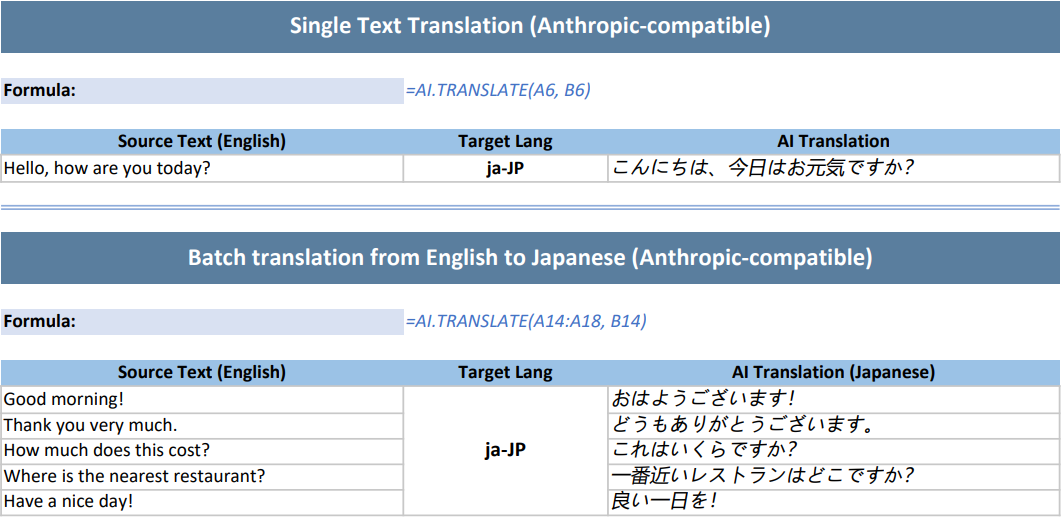
Example 2: Single and Batch Translation (Anthropic-compatible)
The following example shows how to invoke the deepseek-v4-flash model and use the AI.TRANSLATE function for single sentence and batch text translation.
// To use this example, install the Anthropic dependency via NuGet Package Manager in your project.
// Configure the model request handler and choose different large model providers as needed. Here the example uses deepseek-v4-flash; replace with your API key when using.
Workbook.AIModelRequestHandler = new AnthropicAIModelRequestHandler("https://api.deepseek.com/anthropic", "sk-xxxx", "deepseek-v4-flash");
// Anthropic Claude model.
// Workbook.AIModelRequestHandler = new OpenAIModelRequestHandler("https://api.anthropic.com", "sk-xxxx", "claude-haiku-4-5");

// Initialize the workbook and set data.
var workbook = new Workbook();
IWorksheet sheet = workbook.Worksheets[0];
sheet.Columns[0].ColumnWidth = 40;
sheet.Columns[1].ColumnWidth = 20;
sheet.Columns[2].ColumnWidth = 45;

// ============ Single Text Translation ============
sheet.Range["A1:C1"].Merge();
sheet.Range["A1"].Value = "Single Text Translation (Anthropic-compatible)";
sheet.Range["A1"].Font.Bold = true;
sheet.Range["A1"].Font.Size = 14;
sheet.Range["A1"].Font.Color = Color.White;
sheet.Range["A1"].Interior.Color = Color.FromArgb(90, 126, 158);
sheet.Range["A1"].HorizontalAlignment = HorizontalAlignment.Center;
sheet.Range["A1"].VerticalAlignment = VerticalAlignment.Center;
sheet.Range["A1"].RowHeight = 30;
sheet.Range["A3"].Value = "Formula:";
sheet.Range["A3"].Font.Bold = true;
sheet.Range["A3"].Font.Size = 11;
sheet.Range["A3"].Interior.Color = Color.FromArgb(217, 225, 242);
sheet.Range["B3:C3"].Merge();
sheet.Range["B3"].Value = "=AI.TRANSLATE(A6, B6)";
sheet.Range["B3"].Font.Italic = true;
sheet.Range["B3"].Font.Color = Color.FromArgb(68, 114, 196);
sheet.Range["A5:C5"].Value = new object[,] {
    { "Source Text (English)", "Target Lang", "AI Translation" }
};
sheet.Range["A5:C5"].Font.Bold = true;
sheet.Range["A5:C5"].Interior.Color = Color.FromArgb(155, 194, 230);
sheet.Range["A5:C5"].HorizontalAlignment = HorizontalAlignment.Center;
sheet.Range["A6"].Value = "Hello, how are you today?";
sheet.Range["B6"].Value = "ja-JP";
sheet.Range["B6"].Font.Bold = true;
sheet.Range["B6"].HorizontalAlignment = HorizontalAlignment.Center;

// Define AI translation formula to translate the text in A6 to the target language specified in B6.
sheet.Range["C6"].Formula2 = "=AI.TRANSLATE(A6, B6)";
sheet.Range["C6"].Font.Italic = true;
sheet.Range["C6"].Font.Size = 11;
sheet.Range["A6:C6"].Borders.LineStyle = BorderLineStyle.Thin;
sheet.Range["A6:C6"].Borders.Color = Color.FromArgb(200, 200, 200);

// ============ Batch Translation ============
sheet.Range["A9:C9"].Merge();
sheet.Range["A9"].Value = "Batch translation from English to Japanese (Anthropic-compatible)";
sheet.Range["A9"].Font.Bold = true;
sheet.Range["A9"].Font.Size = 14;
sheet.Range["A9"].Font.Color = Color.White;
sheet.Range["A9"].Interior.Color = Color.FromArgb(90, 126, 158);
sheet.Range["A9"].HorizontalAlignment = HorizontalAlignment.Center;
sheet.Range["A9"].VerticalAlignment = VerticalAlignment.Center;
sheet.Range["A9"].RowHeight = 30;
sheet.Range["A11"].Value = "Formula:";
sheet.Range["A11"].Font.Bold = true;
sheet.Range["A11"].Font.Size = 11;
sheet.Range["A11"].Interior.Color = Color.FromArgb(217, 225, 242);
sheet.Range["B11:C11"].Merge();
sheet.Range["B11"].Value = "=AI.TRANSLATE(A14:A18, B14)";
sheet.Range["B11"].Font.Italic = true;
sheet.Range["B11"].Font.Color = Color.FromArgb(68, 114, 196);
sheet.Range["A13:C13"].Value = new object[,] {
    { "Source Text (English)", "Target Lang", "AI Translation (Japanese)" }
};
sheet.Range["A13:C13"].Font.Bold = true;
sheet.Range["A13:C13"].Interior.Color = Color.FromArgb(155, 194, 230);
sheet.Range["A13:C13"].HorizontalAlignment = HorizontalAlignment.Center;
sheet.Range["A14:A18"].Value = new object[,] {
    { "Good morning!" },
    { "Thank you very much." },
    { "How much does this cost?" },
    { "Where is the nearest restaurant?" },
    { "Have a nice day!" }
};
sheet.Range["A14:C18"].Borders.LineStyle = BorderLineStyle.Thin;
sheet.Range["A14:C18"].Borders.Color = Color.FromArgb(200, 200, 200);
sheet.Range["B14"].Value = "ja-JP";
sheet.Range["B14:B18"].Merge();
sheet.Range["B14"].Font.Bold = true;
sheet.Range["B14"].Font.Size = 12;
sheet.Range["B14"].HorizontalAlignment = HorizontalAlignment.Center;
sheet.Range["B14"].VerticalAlignment = VerticalAlignment.Center;
sheet.Range["B14:B18"].Borders.LineStyle = BorderLineStyle.Thin;
sheet.Range["B14:B18"].Borders.Color = Color.FromArgb(200, 200, 200);

// Define AI translation formula to translate the text in A14:A18 into the target language specified in B14.
sheet.Range["C14"].Formula2 = "=AI.TRANSLATE(A14:A18, B14)";
sheet.Range["C14:C18"].Font.Italic = true;
sheet.Range["A1:C7"].Borders[BordersIndex.EdgeBottom].LineStyle = BorderLineStyle.Double;
sheet.Range["A1:C7"].Borders[BordersIndex.EdgeBottom].Color = Color.FromArgb(142, 172, 219);

// The AI function works as an asynchronous calculation function; you need to wait for its calculation to complete.
workbook.Calculate();
workbook.WaitForCalculationToFinish();

// Set the page to print as a single page.
sheet.PageSetup.FitToPagesTall = 1;
sheet.PageSetup.FitToPagesWide = 1;
sheet.PageSetup.IsPercentScale = false;

// Save as PDF file.
workbook.Save("AITranslate.pdf");
public class AnthropicAIModelRequestHandler : IAIModelRequestHandler
{
private readonly string _model;
private readonly AnthropicClient _anthropicClient;
private const string MessagesPath = "/v1/messages";
/// <summary>
/// Initializes a new instance of the AnthropicAIModelRequestHandler class.
/// </summary>
/// <param name="apiKey">The API key used for authentication.</param>
/// <param name="model">The model name used for requests.</param>
public AnthropicAIModelRequestHandler(string apiEndpoint, string apiKey, string model)
{
if (string.IsNullOrWhiteSpace(apiEndpoint))
throw new ArgumentException("API endpoint cannot be null or empty.", nameof(apiEndpoint));
if (string.IsNullOrWhiteSpace(apiKey))
throw new ArgumentException("API key cannot be null or empty.", nameof(apiKey));
if (string.IsNullOrWhiteSpace(model))
throw new ArgumentException("Model cannot be null or empty.", nameof(model));
_model = model;
_anthropicClient = new AnthropicClient(new ClientOptions
{
ApiKey = apiKey,
BaseUrl = GetBaseUrl(apiEndpoint)
});
}
private static string GetBaseUrl(string apiEndpoint)
{
var endpoint = apiEndpoint.TrimEnd('/');
return endpoint.EndsWith(MessagesPath, StringComparison.OrdinalIgnoreCase)
? endpoint.Substring(0, endpoint.Length - MessagesPath.Length)
: endpoint;
}
/// <summary>
/// Asynchronously sends a request from the AI function to the Anthropic API.
/// </summary>
/// <param name="request">The model request containing the message structure and options.</param>
/// <returns>
/// A <see cref="Task{AIModelResponse}"/> representing the asynchronous operation and containing the AI response.
/// </returns>
public async Task<AIModelResponse> SendRequestAsync(AIModelRequest request)
{
if (request == null)
{
Console.Error.WriteLine("Request cannot be null.");
return FailedResponse();
}
try
{
var systemPrompt = string.Join("\n\n", request.Messages
.Where(message => message.Role.Equals("system", StringComparison.OrdinalIgnoreCase))
.Select(message => message.Content));
var messages = new List<MessageParam>();
foreach (var message in request.Messages
.Where(message => !message.Role.Equals("system", StringComparison.OrdinalIgnoreCase)))
{
if (!message.Role.Equals("user", StringComparison.OrdinalIgnoreCase))
throw new InvalidOperationException($"Unknown message role: {message.Role}");
messages.Add(new MessageParam
{
Role = Role.User,
Content = message.Content
});
}
if (messages.Count == 0)
throw new InvalidOperationException("The request must contain at least one user message.");
var parameters = new MessageCreateParams
{
Model = _model,
MaxTokens = 4096,
Messages = messages,
System = string.IsNullOrEmpty(systemPrompt) ? null : systemPrompt
};
var response = await _anthropicClient.Messages.Create(parameters);
var content = string.Concat(response.Content
.Select(block => block.TryPickText(out var text) ? text.Text : null));
if (string.IsNullOrEmpty(content))
{
Console.Error.WriteLine("No text content received from the model.");
return FailedResponse();
}
return new AIModelResponse
{
Content = content,
IsSuccess = true
};
}
catch (TaskCanceledException tcEx) when (tcEx.InnerException is TimeoutException)
{
Console.Error.WriteLine("Request timed out.");
return FailedResponse();
}
catch (Exception ex)
{
Console.Error.WriteLine(ex);
return FailedResponse();
}
}
private static AIModelResponse FailedResponse()
{
return new AIModelResponse { IsSuccess = false };
}
}The output is shown below: