


Document Viewer
The PrintDocument provides a DocumentViewer control, to view fixed document content in a paginated format. This previewing control comes with printing, zooming and text-searching capabilities.
As you can observe in the snapshot below, there is a top toolstrip and a bottom text search tool in the DocumentViewer application.
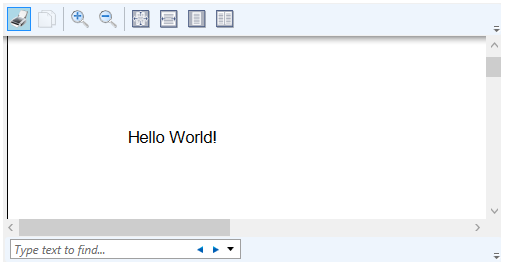
The commands on the toolstrip for Document Viewer are listed below with their icon images and a brief description.
| Toolbar Commands | Icons | Description |
|---|---|---|
 |
Lets you print the document. | |
| Copy |  |
Lets you copy the text from the document. |
| Zoom in |  |
Lets you zoom in the document content. |
| Zoom out |  |
Lets you zoom out the document content. |
| 100% |  |
Lets you zoom the document to 100% of the normal size. |
| Page width |  |
Lets you zoom the page, so that the width matches the window. |
| Whole Page |  |
Lets you zoom the page in or out as required to fit the whole page in the preview window. |
| Two Pages |  |
Lets you zoom the document so you can see multiple pages at once. |
Not just printing and zooming, you can also search for text in the DocumentViewer using its search toolbar, which comprises different options as given below:
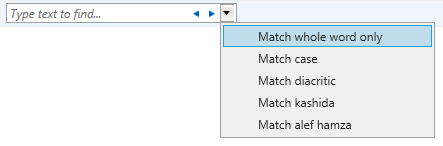
- Match whole word only: Matches the entire text only.
- Match case: Matches letter casing while performing the text search.
- Match diacritic: Matches text with matching diacritics in a right-to-left language document.
- Match kashida: Match text with matching kashidas in a document with Arabic content.
- Match alef hamza: Match text with matching alef hamzas in a document with Arabic content.