


RadarChart Field
The FlexReport control provides the RadarChartField field type for displaying radar charts in reports. You can use the FlexReportDesigner to add radar charts and configure their properties.
Radar charts display multiple data series across a shared set of categories on a radial axis. They are useful for comparing groups of values across several characteristics or dimensions.
Bind RadarChartField to Data
After adding a RadarChartField to a report, bind it to a data source to display data in the report output.
The following example uses the SalesByQuarter table from the C1Nwind.mdb database.
Step 1: Create a Report and Bind the Data Source
Create a new report in FlexReportDesigner.
In the Data tab, bind the
Maindata source to theSalesByQuartertable from theC1Nwind.mdbdatabase.
For detailed data-binding instructions, see the FlexReport QuickStart documentation
Step 2: Add a RadarChartField
On the INSERT tab, select RadarChart.
Place the chart in the report section where you want it to appear, for example, the Header section.
Select the chart on the design surface.
In the Properties window, set the
ChartTypeproperty to the desired chart type, such asLine.
Step 3: Configure Series Data
In the Properties window, locate the
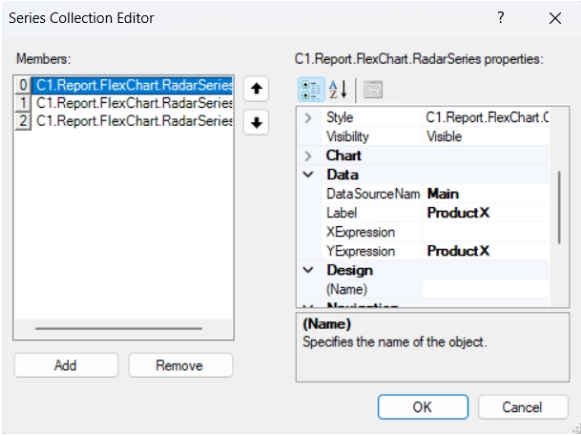
Seriesproperty.Click the ellipsis (...) button to open the Series Collection Editor.
Click Add to create a series.
For each series, configure the following properties:
Property
Value
YExpressionProductX,ProductY, orProductZLabelMatch the selected
YExpressionDataSourceNameMainClick OK after configuring all series.
Step 4: Configure Category Labels
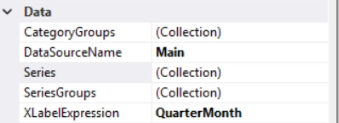
In the chart Data section, set the following properties:
Property | Value |
|---|---|
|
|
|
|
Step 5: Preview the Report
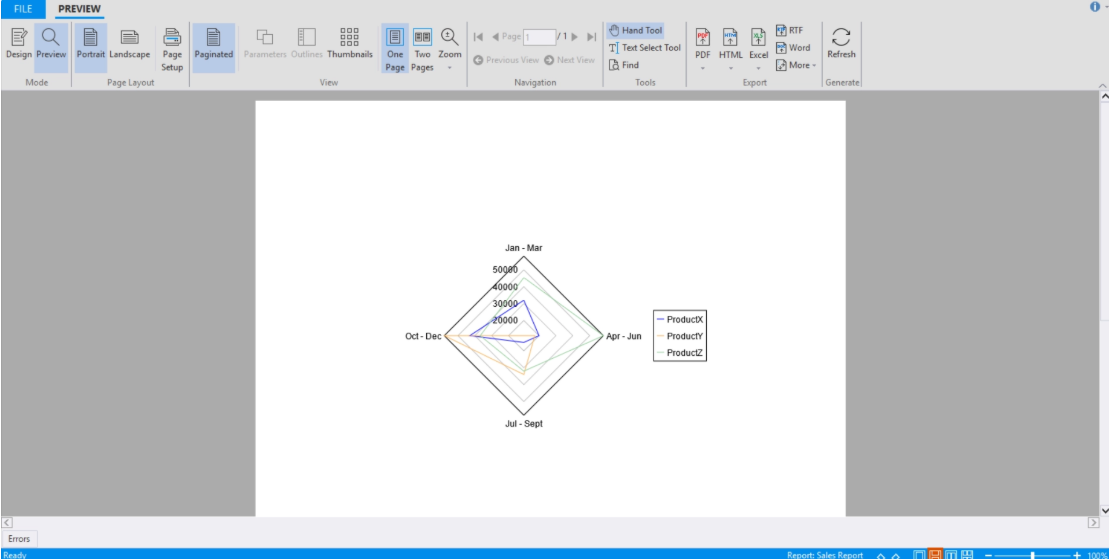
Click Preview to render the report.
RadarChartField and FlexRadar Differences
RadarChartField inherits most of its functionality from FlexRadar. However, RadarChartField is designed specifically for reporting scenarios and uses a reporting-oriented data-binding model.
The primary difference between the two controls is the data-binding implementation:
FlexRadaruses the standard chart binding approach for application UI scenarios.RadarChartFielduses expressions and report data sources that integrate with the FlexReport reporting engine.