


Optional Tab Menu
The C1TabControl control allows you to add a drop-down menu that allows users to select a tab and tab page from a menu. When enabled, this drop-down menu is accessible from the control's tabstrip. The drop-down menu appears as follows:
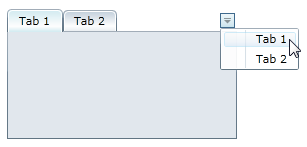
To activate the drop-down menu, simply set the C1TabControl.TabStripMenuVisibility property to Visible:
In XAML
To add a menu to the tabstrip, add TabStripMenuVisibility="Visible" to the <c1:C1TabControl> tag so that the markup resembles the following:
<c1:C1TabControl TabStripMenuVisibility="Visible"></c1:C1TabControl>In Code
Complete the following steps:
Switch to Code view.
Add the following code beneath the InitializeComponent() method:
C1TabControl1.TabStripMenuVisibility = Visiblec1TabControl1.TabStripMenuVisibility = Visible;Run the program.
At Design Time
Complete the following steps:
Select the C1TabControl control.
In the Properties window, click the TabStripMenuVisibility drop-down arrow and select Visible from the list.