


Search
C1HamburgerMenuSearchPanel provides search functionality for C1HamburgerMenu.
The search panel is a separate control and can be placed anywhere in the application layout. Assign the target menu through the HamburgerMenu property. The panel does not need to be hosted inside the menu control.
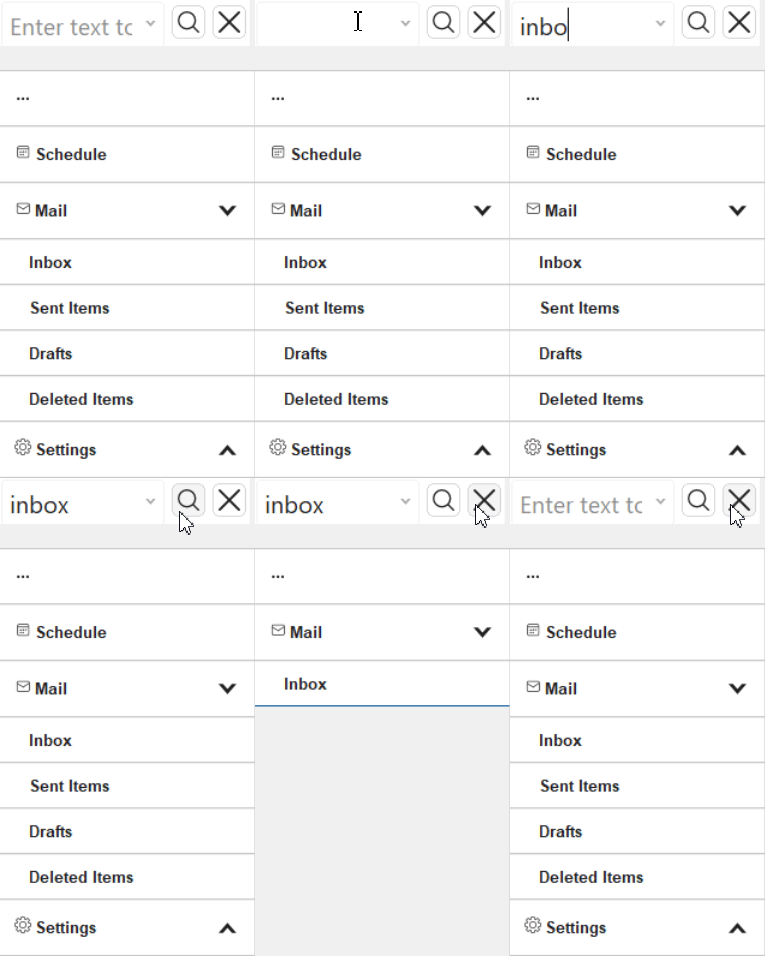
The following example docks the search panel at the top of a container and fills the rest of the container with the menu:
var searchPanel = new C1HamburgerMenuSearchPanel
{
    HamburgerMenu = c1HamburgerMenu1,
    Dock = DockStyle.Top,
    Size = new Size(210, 40)
};

leftPanel.Controls.Add(searchPanel);      // Dock = Top
leftPanel.Controls.Add(c1HamburgerMenu1); // Dock = Fill
leftPanel.Dock = DockStyle.Left;Note: C1HamburgerMenuSearchPanel can be used with any ExpandedMode value. The menu does not need to remain expanded while searching.
Use ExpandedMode.Always when the application requires the menu to remain visible during search operations.
Search Properties
Property | Description | |
|---|---|---|
Specifies whether search is applied automatically or when the user initiates a search action. | ||
Specifies the delay before an automatic search is applied. | ||
Specifies how matching text is highlighted using | ||
Specifies whether nonmatching items are hidden. | ||
Specifies whether the search is limited to currently visible items. | ||
Specify whether the search button and the clear button are displayed. | ||
Gets or sets the current search text. | ||
Gets or sets the current search text. | ||
Gets or sets the placeholder text. | ||
Search from Code
To apply a search without using C1HamburgerMenuSearchPanel, call ApplySearch on the menu.
ApplySearch overloads support add optional highlighting, filtering, visible-items, and delay settings:
ApplySearch(string, SearchHighlightMode)ApplySearch(string, SearchHighlightMode, bool)ApplySearch(string, SearchHighlightMode, bool, bool)ApplySearch(string, SearchHighlightMode, bool, bool, int)ApplySearch(string, SearchHighlightMode, bool, bool, bool, int)
Use programmatic search when the search text originates from another control, command, or application workflow.
Search Events
SearchApplying occurs before a search is applied, and SearchApplied occurs after the operation completes.
Both events provide the following search information:
Property | Description | |
|---|---|---|
The search text. | ||
The | ||
Indicates whether nonmatching items are filtered. | ||
Indicates whether the search is limited to visible items. | ||
Applications can handle these events to log search activity or synchronize other UI elements with the current search state.