Quick Start
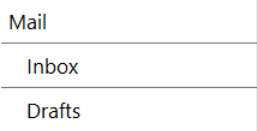
This quick start creates a navigation menu with a parent item and child items.
Install the NuGet Package
C1HamburgerMenu is included in the  C1.Win.Command NuGet package. Install the package by using one of the following methods:
Visual Studio: In Solution Explorer, right-click the project, and then select Manage NuGet Packages. On the Browse tab, search for C1.Win.Command.HamburgerMenu, and then select Install.
.NET CLI:
dotnet add package C1.Win.Command.HamburgerMenuPackage Manager Console:
Install-Package C1.Win.Command.HamburgerMenu1. Set Up the Application
Create a Windows Forms application.
Add a
C1HamburgerMenucontrol to the form. By default, the control is namedc1HamburgerMenu1.Set the
Dockproperty. For example, useDockStyle.Left.
2. Add Menu Items and Handle Selection
Add menu items and configure item selection as follows:
Add
C1HamburgerMenuItemobjects to the menu’s Items collection.Add child items to the parent item’s
Itemscollection.Handle the ItemSelected event to display content associated with the selected item.
Add the following code to the form code-behind file, such as Form1.cs, after the InitializeComponent() call in the form constructor.
The following example adds a Mail item with Inbox and Drafts child items, and displays the text of the selected item in a message box:
using C1.Win.Command.HamburgerMenu;
using System.Windows.Forms;

namespace MyApp
{
    public partial class Form1 : Form
    {
        public Form1()
        {
            InitializeComponent();

            var mail = new C1HamburgerMenuItem {Text = "Mail", ToolTipText = "Email content."};
            mail.Items.Add(new C1HamburgerMenuItem {Text = "Inbox", ToolTipText = "Incoming emails." });
            mail.Items.Add(new C1HamburgerMenuItem {Text = "Drafts", ToolTipText = "Drafts."});

            c1HamburgerMenu1.Items.Add(mail);
            c1HamburgerMenu1.ExpandedWidth = 215;
            c1HamburgerMenu1.AllowWrapToNextLine = true;
            c1HamburgerMenu1.IsExpanded = true;
        }
    }
}
ExpandedWidth sets the width of the expanded menu. If you use push-content layouts, also set AllowWrapToNextLine to true.
3. Run the Application
Run the application. The menu starts expanded because the code sets IsExpanded to true. Select an item, such as Mail, Inbox, or Drafts, and the message box displays its text.