


- ASP.NET Core
- Getting Started
- Configuring your MVC Application
- Adding NuGet Packages to your App
- Adding Controls
- Client-Side Support
- Working with Controls
- Globalization
- Styling
- ASP.NET MVC Samples
- Release History
Insertion
CollectionView controls where new items are inserted into the source collection.
By default, new items are appended to the end of the collection. When paging is enabled, the new item appears on the last page.
Use NewItemIndex to configure the insertion position used by the FlexGrid new-row template or insertAt to insert an item at a specific position programmatically.
Inserting New Items
NewItemIndex specifies the zero-based insertion index used when FlexGrid creates an item through its new-row template.
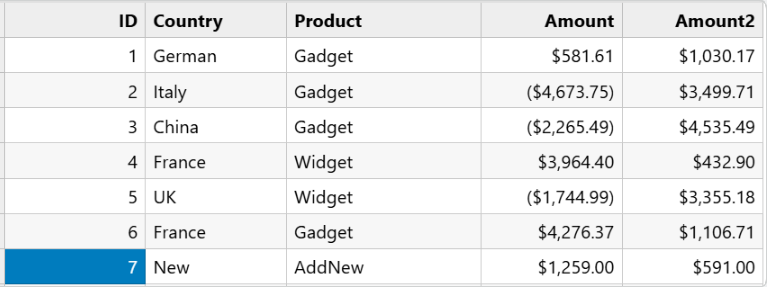
When paging is enabled, the following values determine the insertion position:
Default |
|
|---|---|
Top |
|
Bottom |
|
The following example sets NewItemIndex to 0 to insert a new item at the beginning of the current page.
@(Html.C1().CollectionView()
    .Id("collectionView")
    .Bind(Model)
    .PageSize(5)
    .NewItemIndex(0)
)
To insert the new item at the end of the current page, set NewItemIndex to PageSize - 1.
@(Html.C1().CollectionView()
    .Id("collectionView")
    .Bind(Model)
    .PageSize(5)
    .NewItemIndex(4)
)
When NewItemIndex is set to -1, the default addNew() behavior is preserved. When paging is enabled, values less than 0 or greater than or equal to PageSize also preserve the default behavior.
When paging is disabled, a non-negative NewItemIndex specifies a position within the entire source collection.
Controlling the Insertion Position
The insertAt method inserts a new item at the specified position. Unlike NewItemIndex, which defines the position used by the FlexGrid new-row template, insertAt uses the index specified in the method call.
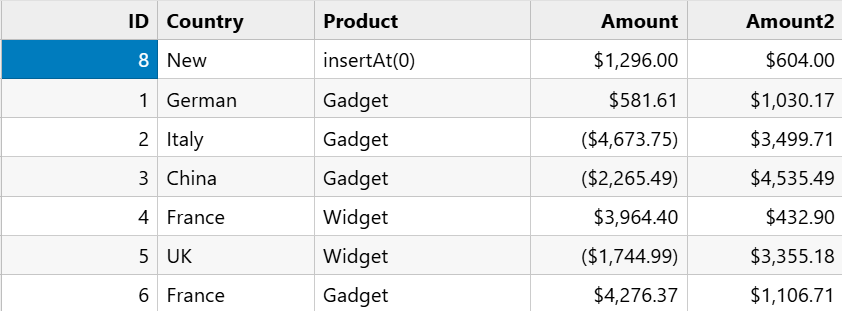
The following example inserts a new item at the beginning of the current page.
var newItem = view.insertAt(0);
if (newItem) {
    newItem.ID = 101;
    newItem.Name = "New Item";
    view.commitNew();
}
To insert a new item at the end of the current page, specify PageSize - 1 as the index.
var newItem = view.insertAt(pageSize - 1);
if (newItem) {
    newItem.ID = 102;
    newItem.Name = "New Item";
    view.commitNew();
}
When paging is enabled, the index specified by insertAt represents a position within the current page. An invalid index does not insert an item. For example, insertAt(-1) returns null.
The insertAt method does not use the value of NewItemIndex. The index specified in the method call determines the insertion position.
The insertion position specified by NewItemIndex is honored only when sorting, filtering, and grouping are inactive. When any of these operations are active, the new item is appended to the end of the source collection.
In Code
Controller
public ActionResult Index(string type = "Default")
{
    var model = GetData();
    switch (type)
    {
        case "Top":
            ViewBag.NewItemIndex = 0;
            break;
        case "Bottom":
            ViewBag.NewItemIndex = model.PageSize - 1;
            break;
        default:
            ViewBag.NewItemIndex = -1;
            break;
    }
    return View(model);
}
View
<c1-collection-view id="collectionView"
                    source-collection="Model"
                    page-size="5"
                    new-item-index="ViewBag.NewItemIndex">
</c1-collection-view>

<c1-flex-grid id="flexGrid"
              items-source-id="collectionView"
              allow-add-new="true">
</c1-flex-grid>
JavaScript
var view = wijmo.Control.getControl("#collectionView").itemsSource;
function addNew() {
    var newItem = view.addNew();
    if (newItem) {
        newItem.ID = 101;
        newItem.Name = "New Item";
        view.commitNew();
    }
}
function insertAt(index) {
    var newItem = view.insertAt(index);
    if (newItem) {
        newItem.ID = 102;
        newItem.Name = "New Item";
        view.commitNew();
    }
}