- Introduction
- Report Readers
-
Report Authors
- Standalone Designer
- WebDesigner
- Report Types
- Report Controls
- Report Wizard
- Data Binding
-
Design Reports
-
Design Page/RDLX Reports
-
Layout
- Set Page Size, Margins, and Orientation in Page Reports
- Skip Page Generation in Page Reports
- Set Page Layout in Z- or N-Order
- Manage Blank Rows in a Table Data Region in Page Reports
- Hide or Show Sections in RDLX and RDLX Dashboard Reports
- Keep Groups Together in Data Regions
- Manage Page Breaks in Data Regions
- Report Dialog
- Master Report (RDLX Report)
- Layers
- Expressions
- Data Visualizers
- Filters
- Groups
- Interactivity
- Scripts
- Report Appearance
- Tutorials: Report Controls in Page/RDLX Reports
- Tutorials: Page/RDLX Report Scenarios
-
Layout
- Design Section Reports
-
Design Page/RDLX Reports
- DevOps
- Developers
- Samples
- Troubleshooting
Manage Page Breaks in Data Regions
You can control page breaks in data groups of data regions by using the NewPage property for data regions and its combination with the PageBreakAtStart, PageBreakAtEnd, and BreakLocation properties. These properties help you tune page breaks after or before a data group in your report and on which page to continue displaying the report content.
The NewPage property works for the data regions - List, Table, BandedList, Tablix, Container, TOC, and Chart, and has the following options.
Next - a default value that makes a new group start from the immediate next page of the report.
Odd - a new group starts from the next odd page of the report.
Even - a new group starts from the next even page of the report.
You can use the NewPage property for the following data region groups:
Table: Groups, Detail groups
Tablix: Row groups, Adjacent Row groups, Child Row groups
List: Detail groups
BandedList: Groups, Details section
NewPage and PageBreakAtStart / PageBreakAtEnd
See the possible combinations of NewPage with the PageBreakAtStart and PageBreakAtEnd properties.
PageBreakAtStart | PageBreaktEnd | NewPage > Next | NewPage > Odd | NewPage > Even |
|---|---|---|---|---|
False | False | No new page | No new page | No new page |
False | True | A new page is added after the data region. | A new page is added after the data region and at odd page of the report. | A new page is added after the data region and at even page of the report. |
True | False | A new page is added before the data region. | A new page is added before the data region and at odd page of the report. | A new page is added before the data region and at even page of the report. |
True | True | A new page is added before and after the data region. | A new page is added before and after the data region and at odd page of the report. | A new page is added before and after the data region and at even page of the report. |
The image below uses a report that has a Table data region with the following properties:
PageBreakAtEnd > True
PageBreakAtStart > False
NewPage > Even
As a result, the report renders 10 pages, a page break is added after a table, and a new page is added after the table at an even page (Page 10).
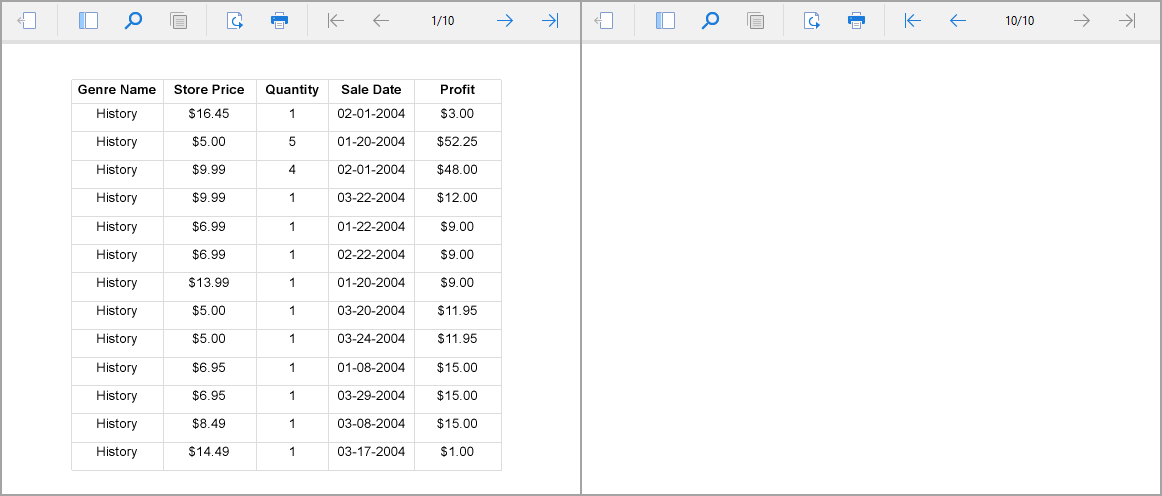
After the same properties are changed as
PageBreakAtEnd > False
PageBreakAtStart > True
NewPage > Odd
As a result, the report renders 11 pages, a page break is added before a table (Page 2), and a new page is added at odd page of the report (Page 1).
NewPage and BreakLocation
The BreakLocation property controls the break location of a data group. See the possible combination of the NewPage with the BreakLocation property.
NewPage > Next | NewPage > Odd | NewPage > Even | |
|---|---|---|---|
BreakLocation > None | No page break | ||
BreakLocation > Start | A page break is added before a new group. A new group starts from the next page of the report. | A page break is added before a new group. A new group starts from the next odd page of the report. | A page break is added before a new group. A new group starts from the next even page of the report. |
BreakLocation > End | A page break is added after a current group. A new group starts from the next page of the report. 1 | A page break is added after a current group. A new group starts from the next odd page of the report. 1 | A page break is added before a new group. A new group starts from the next even page of the report. 1 |
BreakLocation > StartAndEnd | A page break is added before and after a current group. A new group starts from the next page of the report. | A page break is added before and after a current group. A new group starts from the next odd page of the report. | A page break is added before a new group. A new group starts from the next even page of the report. |
BreakLocation > Between | A page break is between groups. A new group starts from the next page of the report. 1 | A page break is between groups. A new group starts from the next odd page of the report. 1 | A page break is added before a new group. A new group starts from the next even page of the report. 1 |
1 The first group always starts on the first page.
Multiple Data Regions Behavior
In a report with multiple data regions, the behavior of the NewPage property is as follows:
If at least one data region in a report has the NewPage > Even, page breaks are added with the value Even for all report's data regions.
If at least one data region in a report has the NewPage > Odd, page breaks are added with the value Odd for all report's data regions.
If NewPage is set to different values in data regions of a report, page breaks are added with the value Next for all data regions.
Page report Limitation: When multiple data regions are added to the same page, the data regions take the Next value; the other values (Odd, Even) are ignored.
Disabled Page Break in Table Group
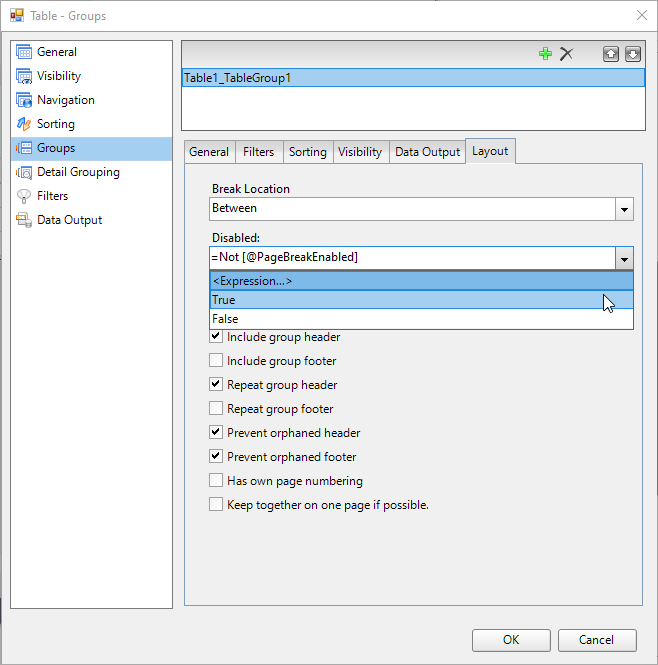
You can use the Disabled setting for a page break, which is available in the Table- Groups dialog. The available options for Disabled are:
True – No page break is added after the table group.
False – A page break is added after the table group.
Expression – Use an expression (e.g., based on report parameter values, dataset fields, or conditions) to decide dynamically whether to insert a page break.
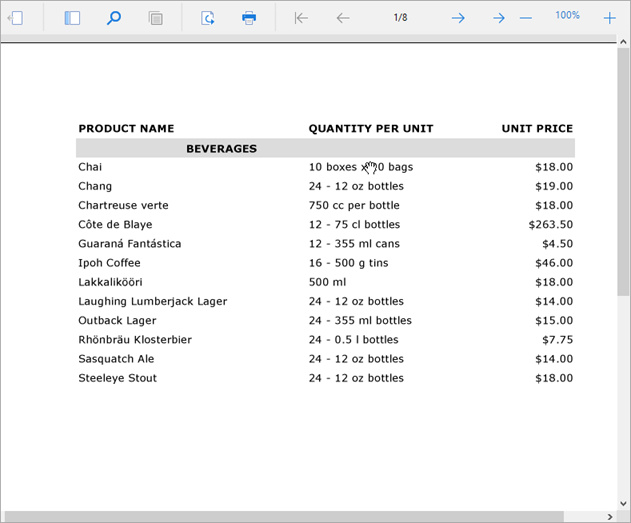
When the Disabled setting is True, no page break is added after a table group:
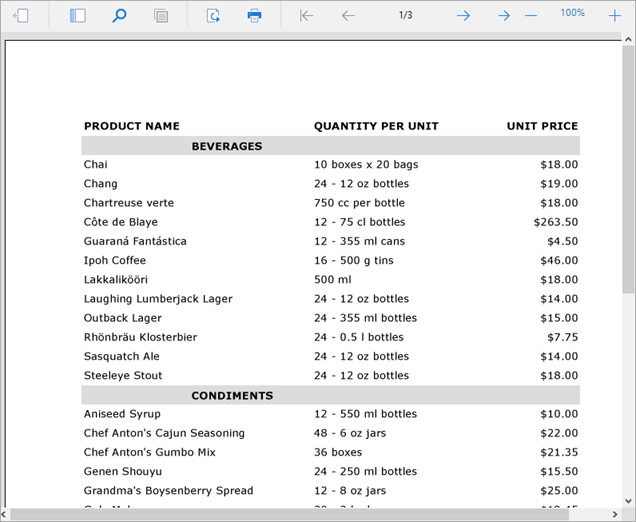
The Disabled setting is set to False, a page break is added after a table group: