


-
Spread for ASP.NET Product Documentation
-
Developer's Guide
- Getting Started
- Understanding the Product
- Namespaces Overview
- Working with the Spread Designer
- Customizing User Interaction
- Customizing the Appearance
- Customizing with Cell Types
- Managing Data Binding
- Managing Data in the Component
- Managing Formulas
- Managing File Operations
- Using Sheet Models
- Maintaining State
- Working with the Chart Control
- Using Touch Support with the Component
- Assembly Reference
- Client-Side Scripting Reference
- Import and Export Reference
-
Developer's Guide
Customizing Sheets, Rows, and Columns in Spread Designer
Using the Spread Designer, you can set several types of properties to customize the sheet appearance. This includes the following sheet properties:
- Colors
- Grid lines
- Sheet names
- Alternating rows
- Group bar colors
- Header starting numbers
- Automatic recalculation
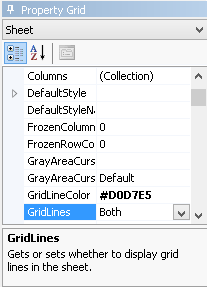
For example, the grid lines properties are shown in the following figure.
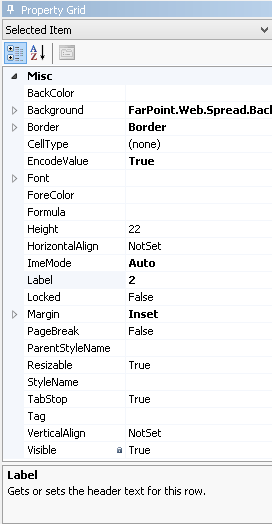
Besides the Sheet properties, you can also set several types of properties to customize the appearance of rows and columns and headers using the Spread Designer. Use the Row menu for rows and row headers. Use the Column menu for columns and column headers. The figure below shows the types of properties that are available for rows.
For more information on setting cell types for a cell or range of cells, refer to Customizing Cells in Spread Designer.
For more tasks within Spread Designer, return to Using the Spread Designer.