Performance
Purpose
The SpreadJS Collaboration Add-on is designed for multi-user real-time editing scenarios, efficiently supporting large-scale concurrent collaboration while ensuring a smooth user experience.
This report comprehensively evaluates the performance of the SpreadJS Collaboration Server across various high-concurrency scenarios based on authoritative testing methodologies, presenting the product's technical capabilities with real data.
Disclaimer
This performance test report is intended solely to help users understand the collaboration add-on's performance under specific configurations. The data presented serves only as reference indicators and does not represent actual performance in third-party environments.
All test data was collected through manual operations under specific test environments and reflects only the performance characteristics of those scenarios.
The recommended configurations in this report are for reference only. Their suitability should be evaluated based on your specific business scenarios, technical architecture, and deployment requirements.
Glossary
Term | Definition |
|---|---|
Snapshot | A saved state of shared data at a specific point in time, used for recovery or comparing changes made during collaboration. |
Document (Doc) | In collaboration, a document represents a shared data model that synchronizes real-time changes between users, ensuring consistency for all participants. |
Latency Metrics (pXX) | The XXth percentile latency, meaning XX% of requests have latency equal to or below this value. For example, p99 means 99% of requests complete within this time. |
Random Delay Startup | Clients start with a random delay in the range of [0-6] seconds, simulating realistic scenarios where users join gradually. |
Operation (OP) | An atomic operation on the data model, such as editing or updating, that needs to be synchronized across all participants. |
submitSnapshotBatchSize | The number of operations (OPs) after which the server writes a snapshot to the database. |
Throughput | The number of operations processed per second (op/s). |
Test Environment and Server Configuration
Component | Specification |
|---|---|
Operating System | Ubuntu 20.04/22.04/24.04 LTS |
Database | PostgreSQL v16.9 |
Node.js | v22.18.0 |
Server A | 2-Core CPU, 4GB RAM |
Server B/C/D | 4-Core CPU, 8GB RAM |
Deployment Modes:
Collaboration service and database on the same machine / separate machines
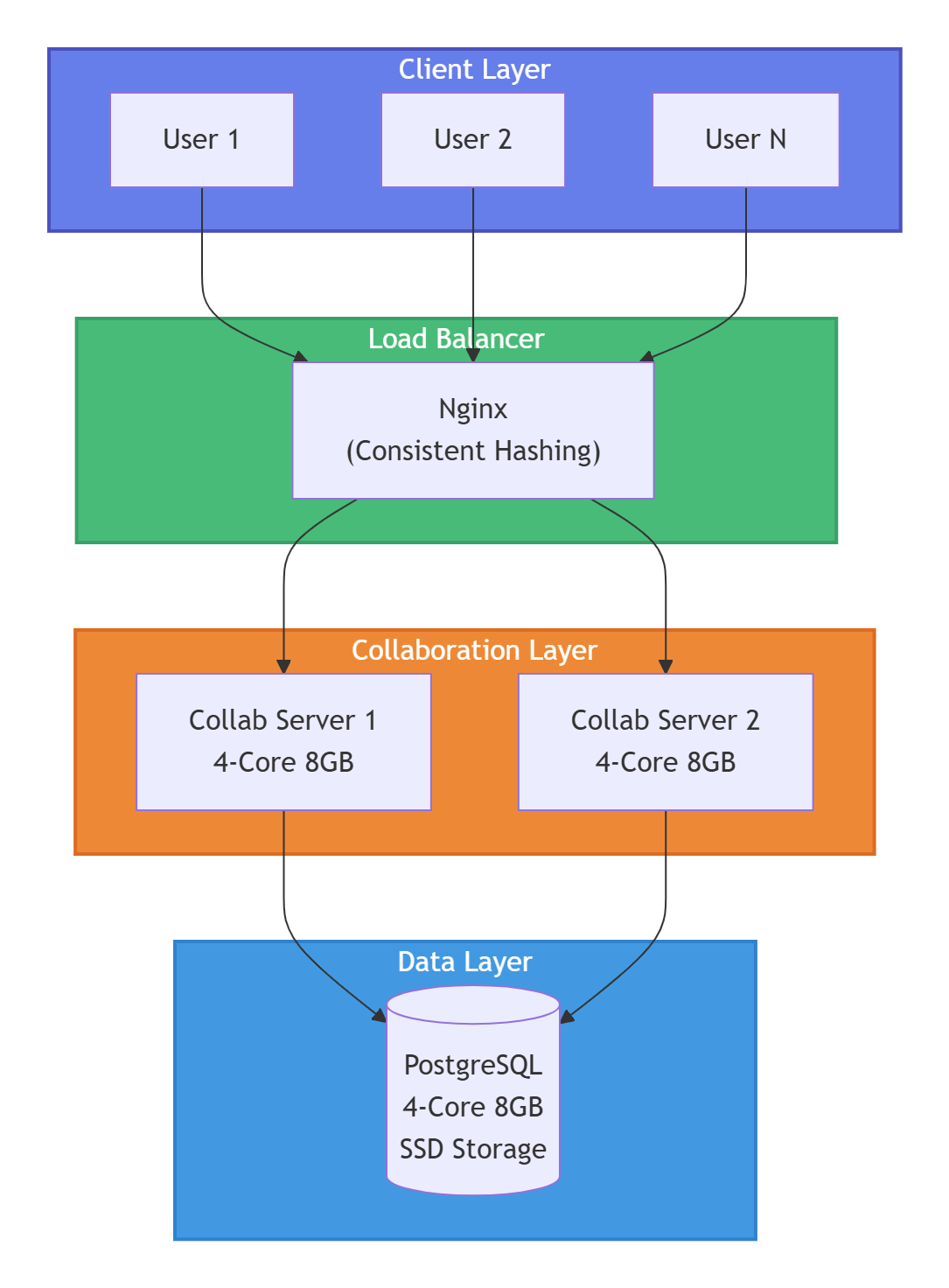
Nginx consistent hashing for load balancing scenarios
Test Plan
User Behavior Definition
The tests simulate the following user operations:
Establish Connection: Connect to the server
Load Document: Load a shared document
Edit Document: Modify the document by editing cells
Disconnect: Exit editing and disconnect from the server
Simulated User Types
Role | Description |
|---|---|
Writer | Writes specific strings to designated cells in the shared document |
Reader | Reads the specific strings written by the Writer |
DummyWriter | Writes random strings to the shared document to simulate concurrent users |
Performance Metrics
Latency: Time difference between write and read operations (in milliseconds)
p50: Median latency (50% of requests complete within this time)
p95: 95th percentile latency (typical performance for most users)
p99: 99th percentile latency (worst-case performance)
Throughput: Operations processed per second (op/s)
Test Methodology
User behavior simulated using Node.js calling the sharedDoc API
Test duration per scenario: 3 minutes
Client startup mode: Random delay startup
Default Parameters
Parameter | Value |
|---|---|
Operation Rate | 1 operation every 6 seconds (0.16 op/s) |
Sheet Snapshot | Blank sheet |
submitSnapshotBatchSize | 1 |
Performance Thresholds
Metric | Good | Warning | Critical |
|---|---|---|---|
p99 Latency | < 500ms | 500-1000ms | > 1000ms |
Throughput | Scaling linearly | Plateauing | Declining |
CPU Usage | < 70% | 70-90% | > 90% |
Key Performance Results
1. Single Document Multi-User Concurrency
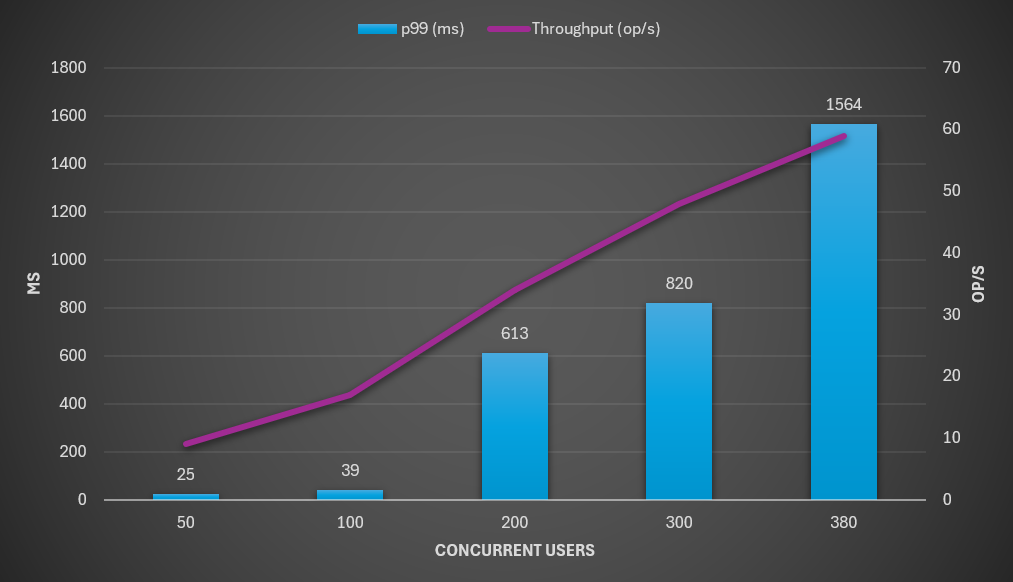
2-Core, 4GB Server
Concurrent Users | p50 (ms) | p95 (ms) | p99 (ms) | Throughput (op/s) |
|---|---|---|---|---|
50 | 8 | 18 | 25 | 9 |
100 | 13 | 31 | 39 | 17 |
200 | 52 | 415 | 613 | 34 |
300 | 82 | 624 | 820 | 48 |
380 | 208 | 1045 | 1564 | 59 |
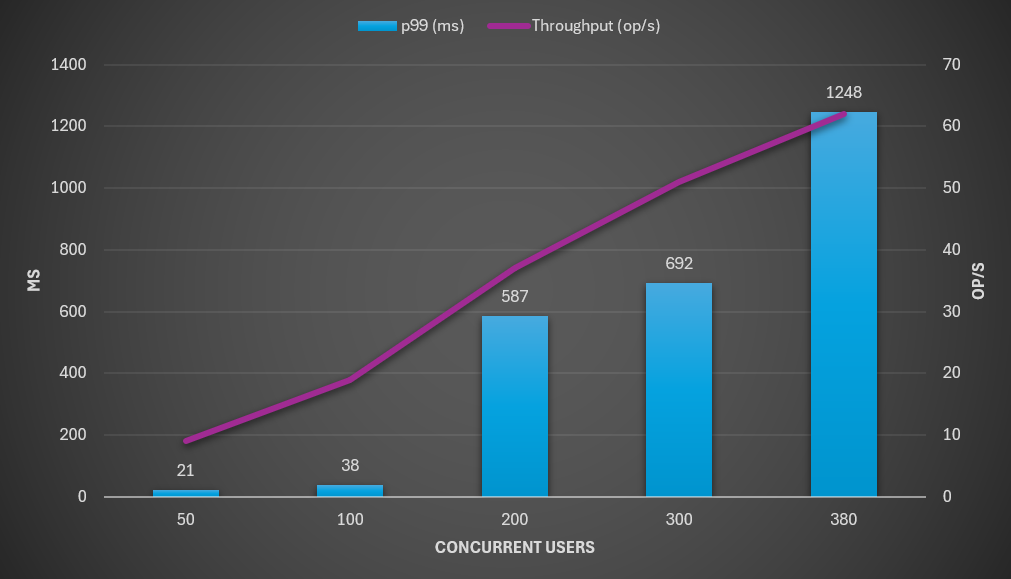
4-Core, 8GB Server
Concurrent Users | p50 (ms) | p95 (ms) | p99 (ms) | Throughput (op/s) |
|---|---|---|---|---|
50 | 8 | 15 | 21 | 9 |
100 | 12 | 29 | 38 | 19 |
200 | 49 | 390 | 587 | 37 |
300 | 74 | 486 | 692 | 51 |
380 | 157 | 833 | 1248 | 62 |
Summary
A single 4-Core 8GB server can stably support approximately 300 concurrent users with p99 latency below 700ms
Test data shows that upgrading from 2-Core 4GB to 4-Core 8GB provides limited performance improvement for single-room scenarios
2. Multi-Document Concurrency
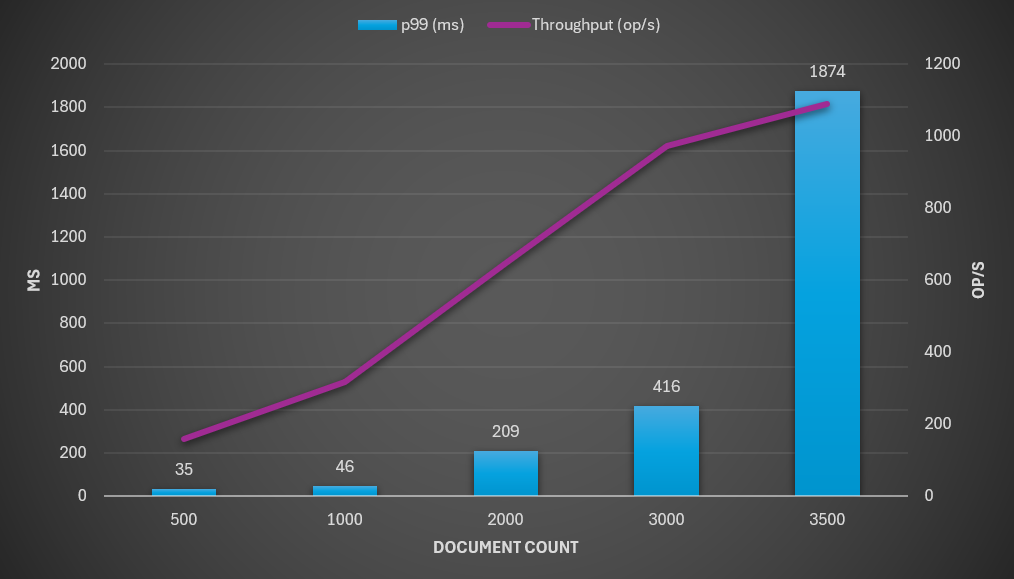
Configuration: 4-Core 8GB server, collaboration service and database deployed separately
Document Count | p50 (ms) | p95 (ms) | p99 (ms) | Throughput (op/s) |
|---|---|---|---|---|
500 | 8 | 25 | 35 | 159 |
1000 | 9 | 36 | 46 | 318 |
2000 | 16 | 155 | 209 | 647 |
3000 | 21 | 313 | 416 | 974 |
3500 | 105 | 1329 | 1874 | 1090 |
Summary
A single 4-Core 8GB server can support 3,000 concurrent documents
Latency increases significantly beyond 3,500 documents
3. Load Balancing Scenario
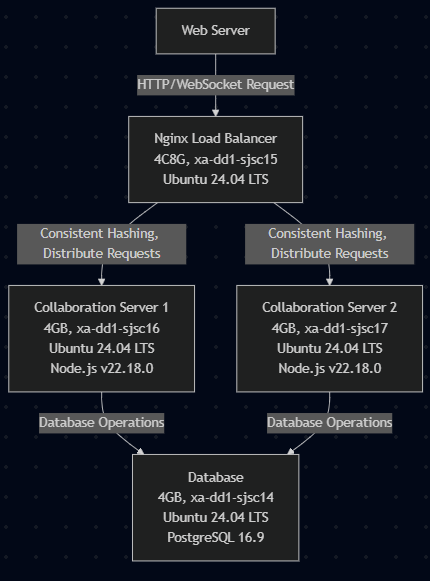
Configuration: 2x 4-Core 8GB collaboration servers + 1x 4-Core 8GB database + 1x 4-Core 8GB Nginx
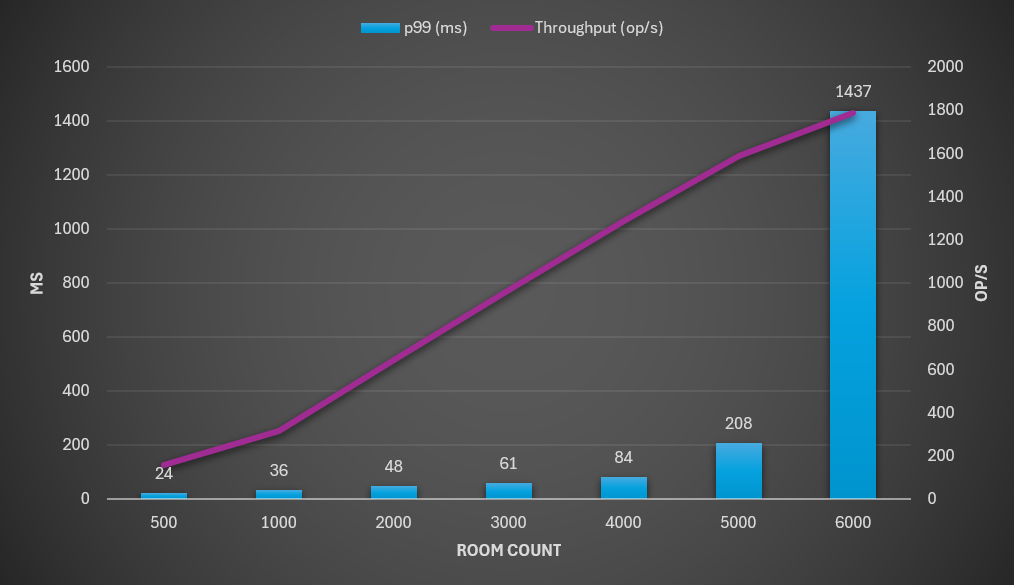
Room Count | p50 (ms) | p95 (ms) | p99 (ms) | Throughput (op/s) |
|---|---|---|---|---|
500 | 8 | 18 | 24 | 157 |
1000 | 9 | 26 | 36 | 316 |
2000 | 10 | 35 | 48 | 644 |
3000 | 13 | 47 | 61 | 968 |
4000 | 16 | 62 | 84 | 1289 |
5000 | 31 | 157 | 208 | 1587 |
6000 | 107 | 1033 | 1437 | 1790 |
Summary
With load balancing, the collaboration system can support approximately 4,000-5,000 concurrent documents
Throughput scales nearly linearly up to 5,000 documents
4. Impact of Snapshot Size
Configuration: 4-Core 8GB server
Note: Larger snapshots reduce the maximum number of concurrent users supported.
Snapshot Type | Max Concurrent Users | p99 Latency (ms) | Throughput (op/s) |
|---|---|---|---|
Empty Sheet | 400 | 372 | 67.6 |
4k Cells | 300 | 157 | 50.9 |
10k Cells | 225 | 114 | 38.5 |
Summary
Empty sheet: Supports up to 400 concurrent users
4k cells: Capacity reduced by 25%
10k cells: Capacity reduced by 44%
5. Impact of submitSnapshotBatchSize
Configuration: 4-Core 8GB server, 10k cell snapshot
Note: Properly configuring submitSnapshotBatchSize can significantly improve system throughput and concurrency capacity.
Batch Size | Max Concurrent Users | p99 Latency (ms) | Throughput (op/s) |
|---|---|---|---|
1 | 225 | 114 | 38.5 |
100 | 300 | 138 | 51.0 |
Summary
Increasing
submitSnapshotBatchSizefrom 1 to 100:+33% concurrent users (225 → 300)
+32% throughput (38.5 → 51 op/s)
Recommended Server Configuration
To ensure stability and performance of the SpreadJS Collaboration Server in high-concurrency scenarios, the following deployment configuration is recommended:
Component | Recommendation |
|---|---|
Collaboration Service | Deploy on servers with 4+ cores and 8+ GB RAM. Prioritize high-frequency CPUs and large memory to enhance message compression, conflict resolution, and snapshot caching capabilities. |
Database | Deploy separately on high I/O performance devices (e.g., SSD/RAID) to ensure efficient high-frequency read/write operations and data persistence. Avoid resource contention with the collaboration service. |
Load Balancing | Use Nginx with consistent hashing to improve horizontal scaling capabilities and meet enterprise-level large-scale collaboration requirements. |
Horizontal Scaling | For higher concurrency, add more collaboration service nodes for linear scaling. Note: Scaling is subject to database, network, and Node.js environment limitations. |
Architecture Diagram