


Web Browser
Updated 3/06/2026.
Using DsPdfJS in the Browser
What is the Browser Environment?
In the browser environment, DsPdfJS (@mescius/ds-pdf) runs entirely client-side using WebAssembly.
No server processing required
No native installation
Works in modern browsers with WebAssembly support
PDF files are generated fully in the browser
Prerequisites
Node.js (version 16 or higher)
npm (version 7 or higher)
A modern browser with WebAssembly support (Chrome, Edge, Firefox, Safari)
A code editor (VS Code recommended)
Basic knowledge of HTML and JavaScript
Working Example
Step 1 — Create a Project
mkdir dspdf-browser-demo
cd dspdf-browser-demo
npm init -y
Step 2 — Install DsPdfJS
npm install @mescius/ds-pdfStep 3 — Run a Dev Server (Vite example)
Modern browsers require a web server to load WASM files due to security restrictions (CORS and module loading rules).
To run the project locally, install a lightweight development server such as Vite:
npm install vite --save-devAdd this to your package.json:
"scripts": {
  "dev": "vite",
  "build": "vite build",
  "preview": "vite preview"
},
Step 4 — Create index.html
<!DOCTYPE html>
<html>
<head>
  <meta charset="UTF-8" />
  <title>DsPdfJS Browser Example – npm + Vite</title>
</head>
<body>
  <h1>Create a PDF in the Browser with DsPdfJS</h1>

  <p>
    This example shows how to generate a PDF file in the browser using
    <strong>DsPdfJS</strong> (<code>@mescius/ds-pdf</code>) installed via npm.
  </p>

  <button id="generateBtn">Generate PDF</button>
  <br /><br />
  <a id="downloadLink" style="display:none;"></a>

<script type="module">
  import {
    connectDsPdf,
    DsPdfConfig,
    ObjectManager,
    PdfDocument
  } from "@mescius/ds-pdf";

  import wasmUrl from "@mescius/ds-pdf/assets/DsPdf.wasm?url";

  // Configure the WebAssembly file location
  DsPdfConfig.wasmUrl = wasmUrl;

  async function generatePdf() {
    const connected = await connectDsPdf();
    if (!connected) {
      alert("Failed to initialize DsPdfJS.");
      return;
    }

    const om = new ObjectManager();

    try {
      const doc = new PdfDocument(om);
      const page = doc.newPageContext();

      page.drawText(
        { text: "Hello from DsPdfJS!", fontSize: 20 },
        50,
        50
      );

      const pdfData = doc.savePdf();
      const buffer = pdfData.buffer || pdfData;

      const blob = new Blob([buffer], { type: "application/pdf" });
      const url = URL.createObjectURL(blob);

      const link = document.getElementById("downloadLink");
      link.href = url;
      link.download = "dspdf-browser-example.pdf";
      link.textContent = "Download generated PDF";
      link.style.display = "inline";
    } finally {
      om.dispose();
    }
  }

  document
    .getElementById("generateBtn")
    .addEventListener("click", generatePdf);
</script>
</body>
</html>
Step 5 — Run the Project
npm run devOpen:
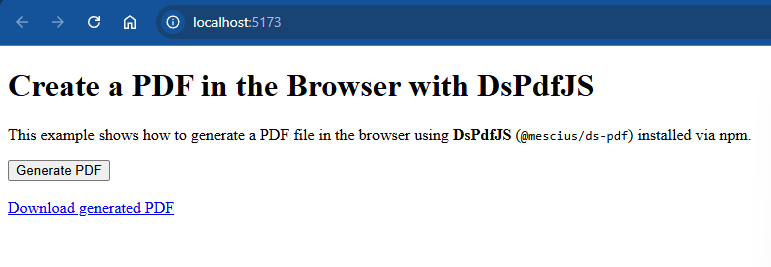
http://localhost:5173Expected Result
Click Generate PDF
A download link appears
The generated file contains the text:
Hello from DsPdfJS!Result screenshot
Project Structure
dspdf-browser-demo/
├── node_modules/
├── package.json
├── package-lock.json
└── index.html